Bilješka
Pristup ovoj stranici zahtijeva provjeru vjerodostojnosti. Možete pokušati da se prijavite ili promijenite direktorije.
Pristup ovoj stranici zahtijeva provjeru vjerodostojnosti. Možete pokušati promijeniti direktorije.
Applies to:  SQL Server Analysis Services
Azure Analysis Services
SQL Server Analysis Services
Azure Analysis Services  Fabric/Power BI Premium
This section describes common classes that aren't specific to OLAP or data mining. Use these classes to manage Azure Analysis Services objects and work with stored procedures, tracing, exceptions, and backup and restore operations.
The following diagram shows the relationships among these classes.
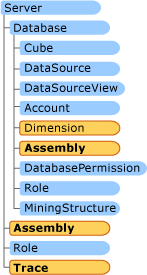
Assembly objects
You create an Assembly object by adding it to the assemblies collection of the server, and then updating the Assembly object to the server, by using the Update method.
To remove an Assembly object, you need to drop it by using the Drop method of the Assembly object. Removing an Assembly object from the assemblies collection of the database doesn't drop the assembly. It only prevents you from seeing it in your application until the next time that you run your application.
For more information about methods and properties available, see Assembly in Microsoft.AnalysisServices .
Important
COM assemblies might pose a security risk. Due to this risk and other considerations, COM assemblies are no longer supported.
Backup and restore methods
Use the Backup method to copy a database and the Restore method to recover it from the copy. The Database object provides Backup, and the Server object provides Restore.
Only server and database administrators are permitted to perform a backup of a database. Only server administrators can restore a database onto a different server than it was backed up from. Database administrators can restore a database by overwriting the existing database only if they own the database that is to be overwritten. After a restore, the database administrator might lose access to the restored database if the database is restored with its original security definitions.
Database backup files must have .abf extensions.
Backup method
Call the Backup method on the database object, and specify the backup file name.
Default values
AllowOverwrite=false
BackupRemotePartitions=false
Security=CopyAll
ApplyCompression=true
Restore method
Call the Restore method on the server object, and specify the backup file.
Default values
AllowOverwrite=false
DataSourceType=Remote
Security=CopyAll
Restrictions
You can't restore a local partition as a remote partition.
You can't restore a remote partition as a local partition. You can restore a remote partition to a server other than the source server.
Common parameters and properties for Backup and Restore methods
File specifies the UNC path of the file to use when you back up or restore a database.
Location specifies backup information for a server, such as BackupFile. Use this parameter to specify a separate backup file for a remote database.
DatasourceID specifies the ID of the subordinate database in a remote server.
ConnectionString lets you update the remote data source if the remote server changes. When you specify ConnectionString, always specify DatasourceID.
Folder remaps local partition folders on the local hard drive.
Original specifies the original folder for local partitions.
New specifies the new location for local partitions from the corresponding Original folder.
If Password isn't blank, the server encrypts the backup file.
Trace objects
Use Trace to monitor, replay, and manage an Analysis Services instance. A client application, such as SQL Profiler, subscribes to a trace, and the server returns the events specified in the trace definition.
Each event is described by an event class. The event class describes the type of event generated. Within an event class, event subclasses describe a finer level of categorization. Each event is described by a number of columns. The columns that describe a trace event are consistent for all events and conform to the SQL trace structure. Information recorded in each column may differ depending on the event class; that is, a predefined set of columns is defined for each trace, but the meaning of the column may differ depending on the event class. For example, the TextData column is used to record the original ASSL for all statement events.
A trace definition can include one or more event classes to be traced concurrently. For each event class, one or more data columns can be added to the trace definition, but not all trace columns must be used. The database administrator can decide which of the available columns to include in a trace. Further, event classes can be selectively traced based on filter criteria on any column in the trace.
You can start and delete traces. You can run multiple traces at any one time. You can capture trace events live or direct them to a file for later analysis or replay. Use SQL Profiler to analyze and replay trace events. Multiple connections can receive events from the same trace.
Traces can be divided in two groups: server traces and session traces. Server traces report all events in the server. Session traces report only events in the current session.
To define a trace in the server's trace collection, follow these steps:
Create a Trace object and set its basic properties, including the trace ID, name, log file name, append or overwrite behavior, and other options.
Add the events to monitor to the trace object's
Eventscollection. Add the required data columns for each event.Add filters to the
Filterscollection to exclude unnecessary data.Start the trace. Creating the trace doesn't start data collection.
Stop the trace.
Use SQL Profiler to review the trace file.
To capture a session trace, follow these steps:
Define handlers for the
OnEventandStoppedevents fromSessionTrace.Register the functions as event handlers.
Start the session trace.
Run your process while the handlers capture events.
Stop the session trace.
Continue running your application.
CaptureLog class and CaptureXML attribute
AMO sends all actions to execute as XMLA messages to the server. AMO provides a way to capture all these messages without the SOAP headers. For more information, see Introducing AMO Classes. CaptureLog is the mechanism in AMO for scripting out objects and operations. Objects and operations are scripted in XMLA.
To capture XML, set the server object's CaptureXML property to true. Then, you start capturing all actions that you send to the server in the CaptureLog class, without sending the actions to the server. CaptureLog is considered a class because it has a method, Clear, which clears the capture log.
To read the log, iterate through its string collection. To combine all logs into one string, use the server object's ConcatenateCaptureLog method. ConcatenateCaptureLog has three parameters, two of which are required. The required parameters are transactional, of Boolean type, and parallel, of Boolean type. If you set transactional to true, it indicates that the XML batch file is created as a single transaction instead of each command being treated as a separated transaction. If you set parallel to true, it indicates that all commands in the batch file are recorded for concurrent execution instead of sequentially as they were recorded.
AMOException exception class
Use the AMOException class to catch exceptions that AMO throws in your application.
AMO throws exceptions when it encounters problems. The following table lists the kind of exceptions that AMO handles. Exceptions derive from the AmoException class.
| Exception | Origin | Description |
|---|---|---|
| AmoException | Base class | Application receives this exception when a required parent object is missing, or when a requested item isn't found in a collection. |
| OutOfSyncException | Derived from AMOException | Application receives this exception when AMO is out of synchronization with the engine and the engine returns an object reference that AMO doesn't know about. |
| OperationException | Derived from AMOException | This an important exception that applications frequently receive. This exception contains the details of an error coming from the server, probably because of a faulty AMO operation like Update or Process or Drop. |
| ResponseFormatException | Derived from AMOException | This exception occurs when the engine returns a message in a format that AMO doesn't understand. |
| ConnectionException | Derived from AMOException | This exception occurs when a connection can't be established (with Server.Connect) or when the connection is lost while AMO is communicating with the engine (for example, during an Update or Process or Drop). |