Bilješka
Pristup ovoj stranici zahtijeva provjeru vjerodostojnosti. Možete pokušati da se prijavite ili promijenite direktorije.
Pristup ovoj stranici zahtijeva provjeru vjerodostojnosti. Možete pokušati promijeniti direktorije.
Applies to:  SQL Server Analysis Services
Azure Analysis Services
SQL Server Analysis Services
Azure Analysis Services  Fabric/Power BI Premium
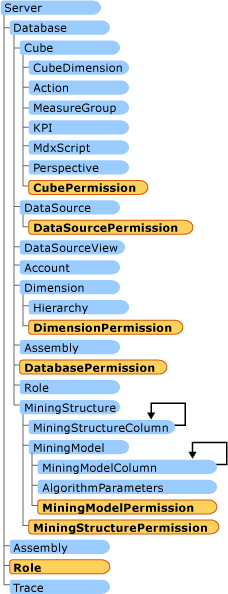
The following diagram shows the relationships between the AMO security classes.
Role and RoleMember objects
To create a Role object, add it to the database's roles collection and call the object's Update method to save it to the server. Update the object before you use it.
To remove a Role object, drop it by using the Drop method of the Role object. The Remove method, from the roles collection, only prevents you from seeing the role in your application, but it doesn't remove the role from the server. You can't drop a Role object if there are any permissions associated with it.
To create a RoleMember object, add a user to the role's members collection and call the Role object's Update method to save the changes to the server. Only server admins or database admins can create roles. Role members can use permitted objects only after you update the role on the server.
To remove a RoleMember object, call the collection's Remove method, and then call the role's Update method.
For information about available methods and properties, see Role and RoleMember in the Microsoft.AnalysisServices namespace.
Permission objects
To create a Permission object, add it to the object's permissions collection, and then call its Update method to save it to the server.
To remove a Permission object, call its Drop method. Calling Remove on the permissions collection only hides the permission in your application. It doesn't remove the Permission object from the server. You can't delete a role that has an associated permission.
For more information about methods and properties available, see Permission in Microsoft.AnalysisServices.