Bilješka
Pristup ovoj stranici zahtijeva provjeru vjerodostojnosti. Možete pokušati da se prijavite ili promijenite direktorije.
Pristup ovoj stranici zahtijeva provjeru vjerodostojnosti. Možete pokušati promijeniti direktorije.
Applies to:  SQL Server 2019 and earlier Analysis Services
  Azure Analysis Services
Fabric/Power BI Premium
Azure Analysis Services
Fabric/Power BI Premium
Important
Data mining was deprecated in SQL Server 2017 Analysis Services and now discontinued in SQL Server 2022 Analysis Services. Documentation is not updated for deprecated and discontinued features. To learn more, see Analysis Services backward compatibility.
A data mining object remains an empty container until Analysis Services processes it. Training refers to processing a data mining model.
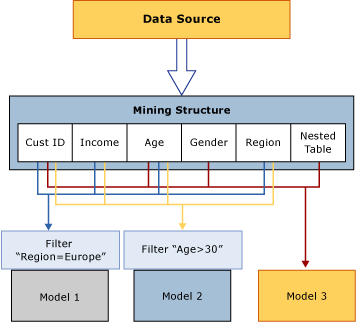
Processing mining structures: A mining structure gets data from an external data source, as defined by the column bindings and usage metadata, and reads the data. This data is read in full and then analyzed to extract various statistics. Analysis Services stores a compact representation of the data, which is suitable for analysis by data mining algorithms, in a local cache. You can either keep this cache or delete it after your models have been processed. By default, the cache is stored. For more information, see Process a Mining Structure.
Processing mining models: A mining model is empty, containing definitions only, until it is processed. To process a mining model, the mining structure that it is based on must have been processed. The mining model gets the data from the mining structure cache, applies any filters that may have been created on the model, and then passes the data set through the algorithm to detect patterns. After the model is processed, the model stores only the results of processing, not the data itself. For more information, see Process a Mining Model.
The following diagram shows how data flows as Analysis Services processes a mining structure and a mining model.
Viewing the Results of Processing
After you process a mining structure, it has a compact representation of the data for statistical analysis. If the cache still has the data, use it in these ways:
Create a Data Mining Extensions (DMX) query on the model and drill through to the structure. For more information, see SELECT FROM <model>.CASES (DMX).
Browse a model based on the structure and use a UI option to drill through to structure cases. For more information, see Data Mining Model Viewers or Drill Through to Case Data from a Mining Model.
Create a DMX query on the structure cases. For more information, see SELECT FROM <structure>.CASES.
After you process a mining model, it has only the patterns from the analysis and mappings from the model results to the cached training data. The term model content refers to the model results. Browse or query the model content. Also query model and structure cases if the cache has them.
Model content depends on the algorithm. For example, clustering and decision trees models produce different content even when they use the same data. For more information, see Mining Model Content (Analysis Services - Data Mining).
Processing requirements
Processing requirements might differ depending on whether your mining models use only relational data or use multidimensional data sources.
For relational data sources, create training data and run mining algorithms on that data. Mining models that use OLAP objects, such as dimensions and measures, also require processed underlying data. You might need to process the multidimensional objects to populate the mining model.
For more information, see Processing Requirements and Considerations (Data Mining).
See Also
Drillthrough Queries (Data Mining)
Mining Structures (Analysis Services - Data Mining)
Mining Models (Analysis Services - Data Mining)
Logical Architecture (Analysis Services - Data Mining)