Bilješka
Pristup ovoj stranici zahtijeva provjeru vjerodostojnosti. Možete pokušati da se prijavite ili promijenite direktorije.
Pristup ovoj stranici zahtijeva provjeru vjerodostojnosti. Možete pokušati promijeniti direktorije.
This article describes how to deploy Azure Local using local identity with Azure Key Vault by using an Azure Resource Manager (ARM) template configured for external DNS. The article also describes the prerequisites and the preparation steps required to begin the deployment.
Important
Use ARM template deployment for Azure Local systems at scale. This approach is intended for experienced IT administrators. Deploy a system via the Azure portal first, then use the ARM template for subsequent deployments.
Prerequisites
- Completion of Register your machines with Azure Arc and assign deployment permissions. Make sure that:
- All machines run the same version of the OS.
- All the machines have the same network adapter configuration.
Step 1: Prepare Azure resources
Follow these steps to prepare the Azure resources you need for the deployment:
Get the object ID for Azure Local Resource Provider
This object ID for the Azure Local Resource Provider (RP) is unique per Azure tenant.
In the Azure portal, search for and go to Microsoft Entra ID.
Go to the Overview tab and search for
00001111-aaaa-2222-bbbb-3333cccc4444.Select the Service Principal Name that is listed and copy the Object ID.
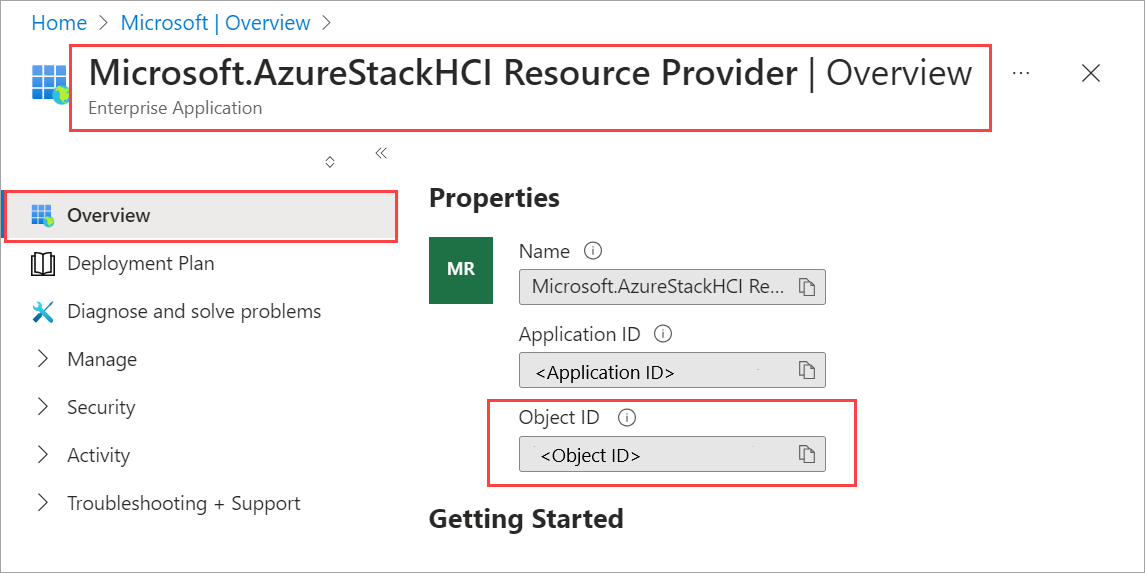
Alternatively, you can use Azure CLI or PowerShell to get the object ID of the Azure Local RP service principal. Run the following command:
(Get-AzADServicePrincipal -ApplicationId "00001111-aaaa-2222-bbbb-3333cccc4444").Id
Use the Object ID for the hciResourceProviderObjectID parameter in the ARM template.
Step 2: Deploy by using ARM template
An ARM template creates and assigns all the resource permissions required for deployment.
When you complete all the prerequisite and preparation steps, you're ready to deploy by using a known good and tested ARM deployment template and corresponding parameters JSON file. Use the parameters contained in the JSON file to fill out all values, including the values you generated previously.
For an example of a parameters JSON file for deployments that use external DNS, see azuredeploy.parameters.json. For detailed descriptions of the parameters defined in this file, see ARM template parameters reference.
Important
Ensure that you fill out all parameters in the JSON file, including placeholders that appear as [“”]. These placeholders indicate that the parameter expects an array structure. Replace these placeholders with actual values based on your deployment environment, or validation fails.
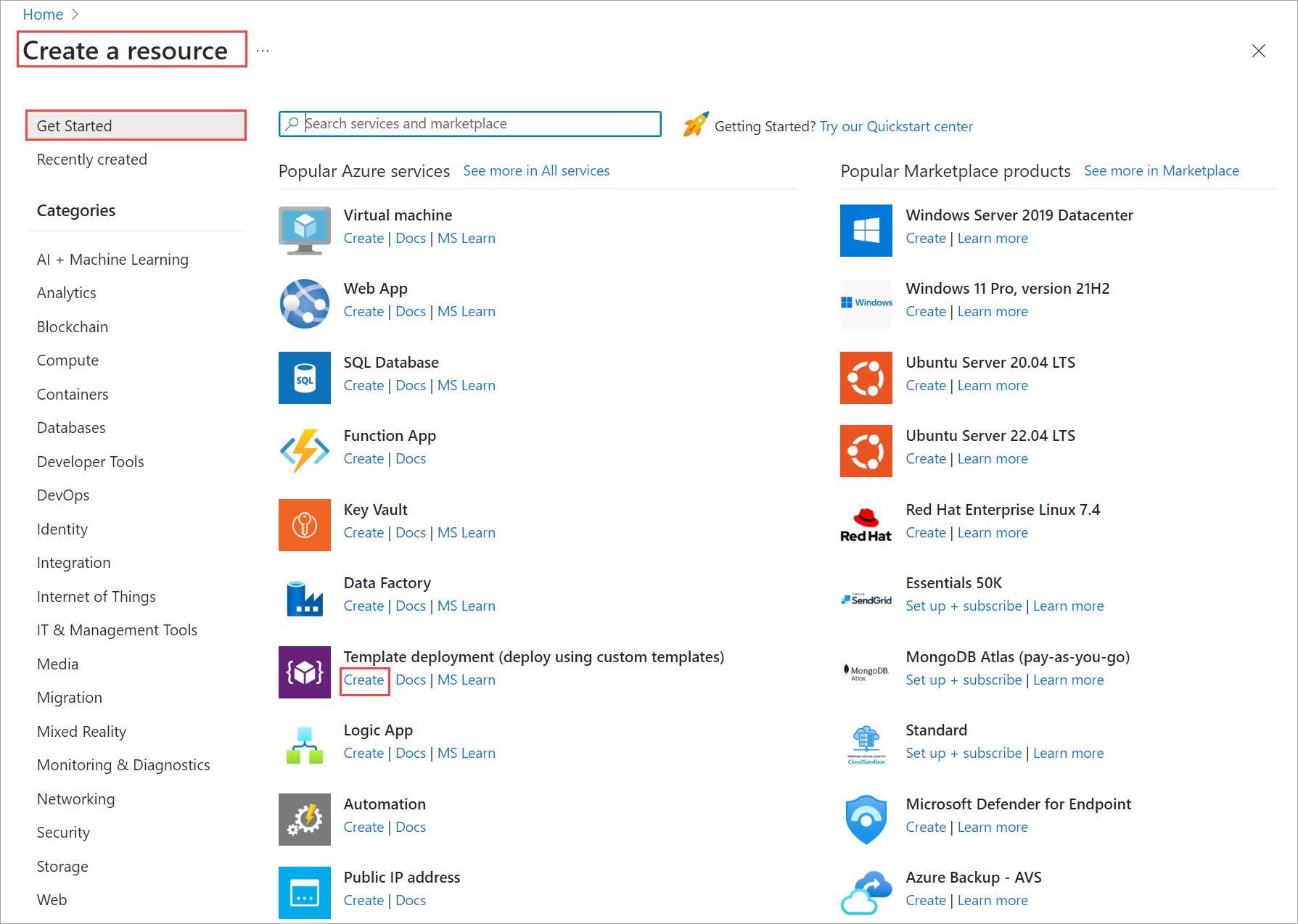
In the Azure portal, go to Home and select + Create a resource.
Select Create under Template deployment (deploy using custom templates).
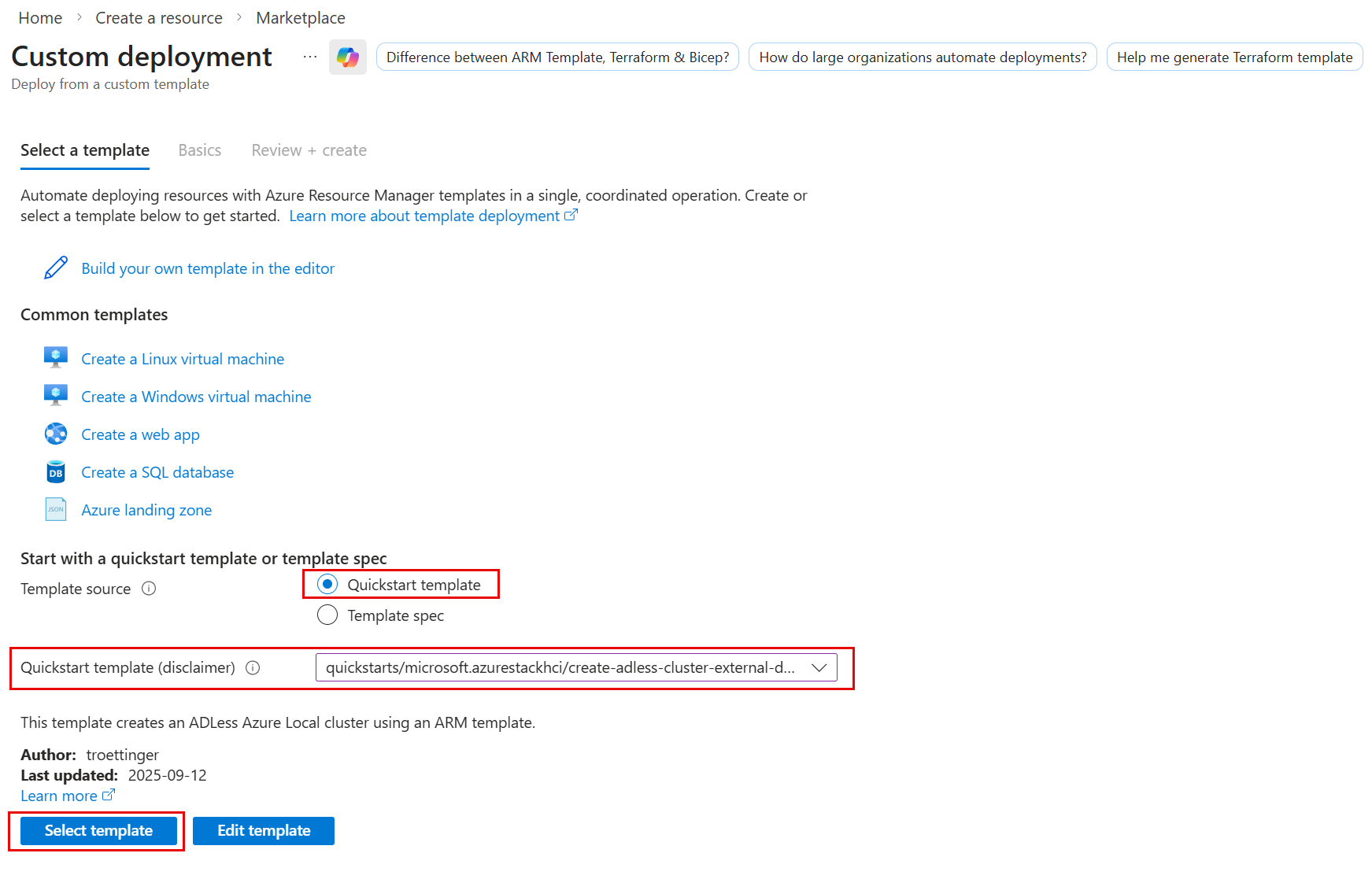
Near the bottom of the page, find the Start with a quickstart template or template spec section. Select Quickstart template.
Use the Quickstart template (disclaimer) field to filter for the appropriate template. Type azurestackhci/create-adless-cluster-external-dns-public-preview for the filter.
When finished, select the Select template button.
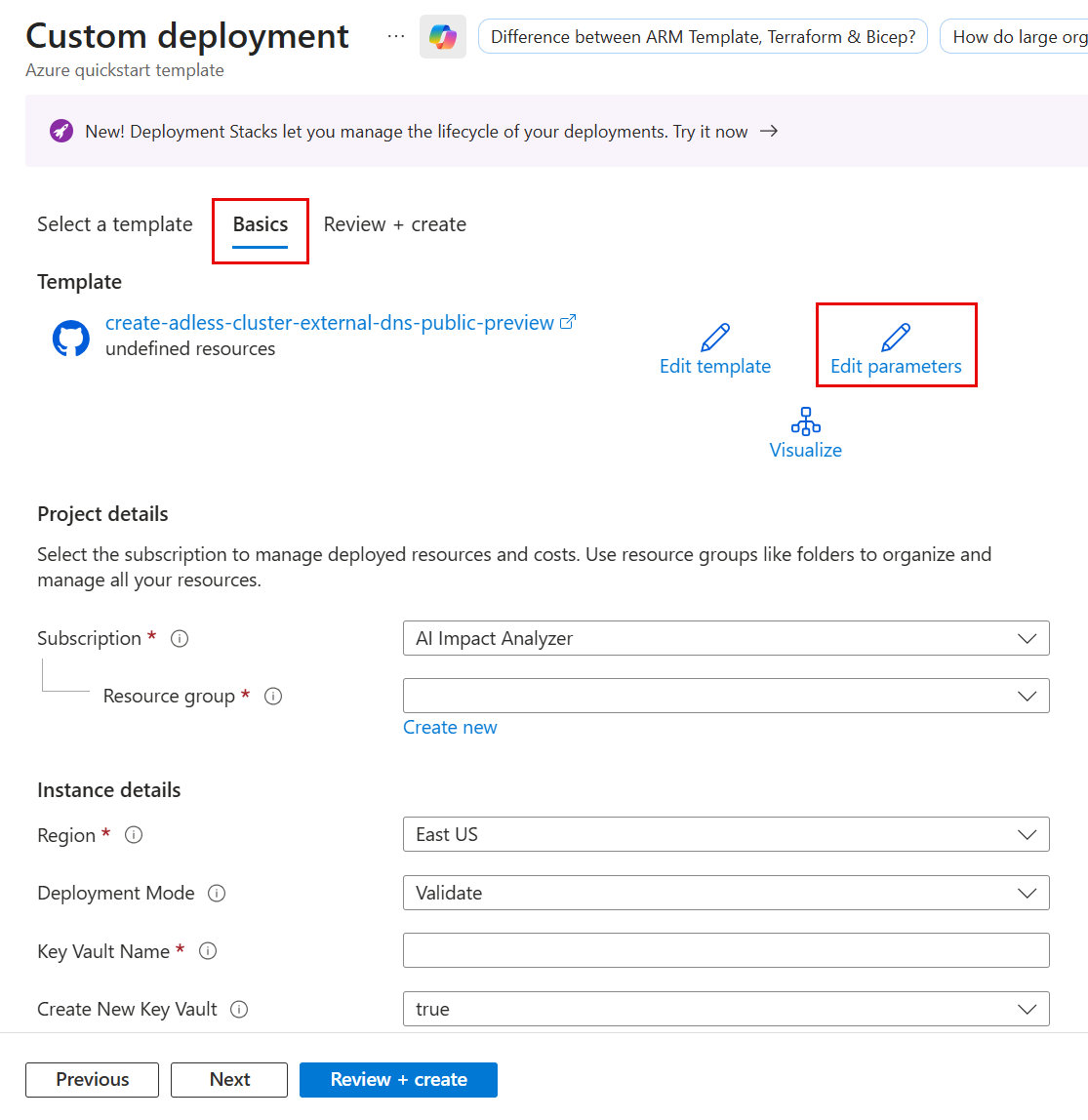
On the Basics tab, you see the Custom deployment page. You can select the various parameters through the dropdown list or select Edit parameters.
Note
For an example parameter file that shows the format of various inputs, such as
ArcNodeResourceId, see azuredeploy.parameters.json.Edit parameters such as network intent or storage network intent. When you fill out all the parameters, Save the parameters file.
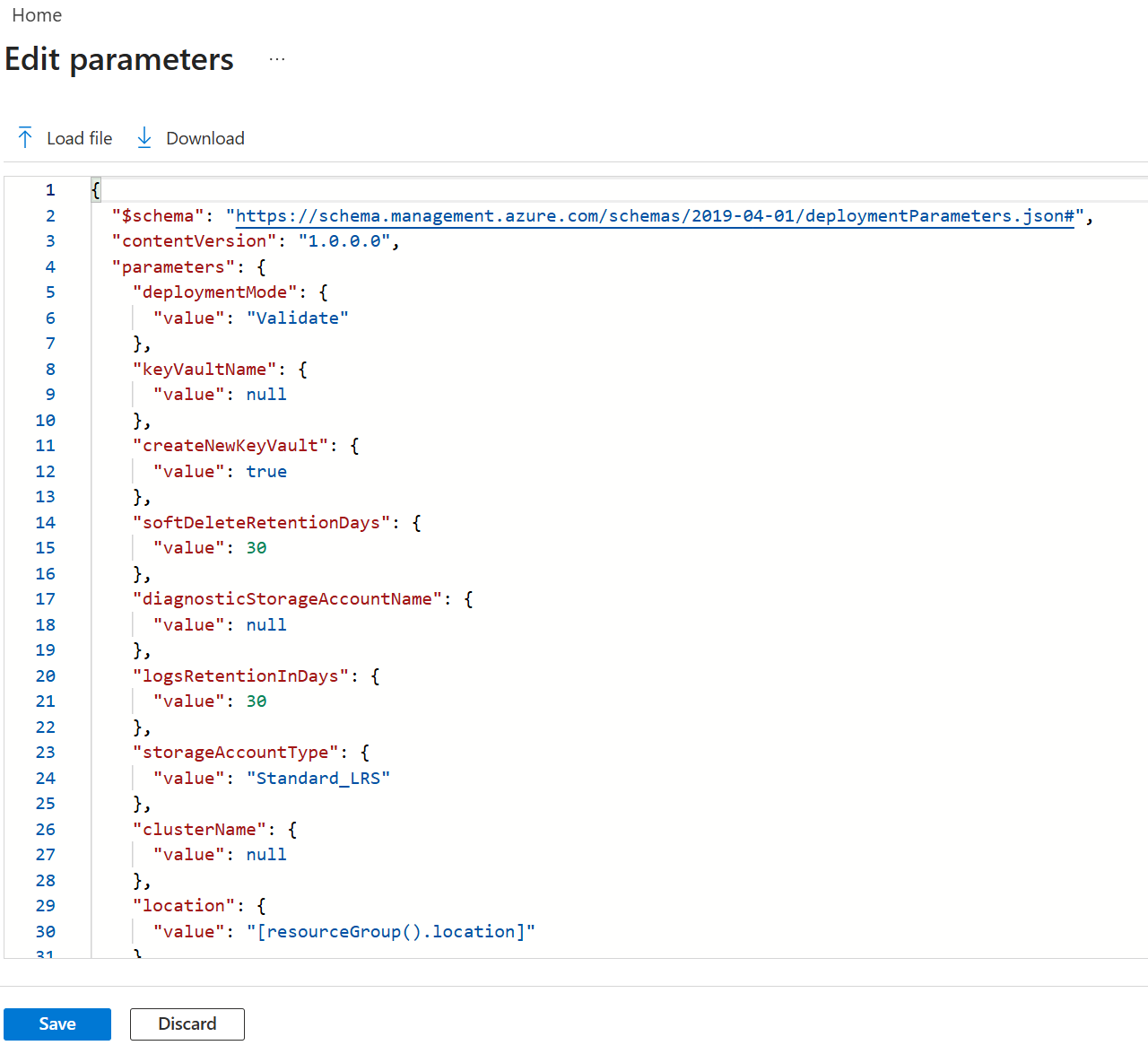
Select the appropriate resource group for your environment.
Confirm that Deployment Mode is set to Validate.
Select Save.
On the Basics tab, select Review + create.
On the Review + Create tab, select Create. This creates the remaining prerequisite resources and validates the deployment. Validation takes about 10 minutes to complete.
Once validation is complete, select Redeploy.
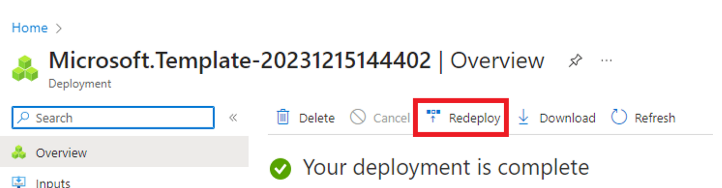
On the Custom deployment screen, select Edit parameters. Load the previously saved parameters and select Save.
At the bottom of the workspace, change the final value in the JSON from Validate to Deploy, where Deployment Mode is set to Deploy.

Verify that the Parameters JSON fills in all the fields for the ARM deployment template.
Select the appropriate resource group for your environment.
Scroll to the bottom, and confirm that Deployment Mode is set to Deploy.
Select Review + create.
Select Create. The deployment begins, using the existing prerequisite resources that the Validate step created.
The Deployment screen cycles on the cluster resource during deployment.
Once deployment initiates, the process runs a limited Environment Checker run, a full Environment Checker run, and starts cloud deployment. After a few minutes, you can monitor deployment in the portal.
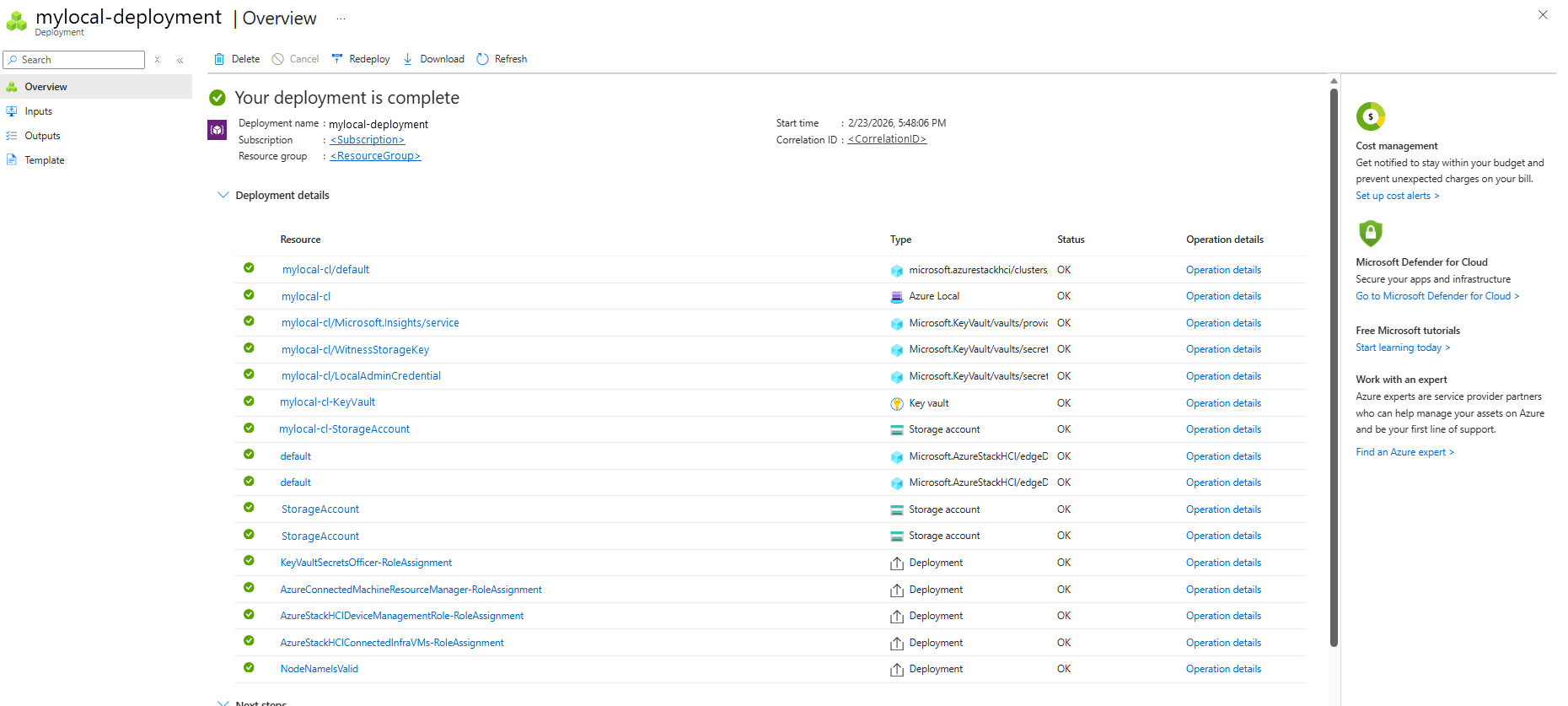
In a new browser window, go to the resource group for your environment. Select the cluster resource.
Select Deployments.
Refresh and watch the deployment progress from the first machine (also known as the seed machine and is the first machine where you deployed the cluster). Deployment takes between 2.5 and 3 hours. Several steps take 40-50 minutes or more.
The step in deployment that takes the longest is Deploy Moc and ARB Stack. This step takes 40-45 minutes.
Once complete, the task at the top updates with status and end time.
ARM template parameters reference
The following table describes the parameters that you define in the ARM template's parameters file:
| Parameter | Description |
|---|---|
| deploymentMode | Determines if the deployment process should only validate or proceed with full deployment: - Validate: Creates Azure resources for this system and validates your system's readiness to deploy. - Deploy: Performs the actual deployment after successful validation. |
| keyVaultName | Name of the Azure Key Vault to use for storing secrets. For naming conventions, see Microsoft.KeyVault in the Naming rules and restrictions for Azure resources article. |
| softDeleteRetentionDays | Number of days that deleted items (such as secrets, keys, or certificates) are retained in an Azure Key Vault before they're permanently deleted. Specify a value between 7 and 90 days. You can’t change the retention period later. |
| diagnosticStorageAccountName | Name of the Azure Storage Account used to store key vault audit logs. This account is a locally redundant storage (LRS) account with a lock. For more information, see Azure Storage Account. For naming conventions, see Azure Storage account names. |
| logsRetentionInDays | Number of days that logs are retained. If you don't want to apply any retention policy and retain data forever, specify 0. |
| storageAccountType | Type of the Azure Storage Account to use in the deployment. For example, Standard_LRS. |
| clusterName | Name of the Azure Local instance being deployed. This is the name that represents your cluster on cloud. It must be different from any of the node names. |
| location | Deployment location, typically derived from the resource group. For a list of supported Azure regions, see Azure requirements. |
| tenantId | Azure subscription tenant ID. For more information, see Find your Microsoft Entra tenant. |
| witnessType | Witness type for your Azure Local cluster. Witness type must be Cloud for a two-node cluster. It can be empty for other cluster sizes. For more information on cloud witness, see Deploy a quorum witness. |
| clusterWitnessStorageAccountName | Name of the storage account used for cluster witness. For more information, see Azure Storage Account. For naming conventions, see Azure Storage account names. |
| localAdminUserName | Username for the local administrator for all the machines in your system. The credentials are identical for all the machines in your system. For more information, see Review deployment prerequisites for Azure Local. |
| localAdminPassword | Password for the local administrator for all the machines in your system. The credentials are identical for all the machines in your system. For more information, see Review deployment prerequisites for Azure Local. |
| hciResourceProviderObjectID | Object ID of the Azure Local Resource Provider. For more information, see Get the object ID for Azure Local Resource Provider. |
| arcNodeResourceIds | Array of resource IDs of the Azure Arc-enabled servers that are part of this Azure Local cluster. |
| namingPrefix | Prefix used for all objects created for the Azure Local deployment. |
| identityProvider | Specifies the identity provider used for the deployment. Set this value to LocalIdentity to indicate that the deployment uses local identity with Azure Key Vault. |
| securityLevel | Security configuration profile to apply to the Azure Local cluster during deployment. The default is Recommended. |
| driftControlEnforced | Drift control setting to reapply the security defaults regularly. For more information, see Security features for Azure Local. |
| credentialGuardEnforced | Credential Guard setting that uses virtualization-based security to isolate secrets from credential-theft attacks. For more information, see Manage security defaults for Azure Local. |
| smbSigningEnforced | Setting for signing SMB traffic between this Azure Local cluster and others to help prevent relay attacks. For more information, see Overview of Server Message Block signing. |
| smbClusterEncryption | SMB cluster traffic setting for encrypting traffic between servers in the cluster on your storage network. For more information, see SMB encryption. |
| bitlockerBootVolume | BitLocker encryption setting for encrypting OS volume on each server. For more information, see Manage BitLocker encryption on Azure Local. |
| bitlockerDataVolumes | BitLocker encryption setting for encrypting cluster shared volumes (CSVs) created on this system during deployment. For more information, see Manage BitLocker encryption on Azure Local. |
| wdacEnforced | Application Control setting to control which drivers and apps are allowed to run directly on each server. For more information, see Manage Application Control for Azure Local. |
| streamingDataClient | Specifies whether telemetry data streaming from the Azure Local cluster to Microsoft is enabled. |
| euLocation | Specifies whether to send and store telemetry and diagnostic data within the European Union (EU). |
| episodicDataUpload | Episodic diagnostic data setting to specify whether to collect log data and upload to Microsoft to assist with troubleshooting and support. For more information, see Crash dump collection. |
| configurationMode | Storage volume configuration mode. The supported values are: - Express: Creates one thinly provisioned volume and storage path per machine for workloads to use. This configuration is in addition to the required one infrastructure volume per cluster. - InfraOnly: Creates only the required one infrastructure volume per cluster. You need to create workload volumes and storage paths later. - KeepStorage: Preserves existing data drives that contain a Storage Spaces pool and volumes. |
| subnetMask | The subnet mask for the management network used by the Azure Local deployment. |
| defaultGateway | The default gateway for deploying an Azure Local cluster. |
| startingIPAddress | The first IP address in a contiguous block of at least six static IP addresses on your management network's subnet, omitting addresses already used by the machines. These IPs are used by Azure Local and internal infrastructure (Arc Resource Bridge) that's required for Arc VM management and AKS Hybrid. |
| endingIPAddress | The last IP address in a contiguous block of at least six static IP addresses on your management network's subnet, omitting addresses already used by the machines. These IPs are used by Azure Local and internal infrastructure (Arc Resource Bridge) that's required for Arc VM management and AKS Hybrid. |
| dnsServers | List of DNS server IPs. |
| useDhcp | Indicates whether to use Dynamic Host Configuration Protocol (DHCP) for hosts and cluster IPs. If not declared, the deployment defaults to static IPs. If TRUE, gateway and DNS servers aren't required. |
| dnsServerConfig | Specifies how DNS servers are configured for the infrastructure network. Allowed values are: - UseDnsServer: Uses the provided DNS servers. - UseForwarder: Uses DNS forwarders. For deployments that use the external DNS template, specify UseDnsServer. |
| dnsZones | Specifies the DNS zones used to deploy an Azure Local instance. For deployments that use the external DNS template, this parameter defines the external DNS zone configuration. See dnsZones example. |
| physicalNodesSettings | Array of physical nodes with their IP addresses. |
| networkingType | Type of networking. For example, switchedMultiServerDeployment. For more information, see Specify network settings. |
| networkingPattern | Pattern used for networking. For example, hyperConverged. |
| intentList | List of deployment intents. |
| storageNetworkList | List of storage networks. |
| storageConnectivitySwitchless | Specifies whether storage connectivity is configured without network switches. |
| enableStorageAutoIp | Specifies whether automatic IP assignment is enabled. |
| customLocation | Custom location for deployment. |
| sbeVersion | Version of the Solution Builder Extension (SBE) to use during an Azure Local deployment. |
| sbeFamily | Family or category of the SBE package being applied during deployment. |
| sbePublisher | Publisher or vendor of the SBE. |
| sbeManifestSource | Source location of the SBE manifest file. |
| sbeManifestCreationDate | Creation date of the SBE manifest. |
| partnerProperties | List of partner-specific properties. |
| partnerCredentiallist | List of partner credentials. |
dnsZones example
The following example shows how to configure the dnsZones parameter for deployments that use the external DNS template:
### dnsZones example (external DNS)

```json
"dnsZones": {
  "value": [
    {
      "dnsZoneName": "redmond.contoso.com",
      "dnsForwarder": []
    }
  ]
}
Next steps
This feature is available only in Azure Local 2510 or later.