Bilješka
Pristup ovoj stranici zahtijeva provjeru vjerodostojnosti. Možete pokušati da se prijavite ili promijenite direktorije.
Pristup ovoj stranici zahtijeva provjeru vjerodostojnosti. Možete pokušati promijeniti direktorije.
Applies to: Azure Local 2503 and later
This article lists the system requirements for migrating VMware virtual machines (VMs) to Azure Local by using Azure Migrate.
Supported configurations
The following operating systems (OSs) are supported for the VMware source appliance, target appliance, and for the guest VMs that you're migrating.
| Component | Supported configurations |
|---|---|
| Source environment | Both the vCenter and ESXi hosts in the source environment must run one of the following supported versions: - VMware vCenter Server and ESXi 8.0 - VMware vCenter Server and ESXi 7 - VMware vCenter Server and ESXi 6.7 - VMware vCenter Server and ESXi 6.5 |
| Source appliance | Windows Server 2022 |
| Target environment | Azure Local 2311.2 or later |
| Target appliance | Windows Server 2022 |
| Guest operating systems | Supported Guest Operating Systems on Azure Local |
*To migrate Windows Server 2008 R2 VMs, see the FAQ.
Supported geographies
You can create an Azure Migrate project in many geographies in the Azure public cloud. Here's a list of supported geographies for migration to Azure Local:
| Geography | Metadata storage locations |
|---|---|
| Asia-Pacific | South East Asia, East Asia |
| Europe | North Europe, West Europe |
| United States | Central US, West US2 |
Keep the following information in mind as you create a project:
- Create the project in the Azure portal. Projects created by other methods, such as an ARM template, the REST API, Azure CLI, or Azure PowerShell, don't support replication to Azure Local yet.
- The project geography only stores the discovered metadata. Your VMware source environment and Azure Local target environment don't need to be in the same geography or region as your Azure Migrate project.
- When you create a project, you select a geography. The Azure Migrate service creates the project and related resources in one of the regions in the geography. Azure Migrate allocates the region. Azure Migrate doesn't move or store customer data outside of the region allocated.
- Your Azure Migrate project must be in the same tenant as your Azure Local instance. The project can recognize Azure Local instances across subscriptions, but it doesn't work with an Azure Local instance registered in a separate Azure tenant.
Azure account permissions
For more information on Azure subscriptions and roles, see Azure roles, Microsoft Entra roles, and classic subscription administrator roles.
At the Microsoft Entra ID tenant scope, an account that registers a source or target appliance needs the Application Developer role.
At the Azure subscription scope, assign one of the following roles based on the user's responsibilities:
- Azure Local Migrate Owner: Provides full access to the Azure Migrate project, including creating and managing the project, registering source and target appliances, assigning migration-specific roles, and performing replication and migration operations.
- Azure Local Migrate Execute Expert: Provides access to perform replication and migration operations and to track and monitor migration progress on an existing, configured project. This role doesn't allow users to create Azure Migrate projects, register source or target appliances, or assign roles.
A user needs only one of these Azure subscription roles, not both. A user who only performs replication and migration with the Azure Local Migrate Execute Expert role and doesn't register appliances doesn't need the Application Developer role.
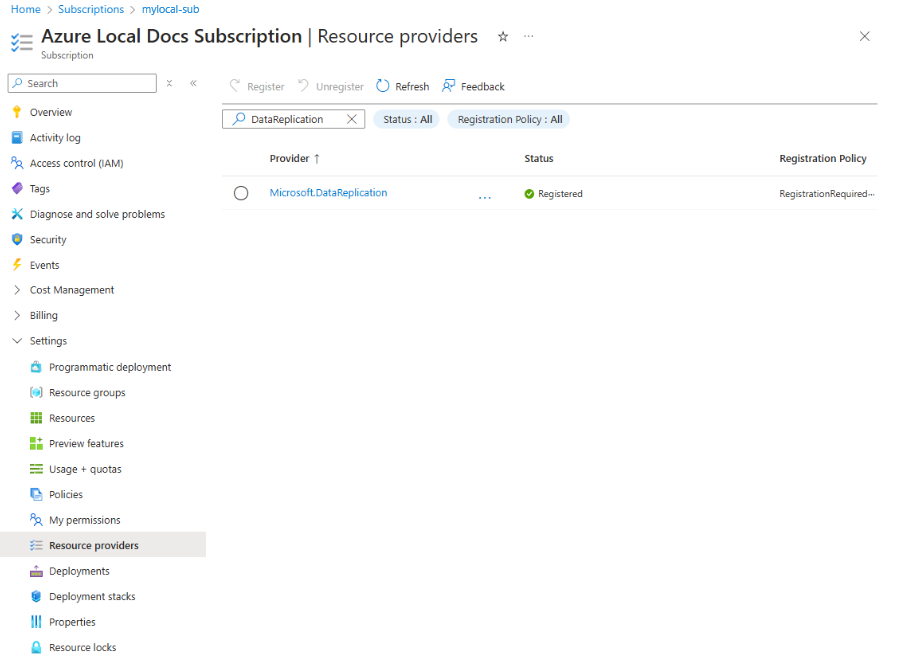
For any subscriptions that host resources used in migration, such as Azure Migrate project subscriptions and target Azure Local instance subscriptions, register the Microsoft.DataReplication resource provider. For more information, see register resource provider.
Source VMware server requirements
The source VMware server you use for migration should have enough resources to create a Windows Server 2022 VM with at least 16 GB memory, 80 GB disk, and 8 vCPUs.
Ensure that vCenter Server permission requirements are met. For more information, see VMware vSphere requirements (agentless).
Before you begin, bring all the disks online and persist the drive letter for all VMware VMs. For more information, see how to configure a SAN policy to bring the disks online.
The VMware source environment must be able to initiate a network connection with the target Azure Local instance, either by being on the same on-premises network or by using a VPN.
Verify that none of the VMs you plan to migrate have the Azure Connected Machine Agent installed. For more information, see FAQ.
Target Azure Local system requirements
The target system must be running Azure Local.
An Azure Arc resource bridge must exist on Azure Local for migration. The Azure Arc resource bridge is automatically created during the deployment. To verify that an Arc resource bridge exists on your Azure Local system, see Deploy using Azure portal.
Make sure that a logical network is configured on your Azure Arc resource bridge. For more information, see Create a logical network.
Make sure that a custom storage path is configured on your Azure Arc resource bridge for migration. For more information, see Create a storage path.
The Azure Local target system must be able to initiate a network connection with the VMware source environment, either by being on the same on-premises network or by using a VPN.
Azure Migrate project requirements
If you have an existing Azure Migrate project with VM discovery complete, you need to create a new Azure Migrate project for migration to Azure Local. You can't use existing Azure Migrate projects for migration.
You must have only one source appliance per Azure Migrate project for Azure Local migrations. This requirement means you can't use the same Azure Migrate project for both a VMware source and a Hyper-V source. Make sure to create a new project for each source you wish to migrate from.
You must have only one target appliance per Azure Migrate project for Azure Local migrations. This requirement means you can't use the same Azure Migrate project for a single source appliance to migrate to multiple target appliances across different Azure Local instances.
In general, Azure Migrate projects must have a 1:1 pairing of only one source appliance and one target appliance per project.
Considerations for migrating VMware VMs to Azure Local
Azure Migrate retains the boot type of the VM during migration. If the source VMware VM uses BIOS, the migrated VM on Azure Local also uses BIOS. If the source VMware VM uses UEFI, the migrated VM on Azure Local also uses UEFI.
This behavior means that the migration process creates BIOS VMs as Hyper-V Generation 1 VMs on Azure Local, and UEFI VMs as Hyper-V Generation 2 VMs on Azure Local. For more information on Generation 1 VM limitations, see Azure Local VM management.