Bilješka
Pristup ovoj stranici zahtijeva provjeru vjerodostojnosti. Možete pokušati da se prijavite ili promijenite direktorije.
Pristup ovoj stranici zahtijeva provjeru vjerodostojnosti. Možete pokušati promijeniti direktorije.
Important
The Dependency Agent and the Map experience in VM Insights has been deprecated and will be retired on 30 June 2028. See our retirement guidance for more details.
Dependency Agent collects data about processes running on the virtual machine and their external process dependencies. This article describes Dependency Agent requirements and how to uninstall it.
Note
Don't initiate further Dependency Agent installations on systems. The following requirements and supported operating systems are provided for reference on machines with an existing Dependency Agent installation. The Dependency Agent sends heartbeat data to the InsightsMetrics table, for which you incur data ingestion charges. This behavior is different from Azure Monitor Agent, which sends agent health data to the Heartbeat table that is free from data collection charges.
Dependency Agent requirements
- Azure Monitor agent must be installed on the same machine.
- Requires a connection from the virtual machine to the address 169.254.169.254. This address identifies the Azure metadata service endpoint.
Supported operating systems
The Dependency agent currently supports the same Windows versions that Azure Monitor Agent supports up to Windows Server 2022 , except Azure Stack HCI and Windows IoT Enterprise. Windows Server Core isn't supported. The Dependency Agent only supports x64 architectures.
Dependency Agent installation restrictions on a Linux machine:
- Only default and SMP Linux kernel releases are supported.
- Nonstandard kernel releases, such as physical address extension (PAE) and Xen, aren't supported for any Linux distribution. For example, a system with the release string of 2.6.16.21-0.8-xen isn't supported.
- Custom kernels, including recompilations of standard kernels, aren't supported.
- For Debian distros other than version 9.4, the Map feature isn't supported. The Performance feature is available only from the Azure Monitor menu. It isn't available directly from the left pane of the Azure VM.
- The Dependency Agent taints the Linux kernel, and you might lose support from your Linux distribution until the machine resets.
The Linux kernel must be patched for the Spectre and Meltdown vulnerabilities. For more information, consult with your Linux distribution vendor. Run the following command to check for availability if Spectre/Meltdown has been mitigated:
$ grep . /sys/devices/system/cpu/vulnerabilities/*
Output for this command looks similar to the following and specify whether a machine is vulnerable to either issue. If these files are missing, the machine is unpatched.
/sys/devices/system/cpu/vulnerabilities/meltdown:Mitigation: PTI
/sys/devices/system/cpu/vulnerabilities/spectre_v1:Vulnerable
/sys/devices/system/cpu/vulnerabilities/spectre_v2:Vulnerable: Minimal generic ASM retpoline
Uninstall Dependency Agent
Note
If you manually install the Dependency Agent, it doesn't appear in the Azure portal and you must uninstall it manually. It only appears if you install it through the Azure portal, PowerShell, ARM template deployment, or Azure policy.
To find machines, including standalone installations that don't appear as an extension, that still have the Dependency Agent installed, see Finding VMs currently using VM Insights map.
From the Virtual Machines menu in the Azure portal, select your virtual machine.
Select Extensions + applications > DependencyAgentWindows or DependencyAgentLinux > Uninstall.
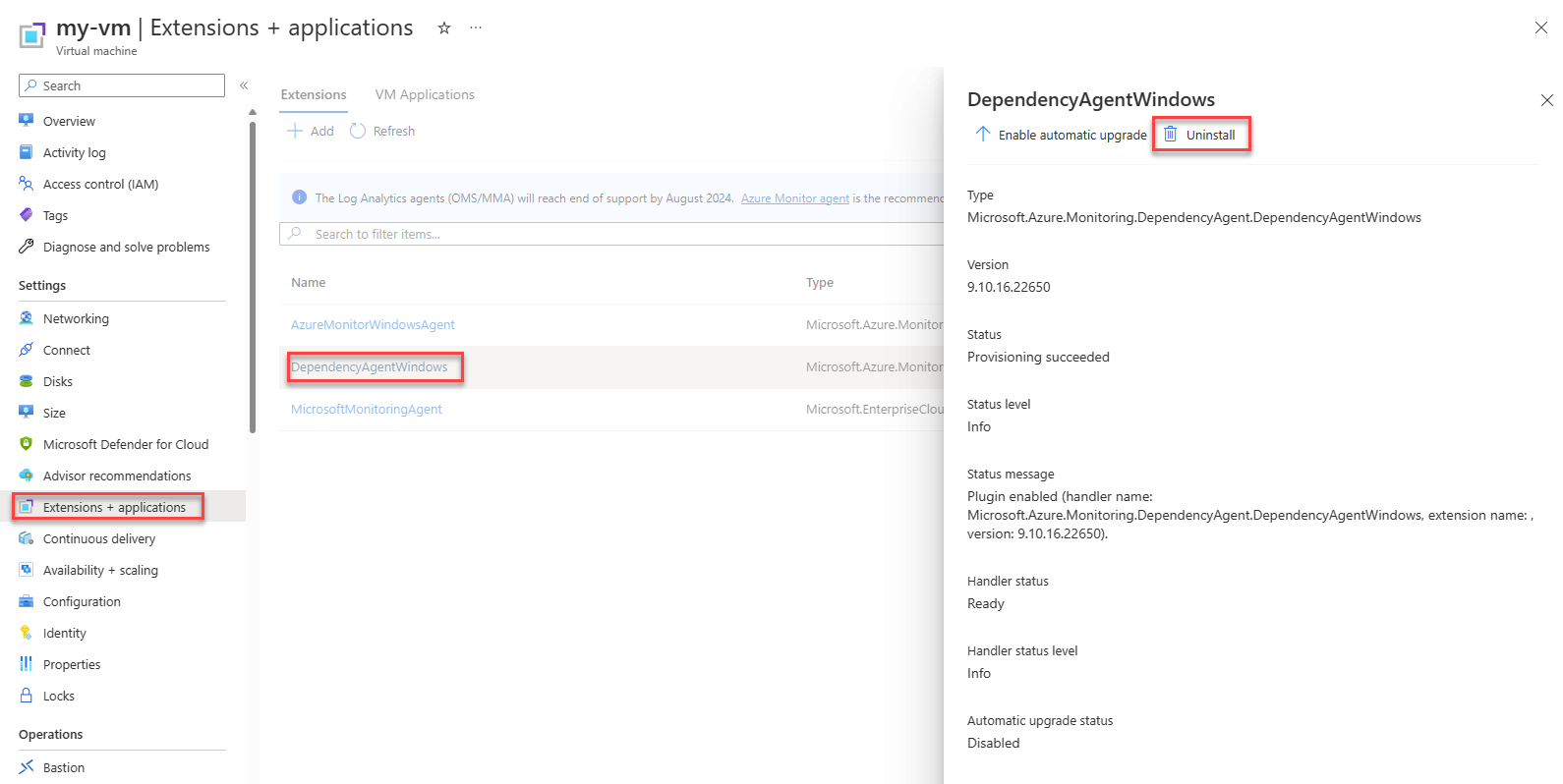
Manually uninstall Dependency Agent on Windows
Method 1: In Windows, go to Add and remove programs, find Microsoft Dependency Agent, click on the ellipsis to open the context menu, and select Uninstall.
Method 2: Use the uninstaller located in the installation directory: C:\Program Files\Microsoft Dependency Agent. Use the command that matches the installed agent version.
| Dependency Agent version | Command to run from the installation directory |
|---|---|
| 9.7.7.4050 and later | Uninstall_<version>.exe /S |
| Prior to 9.7.7.4050 | Uninstall.exe /S |
Note
Uninstallers from versions prior to 9.7.4.3150 don't have a Microsoft digital signature.
Manually uninstall Dependency Agent on Linux
For version 9.10.2.9060 and later:
Sign in on the computer with a user account that has sudo privileges to execute commands as root.
Run the uninstaller script:
sudo /opt/microsoft/dependency-agent/uninstall -s
For versions prior to 9.10.2.9060, which don't include an uninstaller script, use the package manager command that matches your distribution:
Debian/Ubuntu:
sudo dpkg --purge dependency-agent dependency-agent-service microsoft-dependency-agent-dkms
RPM-based distributions (Red Hat, CentOS, SLES):
sudo rpm -e --allmatches dependency-agent
Dependency Agent Linux support
Since Dependency Agent works at the kernel level, support is also dependent on the kernel version. As of Dependency Agent version 9.10.* the agent supports * kernels. The following table lists the major and minor Linux OS release and supported kernel versions for Dependency Agent.
Note
With Dependency agent 9.10.15 and above, installation is not blocked for unsupported kernel versions, but the agent will run in degraded mode. In this mode, connection and port data stored in VMConnection and VMBoundport tables is not collected. The VMProcess table may have some data, but it will be minimal.
| Distribution | OS version | Kernel version |
|---|---|---|
| Red Hat Linux 8 | 8.6 | 4.18.0-372.*el8.x86_64, 4.18.0-372.*el8_6.x86_64 |
| 8.5 | 4.18.0-348.*el8_5.x86_644.18.0-348.*el8.x86_64 | |
| 8.4 | 4.18.0-305.*el8.x86_64, 4.18.0-305.*el8_4.x86_64 | |
| 8.3 | 4.18.0-240.*el8_3.x86_64 | |
| 8.2 | 4.18.0-193.*el8_2.x86_64 | |
| 8.1 | 4.18.0-147.*el8_1.x86_64 | |
| 8.0 | 4.18.0-80.*el8.x86_64 4.18.0-80.*el8_0.x86_64 |
|
| Red Hat Linux 7 | 7.9 | 3.10.0-1160 |
| 7.8 | 3.10.0-1136 | |
| 7.7 | 3.10.0-1062 | |
| 7.6 | 3.10.0-957 | |
| 7.5 | 3.10.0-862 | |
| 7.4 | 3.10.0-693 | |
| Red Hat Linux 6 | 6.10 | 2.6.32-754 |
| 6.9 | 2.6.32-696 | |
| CentOS Linux 8 | 8.6 | 4.18.0-372.*el8.x86_64, 4.18.0-372.*el8_6.x86_64 |
| 8.5 | 4.18.0-348.*el8_5.x86_644.18.0-348.*el8.x86_64 | |
| 8.4 | 4.18.0-305.*el8.x86_64, 4.18.0-305.*el8_4.x86_64 | |
| 8.3 | 4.18.0-240.*el8_3.x86_64 | |
| 8.2 | 4.18.0-193.*el8_2.x86_64 | |
| 8.1 | 4.18.0-147.*el8_1.x86_64 | |
| 8.0 | 4.18.0-80.*el8.x86_64 4.18.0-80.*el8_0.x86_64 |
|
| CentOS Linux 7 | 7.9 | 3.10.0-1160 |
| 7.8 | 3.10.0-1136 | |
| 7.7 | 3.10.0-1062 | |
| CentOS Linux 6 | 6.10 | 2.6.32-754.3.5 2.6.32-696.30.1 |
| 6.9 | 2.6.32-696.30.1 2.6.32-696.18.7 |
|
| Ubuntu Server | 20.04 | 5.8 5.4* |
| 18.04 | 5.3.0-1020 5.0 (includes Azure-tuned kernel) 4.18* 4.15* |
|
| 16.04.3 | 4.15.* | |
| 16.04 | 4.13.* 4.11.* 4.10.* 4.8.* 4.4.* |
|
| 14.04 | 3.13.*-generic 4.4.*-generic |
|
| SUSE Linux 12 Enterprise Server | 12 SP5 | 4.12.14-122.*-default, 4.12.14-16.*-azure |
| 12 SP4 | 4.12.* (includes Azure-tuned kernel) | |
| 12 SP3 | 4.4.* | |
| 12 SP2 | 4.4.* | |
| SUSE Linux 15 Enterprise Server | 15 SP1 | 4.12.14-197.*-default, 4.12.14-8.*-azure |
| 15 | 4.12.14-150.*-default | |
| Debian | 9 | 4.9 |
Note
Dependency agent is not supported for Azure Virtual Machines with Ampere Altra ARM–based processors.
Next steps
If you want to stop monitoring your VMs for a while or remove VM Insights entirely, see Disable monitoring of your VMs in VM Insights.