Bilješka
Pristup ovoj stranici zahtijeva provjeru vjerodostojnosti. Možete pokušati da se prijavite ili promijenite direktorije.
Pristup ovoj stranici zahtijeva provjeru vjerodostojnosti. Možete pokušati promijeniti direktorije.
Effective communication is essential for success in today's fast-paced business environment. Choosing the right public switched telephone network (PSTN) connectivity option for your organization's communication needs can significantly improve efficiency, reduce cost, and raise overall performance.
As organizations increasingly adopt Microsoft Teams for their collaboration and communication needs, understanding the various PSTN connectivity options available becomes crucial. This article explores your options for Teams Phone extensibility and provides guidance on selecting the best fit for your specific requirements. Options include Calling Plans, Operator Connect, and Direct Routing.
This article also explores the business model for Teams Phone extensibility. We offer insights into cost estimation and the associated services, helping you make informed decisions to optimize your communication infrastructure.
PSTN connectivity options for Teams Phone extensibility
There are three primary options available:
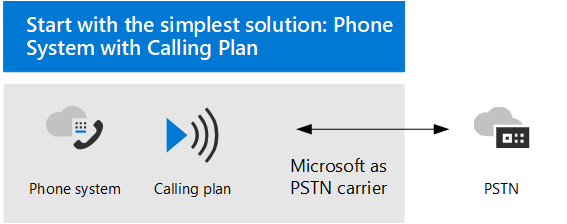
Calling Plans are an all-in-the-cloud solution in which Microsoft acts as your PSTN carrier. Calling Plans are the simplest option, ideal for organizations that don't need to retain their current PSTN carrier. With Calling Plans, you get Teams Phone with added Domestic or International Calling Plans for your solution to reach phone numbers around the world.
This option doesn't require any on-premises deployment or maintenance. For more information, see Microsoft Teams Calling Plans.
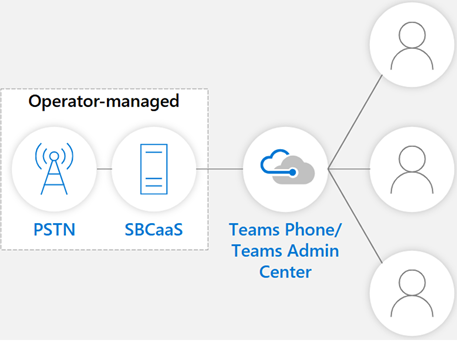
Operator Connect enables you to bring your existing PSTN carrier into the Microsoft Teams environment. If your carrier participates in the Microsoft Operator Connect program, they can manage PSTN calling and Session Border Controllers (SBCs) for you.
Operator Connect provides a fully managed service with no hardware footprint. This option is a great choice for organizations that want to maintain their existing PSTN infrastructure while using Teams. For more information, see Plan for Operator Connect.
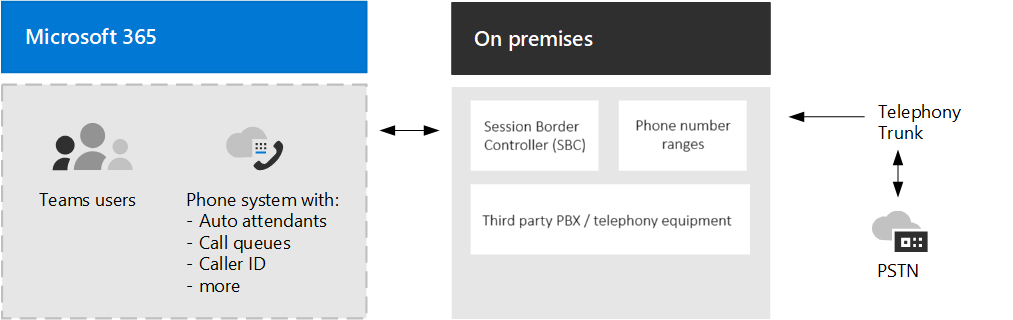
Direct Routing enables you to use your own PSTN carrier by connecting your SBCs to Teams Phone. Direct Routing offers the most flexibility, enabling you to design a solution that fits complex environments or manage a multi-step migration.
Direct Routing is suitable for organizations that need to retain their current PSTN carrier and have specific requirements for interoperability with third-party private branch exchanges (PBXs), analog devices, and other telephony equipment. For more information, see Plan Direct Routing.
How to choose a connectivity option
Choosing the best PSTN connectivity solution for Teams Phone extensibility depends on several factors. You need to consider the availability of services in your region, your existing infrastructure, and your specific needs.
Availability: Find out if the PSTN connectivity option is available in your country/region. For example, Microsoft Calling Plans are available in specific regions, and Operator Connect requires your existing carrier to participate in the program. Make sure that the option you choose is supported in your location.
Teams provides the Calling Plans option in multiple countries/regions. For more information and the up-to-date list, see Country/region availability for Calling Plans.
Microsoft Teams also offers the option to use integration with 105 operators worldwide using the Operator Connect option. For more information and the current list, see Modern Work for Partners - Operator Directory.
For the most flexible option, use Teams Direct Routing. You can connect your SBC to almost any telephony trunk or interconnect with third party PSTN equipment. This flexibility enables you to deploy your solution in any region or country. Remember that you need to configure the solution correctly for optimal performance and compliance with local regulations. For more information, see Configure Direct Routing for Microsoft Teams.
Existing infrastructure: Consider your current telephony setup. If you have an existing PSTN carrier and infrastructure that you want to retain, either Direct Routing or Operator Connect might be the best option. If you prefer a fully managed, cloud-based solution with minimal on-premises requirements, Calling Plans could be the ideal choice.
Specific needs: Evaluate your organization's specific needs. For example, do you need international calling, how complex is your telephony environment, and how much control do you require over your PSTN connectivity. Direct Routing offers the most flexibility and control, while Calling Plans provide simplicity and ease of use.
Estimate Teams Phone extensibility cost on ISV
The Teams Phone Extensibility business model for independent software vendors (ISVs) includes charging contact center as a service (CCaaS) vendors for using Azure Communication Services SDKs. This model includes Calling SDK and VoIP consumption, which require charges for each leg between the call automation bot and the CCaaS agent.
This solution also includes Audio Insights with access to mixed/unmixed audio streams or direct transcriptions. Using transcription incurs an Azure Speech in Foundry Tools pricing for the selected Azure resource and Call Recording with pay-as-you-go for mixed/unmixed AV recordings. You can review current pricing for VoIP, transcription, and recording at Azure Communication Services pricing.
Teams licenses requirements
Teams licensing requirements vary based on the calling scenario when Teams Phone Extensibility is provisioned:
General prerequisites
- For every human agent who needs to place or receive calls, you need to enable the standard Teams license as well as Teams Phone license for the agent, see Assign Teams add-on licenses to users > Product names and SKU identifiers for licensing.
- You need to enable Enterprise voice as described in Teams Phone features.
- For the designated Teams resource account, you need to get a Microsoft Teams Phone Resource Account license, included in the Teams Phone license.
Outbound calling prerequisites
Starting November 1, 2025, Calling Plan licenses assigned to Teams Resource Accounts will no longer support On-Behalf-Of PSTN outbound calls or server-initiated outbound calls. Customers now need a financing balance, which can be provided by a Communications Credits license for legacy customers or telco overage for MCA customers. To activate a Communications Credits license, a Pay-As-You-Go Calling Plan license is required as a prerequisite, since the Communications Credits license is an add-on. While telco overage can be set up without a PAYG license initially, the PAYG license must be acquired and assigned to the Resource Account for proper functionality. Therefore, customers must ensure the RA has a PAYG license along with either a Communications Credits license or telco overage.
Note
Direct Routing numbers aren’t affected by these licensing changes.
Calling Plan customers
Assign a Pay-As-You-Go Calling Plan license to any Teams Resource Account that uses a Calling Plan number for outbound PSTN calls. Outbound calls will fail after November 1, 2025, if licenses aren’t assigned. You can follow the below steps to make sure you get the proper licenses:
- Log in to the Admin portal
- Verify agreement type and funding source
- For MCA agreements:
- Confirm postpaid payment method is active.
- Navigate to Marketplace → All Products.
- Search for Microsoft Teams Calling Plan (Pay-As-You-Go).
- Select the appropriate Pay-As-You-Go Calling Plan Zone (Zone 1 or Zone 2) based on your location.
- Add the plan under Add-ons.
- For older agreements:
- Navigate to Marketplace → All Products and purchase Communications Credits.
- Add funds to ensure a positive balance.
- Enable Auto-Recharge under Billing → Your Products → Communications Credits.
- For MCA agreements:
Operator Connect customers
Starting November 1, 2025, On-Behalf-Of PSTN outbound calls and server-initiated outbound calls may change depending on your carrier. Work with your Operator Connect carrier to ensure uninterrupted service. Without carrier adjustments, outbound calls through Teams Phone Extensibility may fail.
Learn more
- Pay-As-You-Go Calling Plan
- Set up Communications Credits
- How to buy Calling Plans
- Enable pay-as-you-go services
- Assign Teams add-on licenses