Bilješka
Pristup ovoj stranici zahtijeva provjeru vjerodostojnosti. Možete pokušati da se prijavite ili promijenite direktorije.
Pristup ovoj stranici zahtijeva provjeru vjerodostojnosti. Možete pokušati promijeniti direktorije.
Use Cloud Security Explorer to identify vulnerabilities in registry images and running containers. This article shows you how to build queries that find vulnerable container images in registries and in running Kubernetes workloads, and how to review the results.
For an introduction to Cloud Security Explorer, see Build queries with Cloud Security Explorer.
Create a query to identify vulnerabilities in registry images
Find registry container images that have known vulnerabilities.
Sign in to the Azure portal.
Go to Microsoft Defender for Cloud > Cloud Security Explorer.
In Query builder, select Select resource types.
Select Container Images.
Select Done.
Select +.
Select Select condition.
In Vulnerabilities, select All vulnerabilities.
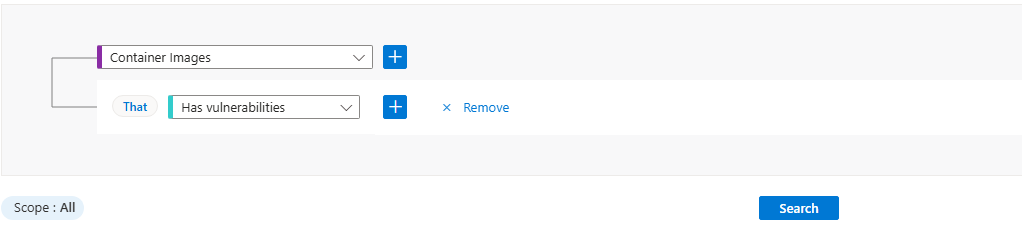
Select Search.
Select View details > for a container image.
In Result details, review the affected packages and severity.
Select Open the vulnerability page for more details.
Create a query to identify vulnerabilities in running containers
Find running containers in Kubernetes clusters that have known vulnerabilities.
Sign in to the Azure portal.
Go to Microsoft Defender for Cloud > Cloud Security Explorer.
In Query builder, select Select resource types.
In Containers, select Containers.
Select Done.
Select +.
Select Select condition.
In Application, select Created by.
Select Select resource types.
Select Container Images.
Select +.
Select Select condition.
In Vulnerabilities, select Has vulnerabilities.
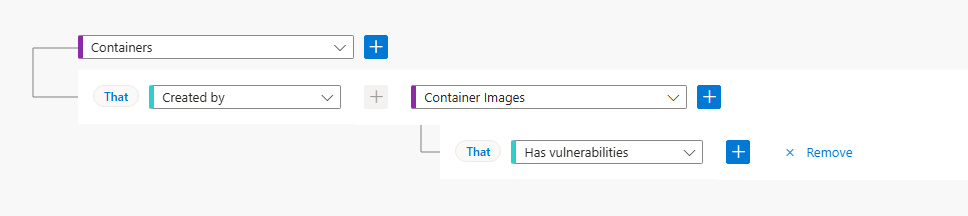
Select Search.
Select View details > for a container.
In Result details, review the affected images, severity, and related resources.
Select Open the vulnerability page for more details.
