Bilješka
Pristup ovoj stranici zahtijeva provjeru vjerodostojnosti. Možete pokušati da se prijavite ili promijenite direktorije.
Pristup ovoj stranici zahtijeva provjeru vjerodostojnosti. Možete pokušati promijeniti direktorije.
Microsoft Defender for IoT evaluates OS configurations against CIS benchmarks and raises recommendations when a device doesn't meet baseline security checks. This article walks you through two investigation approaches: a basic investigation using the Defender for IoT portal, and an advanced investigation that uses Azure Log Analytics to query OS baseline test results, identify failed checks, and pinpoint affected devices across your fleet. The advanced investigation requires a Log Analytics workspace connected to Defender for IoT. For details, see Prerequisites for advanced OS baseline investigation.
Basic OS baseline security recommendation investigation
You can investigate OS baseline recommendations by navigating to Defender for IoT in the Azure portal. For more information, see how to Investigate security recommendations.
Advanced OS baseline security recommendation investigation
The advanced investigation workflow helps you understand OS baseline test results and query related events in Azure Log Analytics.
Prerequisites:
The advanced OS baseline security recommendation investigation is only supported by using Azure Log Analytics and you must connect Defender for IoT to a Log Analytics workspace before continuing.
For more information, see Configure Microsoft Defender for IoT agent-based solution.
To query your IoT security events in Log Analytics for alerts:
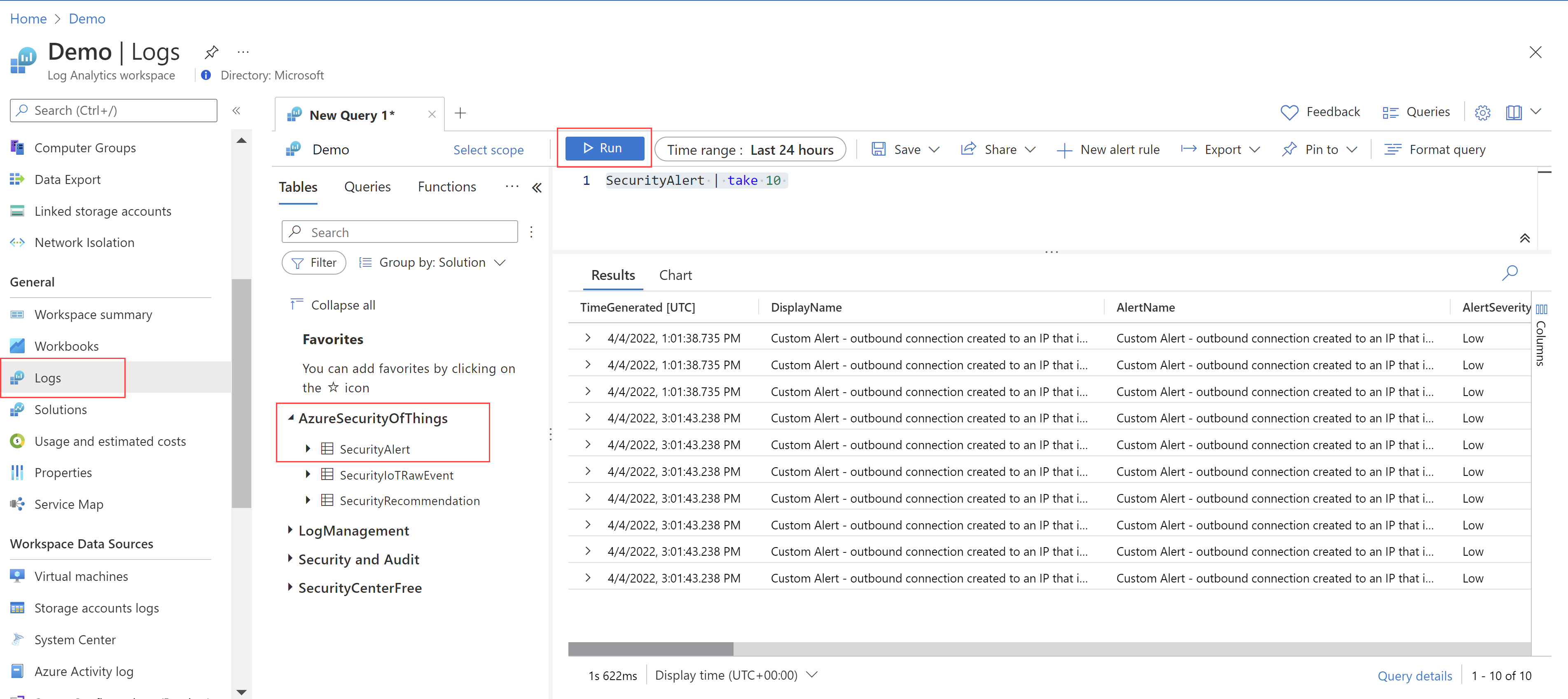
In your Log Analytics workspace, go to Logs > AzureSecurityOfThings > SecurityAlert.
In the query editor on the right, enter a KQL query to display the alerts you want to see.
Select Run to display the alerts that match your query.
For example:
Note
In addition to alerts, you can also use this same procedure to query for recommendations or raw event data.
Useful queries to investigate the OS baseline resources
Use the following Kusto queries in your Log Analytics workspace to retrieve the latest OS baseline check results for your devices.
Note
Make sure to replace <device-id> with the name(s) you gave your device in each of the following queries.
Retrieve the latest information
Device fleet failure: Run this query to retrieve the latest information about checks that failed across the device fleet:
let lastDates = SecurityIoTRawEvent |
where RawEventName == "Baseline" |
summarize TimeStamp=max(TimeStamp) by DeviceId;
lastDates | join kind=inner (SecurityIoTRawEvent) on TimeStamp, DeviceId |
extend event = parse_json(EventDetails) |
where event.BaselineCheckResult == "FAIL" |
project DeviceId, event.BaselineCheckId, event.BaselineCheckDescription
Specific device failure - Run this query to retrieve the latest information about checks that failed on a specific device:
let id = SecurityIoTRawEvent |
extend IoTRawEventId = extractjson("$.EventId", EventDetails, typeof(string)) |
where TimeGenerated <= now() |
where RawEventName == "Baseline" |
where DeviceId == "<device-id>" |
summarize arg_max(TimeGenerated, IoTRawEventId) |
project IoTRawEventId;
SecurityIoTRawEvent |
extend IoTRawEventId = extractjson("$.EventId", EventDetails, typeof(string)), extraDetails = todynamic(EventDetails) |
where IoTRawEventId == toscalar(id) |
where extraDetails.BaselineCheckResult == "FAIL" |
project DeviceId, CceId = extraDetails.BaselineCheckId, Description = extraDetails.BaselineCheckDescription
Specific device error - Run this query to retrieve the latest information about checks that have an error on a specific device:
let id = SecurityIoTRawEvent |
extend IoTRawEventId = extractjson("$.EventId", EventDetails, typeof(string)) |
where TimeGenerated <= now() |
where RawEventName == "Baseline" |
where DeviceId == "<device-id>" |
summarize arg_max(TimeGenerated, IoTRawEventId) |
project IoTRawEventId;
SecurityIoTRawEvent |
extend IoTRawEventId = extractjson("$.EventId", EventDetails, typeof(string)), extraDetails = todynamic(EventDetails) |
where IoTRawEventId == toscalar(id) |
where extraDetails.BaselineCheckResult == "ERROR" |
project DeviceId, CceId = extraDetails.BaselineCheckId, Description = extraDetails.BaselineCheckDescription
Update device list for device fleet that failed a specific check - Run this query to retrieve updated list of devices (across the device fleet) that failed a specific check:
let lastDates = SecurityIoTRawEvent |
where RawEventName == "Baseline" |
summarize TimeStamp=max(TimeStamp) by DeviceId;
lastDates | join kind=inner (SecurityIoTRawEvent) on TimeStamp, DeviceId |
extend event = parse_json(EventDetails) |
where event.BaselineCheckResult == "FAIL" |
where event.BaselineCheckId contains "6.2.8" |
project DeviceId;