Bilješka
Pristup ovoj stranici zahtijeva provjeru vjerodostojnosti. Možete pokušati da se prijavite ili promijenite direktorije.
Pristup ovoj stranici zahtijeva provjeru vjerodostojnosti. Možete pokušati promijeniti direktorije.
After you've set up user access in the Azure portal and on your OT network sensors, you can track and audit user activity across Microsoft Defender for IoT.
Audit Azure user activity
Use Microsoft Entra user auditing resources to audit Azure user activity across Defender for IoT. For more information, see:
Audit user activity on an OT network sensor
Audit and track user activity on a sensor's Event timeline. The Event timeline displays events that occurred on the sensor, affected devices for each event, and the time and date that the event occurred.
Prerequisites
You must be a default, privileged admin user or have an Admin role on the sensor.
To use the sensor's Event Timeline:
Sign into the sensor console as the default, privileged admin users or any user with an Admin role.
On the sensor, select Event Timeline from the left-hand menu. Make sure that the filter is set to show User Operations.
For example:
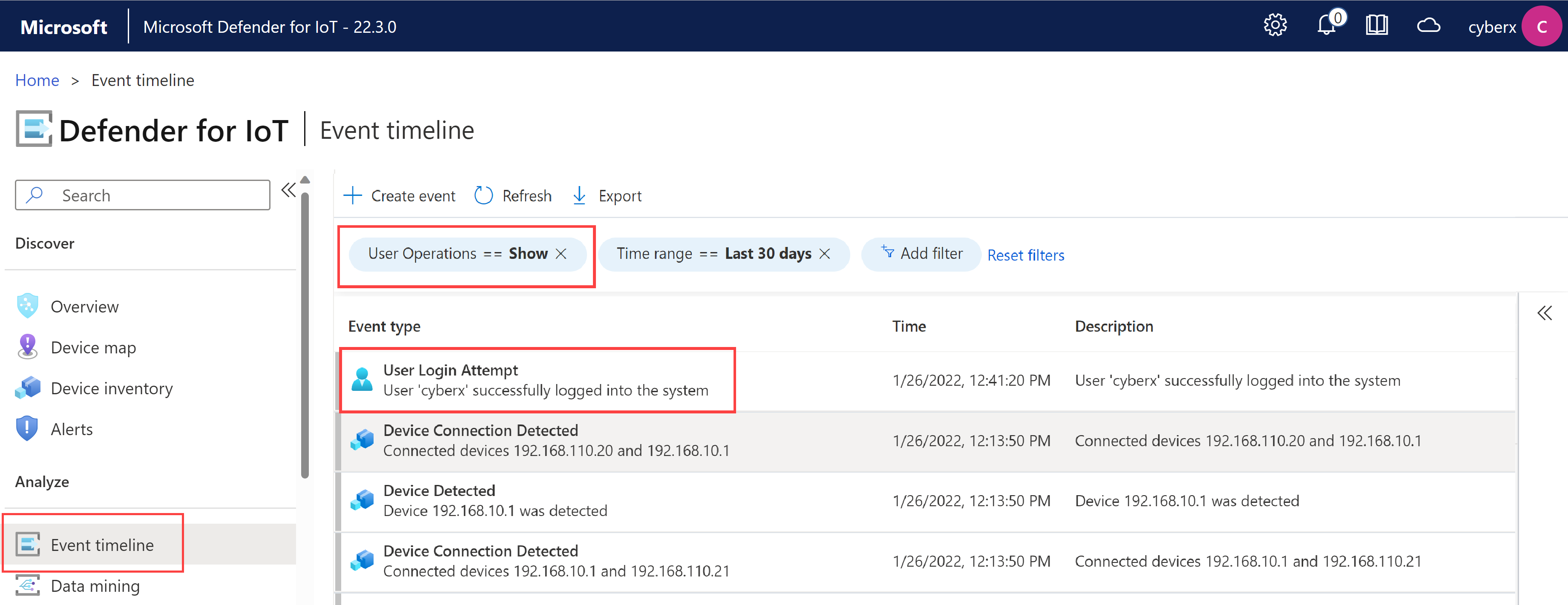
Use additional filters or search using CTRL+F to find the information of interest to you.
For more information on the event timeline, see Track network and sensor activity with the event timeline
Next steps
For more information, see: