Bilješka
Pristup ovoj stranici zahtijeva provjeru vjerodostojnosti. Možete pokušati da se prijavite ili promijenite direktorije.
Pristup ovoj stranici zahtijeva provjeru vjerodostojnosti. Možete pokušati promijeniti direktorije.
You can host a web application inside an enclave and make it publicly accessible by routing traffic through a separate Demilitarized Zone (DMZ) enclave. This design uses an Application Gateway, Web Application Firewall (WAF), and public IP address, creates an enclave endpoint for the web app, and establishes an enclave connection between the web app and DMZ enclaves.
Host a public web application in Azure Enclave
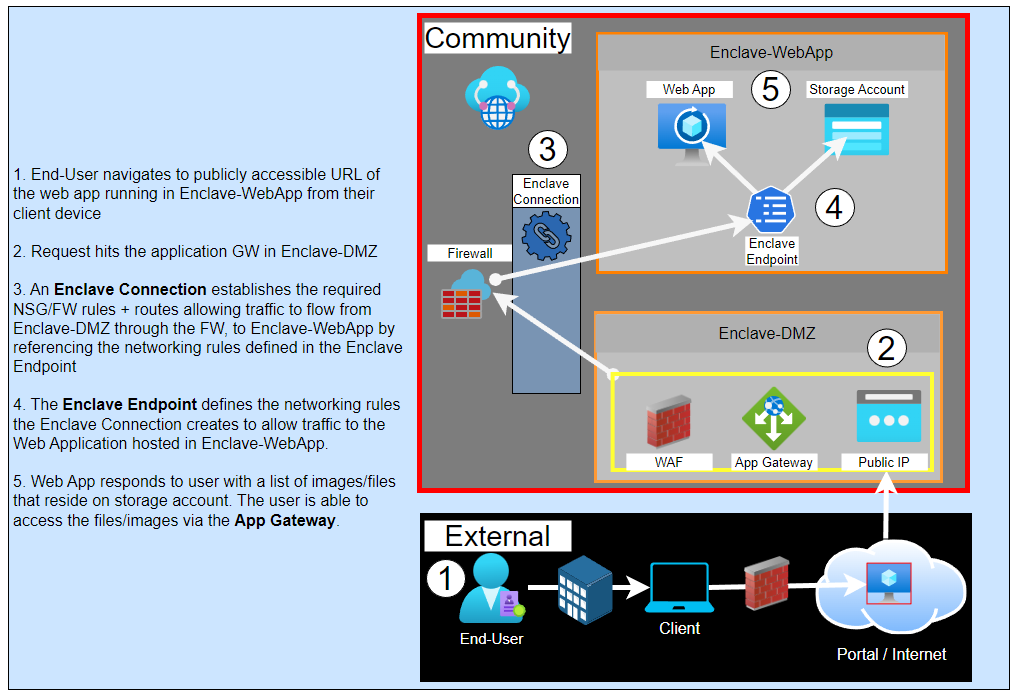
Make your web app accessible from the internet
- Deploy an enclave to host the public web application (
Enclave-WebApp). - Deploy an enclave to host an Application Gateway (
Enclave-DMZ). - Deploy the workload and required resources for the web application into
Enclave-WebApp. - Deploy an endpoint in
Enclave-WebApp(endpoint-MyService) that allows traffic to the web application's IP address over port443and/or80. - Deploy a workload and Application Gateway into
Enclave-DMZ. - Configure the web application storage account to proxy through the Application Gateway.
- Create an enclave connection from
Enclave-DMZtoEnclave-WebAppwith:Source enclave:Enclave-DMZSource IP/CIDR:Application Gateway PIPDestination enclave:Enclave-WebAppDestination endpoint:endpoint-MyService