Bilješka
Pristup ovoj stranici zahtijeva provjeru vjerodostojnosti. Možete pokušati da se prijavite ili promijenite direktorije.
Pristup ovoj stranici zahtijeva provjeru vjerodostojnosti. Možete pokušati promijeniti direktorije.
To communicate with an event hub in a namespace, you need a connection string for the namespace or the event hub. If you use a connection string to the namespace from your application, the application has the provided access (manage, read, or write) to all event hubs in the namespace. If you use a connection string to the event hub, you have the provided access to that specific event hub.
The connection string for a namespace has the following components embedded within it:
- Fully qualified domain name of the Event Hubs namespace you created (it includes the Event Hubs namespace name followed by
servicebus.windows.net) - Name of the shared access key
- Value of the shared access key
The connection string for a namespace looks like:
Endpoint=sb://<NamespaceName>.servicebus.windows.net/;SharedAccessKeyName=<KeyName>;SharedAccessKey=<KeyValue>
The connection string for an event hub has an extra component in it, that is, EntityPath=<EventHubName>.
Endpoint=sb://<NamespaceName>.servicebus.windows.net/;SharedAccessKeyName=<KeyName>;SharedAccessKey=<KeyValue>;EntityPath=<EventHubName>
This article shows you how to get a connection string to a namespace or a specific event hub by using the Azure portal, PowerShell, or CLI.
Prerequisites
- An Azure subscription. If you don't have one, create a free account before you begin.
- An Event Hubs namespace and an event hub. If you don't have them, see Quickstart: Create an event hub by using the Azure portal.
- To use Azure PowerShell or the Azure CLI, use Azure Cloud Shell, or install Azure PowerShell or the Azure CLI locally.
Azure portal
Connection string for a namespace
Sign in to the Azure portal.
In the search box at the top of the portal, enter Event Hubs, and then select Event Hubs from the results.
In the list of Event Hubs namespaces, select your namespace.
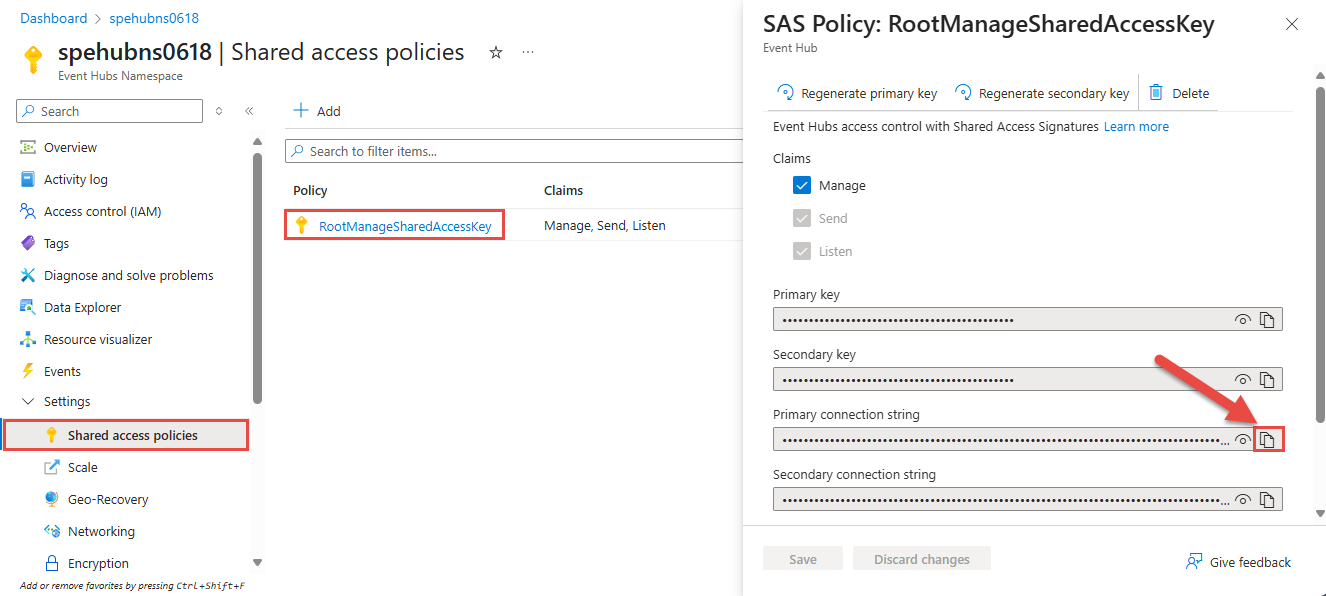
On the Event Hubs namespace page, select Shared access policies on the left menu under Settings.
Select a shared access policy in the list of policies. The default policy is named RootManageSharedAccessKey. You can also add a policy with the appropriate permissions (Send, Listen), and use that policy.
Select the copy button next to the Connection string-primary key field.
Connection string for a specific event hub in a namespace
This section gives you steps for getting a connection string to a specific event hub in a namespace.
On the Event Hubs namespace page, select Event Hubs under Entities on the left menu, and then select your event hub.
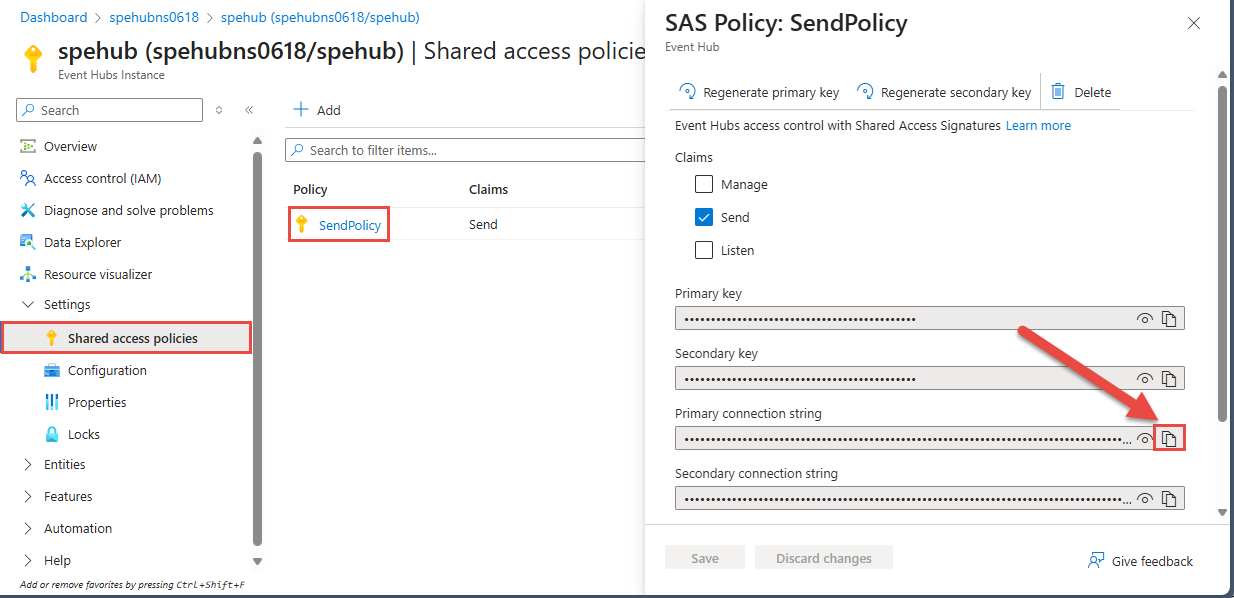
On the Event Hubs instance page, select Shared access policies on the left menu under Settings.
There's no default policy created for an event hub. Create a policy with Manage, Send, or Listen access.
Select the policy from the list.
Select the copy button next to the Connection string-primary key field.
Azure PowerShell
Use the Get-AzEventHubKey cmdlet to get the connection string for a specific policy or rule.
The following example gets the connection string for a namespace. MyAuthRuleName is the name of the shared access policy. For a namespace, the default policy is RootManageSharedAccessKey.
Get-AzEventHubKey -ResourceGroupName MyResourceGroupName -NamespaceName MyNamespaceName -AuthorizationRuleName MyAuthRuleName
The following example gets the connection string for a specific event hub within a namespace:
Get-AzEventHubKey -ResourceGroupName MyResourceGroupName -NamespaceName MyNamespaceName -EventHubName MyEventHubName -AuthorizationRuleName MyAuthRuleName
The following example gets the connection string for a namespace that's part of a Geo-disaster recovery configuration, by using its alias.
Get-AzEventHubKey -ResourceGroupName MyResourceGroupName -NamespaceName MyNamespaceName -AliasName MyAliasName -AuthorizationRuleName MyAuthRuleName
Azure CLI
The following example gets the connection string for a namespace. MyAuthRuleName is the name of the shared access policy. For a namespace, the default policy is RootManageSharedAccessKey.
az eventhubs namespace authorization-rule keys list --resource-group MyResourceGroupName --namespace-name MyNamespaceName --name RootManageSharedAccessKey
The following example gets the connection string for a specific event hub within a namespace:
az eventhubs eventhub authorization-rule keys list --resource-group MyResourceGroupName --namespace-name MyNamespaceName --eventhub-name MyEventHubName --name MyAuthRuleName
The following example gets the connection string for a namespace that's part of a Geo-disaster recovery configuration, by using its alias.
az eventhubs georecovery-alias authorization-rule keys list --resource-group MyResourceGroupName --namespace-name MyNamespaceName --alias MyAliasName --name MyAuthRuleName
For more information about Azure CLI commands for Event Hubs, see Azure CLI for Event Hubs.
Related content
You can learn more about Event Hubs by visiting the following articles: