Bilješka
Pristup ovoj stranici zahtijeva provjeru vjerodostojnosti. Možete pokušati da se prijavite ili promijenite direktorije.
Pristup ovoj stranici zahtijeva provjeru vjerodostojnosti. Možete pokušati promijeniti direktorije.
Important
Items marked (preview) in this article are currently in public preview. This preview is provided without a service-level agreement, and we don't recommend it for production workloads. Certain features might not be supported or might have constrained capabilities. For more information, see Supplemental Terms of Use for Microsoft Azure Previews.
This article covers synthetic data generation. For all dataset preparation options and the standard field names, see Evaluation datasets in Microsoft Foundry and Evaluation dataset schema.
When your agent doesn't have production traffic yet, you can still build a meaningful evaluation dataset. The Microsoft Foundry data generation service synthesizes evaluation data from material you already have: an agent's instructions, an inline prompt, or a reference document you upload. Two task types are available:
- Simple QnA (single-turn) produces question-and-answer pairs for turn-level evaluation.
- Simulation seed (multi-turn) produces scenario descriptions that feed the Simulate conversations flow for multi-turn evaluation.
You can evaluate simple Q&A datasets directly. Simulation seed datasets first drive a simulator that plays the user's role against the target agent. Conversation-level evaluators then score the generated conversations.
Three input source types are available, and you can combine them in a single job for richer coverage:
- Agent definition—seed generation from a deployed agent's instructions or prompt.
- Prompt—pass an inline text prompt that describes the domain or steers difficulty.
- Reference file—upload a document (for example, a policy, spec, or knowledge-base export) and generate questions grounded in its content.
Synthetic generation and trace-based generation are complementary: synthetic datasets cover edge cases and prelaunch scenarios, while trace-based datasets reflect real production behavior. Using both gives the strongest evaluation signal. See Convert agent traces into evaluation datasets.
When to use synthetic generation
Use synthetic generation when:
- You're prelaunch and have no production traces yet.
- Your agent has low traffic and a trace window doesn't yield enough distinct samples.
- You need a stable regression baseline that doesn't drift with changing production behavior.
- You want to expand coverage of edge cases the agent hasn't encountered in production.
- You're iterating on an agent's instructions and want a quick smoke-test dataset.
Choose a source type
| Source | Use when |
|---|---|
Agent definition (AgentDataGenerationJobSource) |
You have a deployed agent and want a dataset that reflects its actual instructions and persona. |
Prompt (PromptDataGenerationJobSource) |
You want to generate from inline text such as a policy snippet, or steer generation with an instruction like "expert-level questions only." |
Reference file (FileDataGenerationJobSource) |
You have a longer document (spec, policy, knowledge base) that should ground the generated questions in real domain content. |
You can combine sources in a single job. A common pattern is to pair a reference file (for grounding) with a prompt (for steering tone or difficulty).
Prerequisites
- Python SDK version
2.5.0or later:pip install "azure-ai-projects>=2.5.0" azure-identity. - A Microsoft Foundry project endpoint URL in the format
https://<your-resource>.services.ai.azure.com/api/projects/<your-project>. - Foundry User role or higher on the project.
- An Azure OpenAI model deployment that supports the Responses API. Both the
simple_qnaandsimulation_seedrecipes use this model to synthesize output rows. For the supported-model list, see Azure OpenAI Responses API model support. - A supported region. For the list, see Supported regions for data generation.
Generate a dataset from the portal
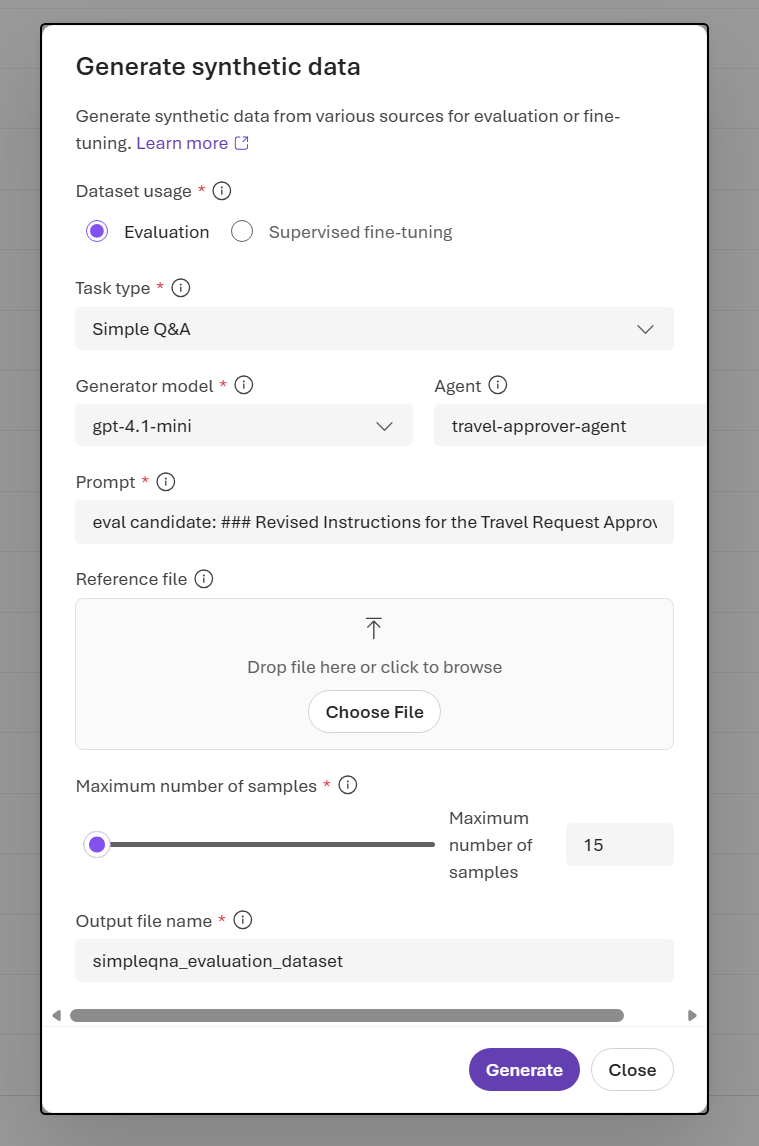
- In the portal, open the Data Generation tab. Select Create dataset, and then select Generate synthetic.
- In Generate synthetic data, set Dataset usage to Evaluation.
- Set Task type. Select Simple QnA (single-turn) for question-and-answer pairs, or Simulation seed (multi-turn) for scenario descriptions used in conversation simulation.
- Select a Generator model.
- Provide one or more source inputs: Agent, Prompt, or Reference file.
- Set Maximum number of samples and Output file name.
- Select Generate.
- Track the dataset generation job status in the Data Generation tab.
- When the job finishes, preview the generated rows on the Data tab.
Generate a dataset from an agent definition (SDK)
This flow seeds generation from a deployed agent's instructions. The service fetches the agent's prompt and uses your configured model to synthesize question-and-answer pairs from it.
First, create an AIProjectClient by using your project endpoint and DefaultAzureCredential. You can find all data generation operations under project_client.beta.datasets.
from azure.identity import DefaultAzureCredential
from azure.ai.projects import AIProjectClient

credential = DefaultAzureCredential()
project_client = AIProjectClient(
    endpoint="https://<your-resource>.services.ai.azure.com/api/projects/<your-project>",
    credential=credential,
)
Then submit a SimpleQnA job whose source is an agent reference. If you already have a deployed agent, skip the create_version call and pass its existing name and version to AgentDataGenerationJobSource.
import time
from azure.ai.projects.models import (
    AgentDataGenerationJobSource,
    DataGenerationJob,
    DataGenerationJobInputs,
    DataGenerationJobOutputOptions,
    DataGenerationJobScenario,
    DataGenerationModelOptions,
    DatasetDataGenerationJobOutput,
    PromptAgentDefinition,
    SimpleQnADataGenerationJobOptions,
)

MODEL_NAME = "gpt-4.1-mini"
poll_interval_seconds = 10

# 1. Reference (or create) a prompt agent whose instructions seed generation.
agent = project_client.agents.create_version(
    agent_name="retail-agent",
    definition=PromptAgentDefinition(
        model=MODEL_NAME,
        instructions=(
            "You are a customer support assistant for Contoso Retail. "
            "Answer questions about the product catalog, loyalty program, store hours, "
            "and the return policy. If a question falls outside this scope, say you "
            "don't have that information."
        ),
    ),
)

# 2. Define a SimpleQnA evaluation job sourced from the agent definition.
job = DataGenerationJob(
    inputs=DataGenerationJobInputs(
        name="retail-agent-eval-set",
        scenario=DataGenerationJobScenario.EVALUATION,
        sources=[
            AgentDataGenerationJobSource(
                description="Agent definition used to seed QnA generation.",
                agent_name=agent.name,
                agent_version=agent.version,
            ),
        ],
        options=SimpleQnADataGenerationJobOptions(
            # Service requires max_samples to be between 15 and 1000.
            max_samples=15,
            # simple_qna requires model_options.
            model_options=DataGenerationModelOptions(model=MODEL_NAME),
        ),
        output_options=DataGenerationJobOutputOptions(name="retail-agent-eval-set"),
    ),
)

# 3. Submit and wait for completion.
poller = project_client.beta.datasets.begin_create_generation_job(job=job)
while not poller.done():
    print(f"\tstatus=`{poller.status()}`")
    time.sleep(poll_interval_seconds)
result = poller.result()

# 4. Resolve the generated dataset.
output_name = ""
output_version = ""
for output in (result.outputs if result is not None else None) or []:
    if isinstance(output, DatasetDataGenerationJobOutput):
        output_name = output.name or ""
        output_version = output.version or ""
        break

dataset = project_client.datasets.get(name=output_name, version=output_version)
print(f"Generated dataset: {dataset.name} v{dataset.version} (id: {dataset.id})")
The job produces a versioned dataset with single-turn query and ground_truth fields. Preview it on the Data tab in the portal to spot-check the generated rows before evaluating.
Generate a dataset from a prompt (SDK)
If you don't have a deployed agent yet, or if you want to generate data from a self-contained snippet of source material, pass the text as a PromptDataGenerationJobSource. This approach is useful for policy documents, FAQ content, or short specs.
import time
from azure.ai.projects.models import (
    DataGenerationJob,
    DataGenerationJobInputs,
    DataGenerationJobOutputOptions,
    DataGenerationJobScenario,
    DataGenerationModelOptions,
    PromptDataGenerationJobSource,
    SimpleQnADataGenerationJobOptions,
)

MODEL_NAME = "gpt-4.1-mini"
poll_interval_seconds = 10

job = DataGenerationJob(
    inputs=DataGenerationJobInputs(
        name="contoso-refund-eval-set",
        scenario=DataGenerationJobScenario.EVALUATION,
        sources=[
            PromptDataGenerationJobSource(
                description="Contoso refund policy",
                prompt=(
                    "Contoso offers a full refund within 30 days of purchase for any product "
                    "returned in its original condition. After 30 days, store credit may be "
                    "issued at the discretion of customer support. Digital goods are "
                    "non-refundable once downloaded."
                ),
            ),
        ],
        options=SimpleQnADataGenerationJobOptions(
            max_samples=15,
            model_options=DataGenerationModelOptions(model=MODEL_NAME),
        ),
        output_options=DataGenerationJobOutputOptions(name="contoso-refund-eval-set"),
    ),
)

poller = project_client.beta.datasets.begin_create_generation_job(job=job)
# Optional: While SDK is polling, periodically print the job status until the job is complete
print("Periodically check job status:")
while not poller.done():
    print(f"\tstatus=`{poller.status()}`")
    time.sleep(poll_interval_seconds)
result = poller.result()
Resolve the dataset by using the same pattern shown in the previous section.
Generate a dataset from reference files (SDK)
For longer source material, upload a document as an Azure OpenAI file and reference it by ID. This option works best when the agent's domain knowledge lives in a spec, knowledge-base export, or policy document, because the generated questions stay grounded in that content.
The file must be in the processed state before the data generation service can use it, and it needs to contain at least 1 KB of content.
Supported reference file extensions are:
.txt, .md, .csv, .json, .xml, .html, .pdf, .png, .jpg, .jpeg, .gif, .tiff, .tif, .svg.
import io
import time
from azure.ai.projects.models import (
    DataGenerationJob,
    DataGenerationJobInputs,
    DataGenerationJobOutputOptions,
    DataGenerationJobScenario,
    DataGenerationModelOptions,
    FileDataGenerationJobSource,
    SimpleQnADataGenerationJobOptions,
)

MODEL_NAME = "gpt-4.1-mini"
REFERENCE_DOCUMENT = open("retail-agent-reference.md", "rb").read()
poll_interval_seconds = 10

# 1. Upload the reference document via the Azure OpenAI Files API.
openai_client = project_client.get_openai_client()
seed_file = openai_client.files.create(
    file=("retail-agent-reference.md", io.BytesIO(REFERENCE_DOCUMENT)),
    purpose="user_data",
)

# 2. Wait for the file to finish processing.
while seed_file.status not in ("processed", "error"):
    time.sleep(2)
    seed_file = openai_client.files.retrieve(file_id=seed_file.id)
if seed_file.status != "processed":
    raise RuntimeError(f"File failed to process: {seed_file.status}")

# 3. Submit a SimpleQnA job that references the uploaded file.
job = DataGenerationJob(
    inputs=DataGenerationJobInputs(
        name="retail-agent-file-eval-set",
        scenario=DataGenerationJobScenario.EVALUATION,
        sources=[
            FileDataGenerationJobSource(
                description="Contoso Retail product catalog and policy reference.",
                id=seed_file.id,
            ),
        ],
        options=SimpleQnADataGenerationJobOptions(
            max_samples=15,
            model_options=DataGenerationModelOptions(model=MODEL_NAME),
        ),
        output_options=DataGenerationJobOutputOptions(name="retail-agent-file-eval-set"),
    ),
)

poller = project_client.beta.datasets.begin_create_generation_job(job=job)
# Optional: While SDK is polling, periodically print the job status until the job is complete
print("Periodically check job status:")
while not poller.done():
    print(f"\tstatus=`{poller.status()}`")
    time.sleep(poll_interval_seconds)
result = poller.result()
Generate a simulation seed dataset (SDK)
Simulation seed jobs produce a dataset of scenario descriptions that feed the Simulate conversations flow. Generated rows can contain id, category, test_case_description, and desired_num_turns. Only test_case_description is required.
The job shape is identical to Simple Q&A. The only differences are the options class (SimulationSeedDataGenerationJobOptions) and the wire type value (simulation_seed). The following example uses an agent definition as the source. To use a prompt or reference file instead, swap the source class as shown in Generate a dataset from a prompt (SDK) or Generate a dataset from reference files (SDK), and substitute SimulationSeedDataGenerationJobOptions for SimpleQnADataGenerationJobOptions.
This example assumes a deployed agent named retail-agent. If you don't have one yet, create it first with the create_version pattern shown in Generate a dataset from an agent definition (SDK).
from azure.ai.projects.models import (
    AgentDataGenerationJobSource,
    DataGenerationJob,
    DataGenerationJobInputs,
    DataGenerationJobOutputOptions,
    DataGenerationJobScenario,
    DataGenerationModelOptions,
    SimulationSeedDataGenerationJobOptions,
)

MODEL_NAME = "gpt-4.1-mini"

job = DataGenerationJob(
    inputs=DataGenerationJobInputs(
        name="retail-agent-simulation-seeds",
        scenario=DataGenerationJobScenario.EVALUATION,
        sources=[
            AgentDataGenerationJobSource(
                description="Agent definition used to seed simulation scenarios.",
                agent_name="retail-agent",
                agent_version="1",
            ),
        ],
        options=SimulationSeedDataGenerationJobOptions(
            max_samples=15,
            model_options=DataGenerationModelOptions(model=MODEL_NAME),
        ),
        output_options=DataGenerationJobOutputOptions(name="retail-agent-simulation-seeds"),
    ),
)

poller = project_client.beta.datasets.begin_create_generation_job(job=job)
result = poller.result()
Resolve the generated dataset from result by using the output-handling pattern shown in Generate a dataset from an agent definition (SDK).
Generated dataset schema
The simulation seed schema supports the following fields. Only
test_case_description is required; the other fields are optional.
| Field | Required | Description |
|---|---|---|
test_case_description |
Yes | Free-form description of the scenario that the simulator uses to play the user's role. |
id |
No | Identifier for the scenario row. |
category |
No | Category label for organizing related scenarios. |
desired_num_turns |
No | Recommended conversation length. When provided, the simulator uses it as guidance during the interaction. |
Example row (test_case_description shortened for readability):
{
  "id": "1",
  "category": "Basic support & empathy",
  "test_case_description": "A mildly frustrated customer says they've been charged different amounts across recent months and asks for an explanation and refund. The agent must acknowledge the confusion without blame, note it can't see the actual account, and offer concrete generic next steps (what to check, how to contact billing support). Multi-turn behavior to evaluate: whether the agent stays consistent about its limitations across turns, and whether it keeps offering practical options rather than vague sympathy...",
  "desired_num_turns": 4
}
Preview the generated rows on the Data tab before running conversation simulation. Rows with unclear test_case_description values tend to produce lower-quality simulated conversations.
Run an evaluation against the generated dataset
The evaluation path depends on the task type:
- Simple Q&A datasets use the standard
queryandground_truthschema and work directly with the evaluation APIs. For the full flow, see Evaluate models and agents in the cloud. For complete runnable end-to-end examples, see sample_synthetic_data_agent_evaluation.py and sample_synthetic_data_model_evaluation.py on GitHub. - Simulation seed datasets feed the Simulate conversations flow. Pass the generated dataset ID as the simulation run's source. The simulator uses each row's
test_case_descriptionto play the user's role and, when provided, usesdesired_num_turnsas guidance. Conversation-level evaluators score the resulting conversation rather than the seed row.
Manage data generation jobs
Use project_client.beta.datasets job-management APIs to list, inspect, cancel, and delete synthetic generation jobs.
from azure.ai.projects.models import DataGenerationJobScenario

# List recent evaluation jobs.
for job in project_client.beta.datasets.list_generation_jobs(
    limit=20,
    order="desc",
    scenario=DataGenerationJobScenario.EVALUATION,
):
    print(f"{job.id}  {job.status:<12}  {job.inputs.name}")

# Inspect a specific job's status.
job = project_client.beta.datasets.get_generation_job(job_id="job_...")
print(f"{job.id}  {job.status}")

# Cancel a running job.
project_client.beta.datasets.cancel_generation_job(job_id="job_...")

# Delete a job record (produced datasets are not deleted).
project_client.beta.datasets.delete_generation_job(job_id="job_...")
For more context, see Manage data generation jobs.
Limitations
- If your Foundry project is connected to your own storage account, public network access must be enabled on that storage account for successful dataset creation.
Best practices
- Mirror your production system prompt. When you generate from an agent definition or a prompt, use instructions that match what your production agent actually runs. Drift here weakens the evaluation signal.
- Combine a reference file with a prompt for grounded coverage. The file anchors generated questions in real domain content; the prompt steers tone, difficulty, or topic emphasis.
- Generate a small batch first. Start at the minimum
max_samplesof 15, review the rows manually on the Data tab, then scale up once the output quality looks right. - Regenerate when the agent's instructions change. A dataset generated from one version of an agent's prompt becomes stale when the prompt changes significantly. Rerun the job and version the new output.
- Combine synthetic and trace-based generation for the strongest coverage. Synthetic data fills gaps before launch and for edge cases; production traces reflect how your agent actually behaves. Use both sources together rather than treating them as alternatives. See Convert agent traces into evaluation datasets.
- Write scenario-focused
test_case_descriptionvalues for simulation seeds. The simulator plays the user side of the conversation based on this text. Descriptions that spell out the user's goal, constraints, and any edge cases you want to cover produce higher-quality simulated conversations.