Bilješka
Pristup ovoj stranici zahtijeva provjeru vjerodostojnosti. Možete pokušati da se prijavite ili promijenite direktorije.
Pristup ovoj stranici zahtijeva provjeru vjerodostojnosti. Možete pokušati promijeniti direktorije.
APPLIES TO:  Python SDK azure-ai-ml v2 (current)
Azure Machine Learning provides a diagnostic API that can be used to identify problems with your workspace. Errors returned in the diagnostics report include information on how to resolve the problem.
You can use the workspace diagnostics from the Azure Machine Learning studio or Python SDK.
Prerequisites
An Azure Machine Learning workspace. For steps for creating a workspace, see Create the workspace.
The Azure Machine Learning SDK for Python v2. To install the SDK, use the following command:
pip install azure-ai-ml azure-identityTo update an existing installation of the SDK to the latest version, use the following command:
pip install --upgrade azure-ai-ml azure-identityFor more information, see Azure Machine Learning Package client library for Python.
Diagnostics from studio
From the Azure Machine Learning studio, you can run diagnostics on your workspace to check your setup. To run diagnostics, select the '?' icon in the upper right corner of the page. Then select Run workspace diagnostics.
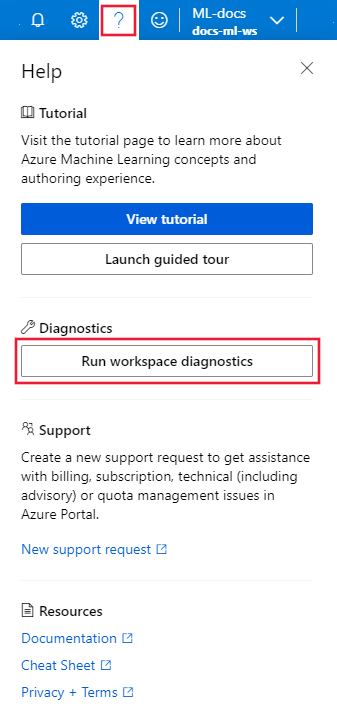
After diagnostics run, a list of any detected problems is returned. This list includes links to possible solutions.
Diagnostics from Python
The following snippet demonstrates how to use workspace diagnostics from Python.
APPLIES TO:
Python SDK azure-ai-ml v2 (current)
from azure.ai.ml import MLClient
from azure.identity import DefaultAzureCredential

subscription_id = '<your-subscription-id>'
resource_group = '<your-resource-group-name>'
workspace = '<your-workspace-name>'

ml_client = MLClient(DefaultAzureCredential(), subscription_id, resource_group, workspace)
resp = ml_client.workspaces.begin_diagnose(workspace).result()
# Inspect the attributes of the response you are interested in
for result in resp.application_insights_results:
    print(f"Diagnostic result: {result.code}, {result.level}, {result.message}")
The response is a DiagnoseResponseResultValue object that contains information on any problems detected with the workspace.
For more information, see the Workspace reference.