Bilješka
Pristup ovoj stranici zahtijeva provjeru vjerodostojnosti. Možete pokušati da se prijavite ili promijenite direktorije.
Pristup ovoj stranici zahtijeva provjeru vjerodostojnosti. Možete pokušati promijeniti direktorije.
The Microsoft Sentinel Solution for SAP applications provides powerful application-layer monitoring for SAP systems, tracking user activity, business transactions, and critical events. However, in SAP RISE/ECS environments, infrastructure and operating system logs are owned and managed by SAP, and aren't accessible through the standard SAP application connector.
SAP LogServ bridges that gap. It's an SAP Enterprise Cloud Services (ECS) service that centralizes logs from all systems, applications, and ECS services managed by SAP. The SAP LogServ (RISE), S/4HANA Cloud private edition solution in the Microsoft Sentinel Content Hub enables ingestion of these infrastructure-level logs into Microsoft Sentinel, complementing the existing application-layer coverage.
Important
SAP LogServ is an optional service within your SAP Cloud ERP private (RISE) package. A purchase order for SAP LogServ must be completed before you can use this integration. Contact your SAP account team for details.
Tip
For latest updates and guidance, see the SAP LogServ blog series.
What logs does SAP LogServ provide?
LogServ extends your monitoring scope beyond the SAP application layer to include logs that SAP ECS owns as the system provider. The available log types include sources such as:
| Log category | Examples |
|---|---|
| Database | SAP HANA database logs |
| Application server | AS JAVA, ICM, SAP Gateway |
| Web and connectivity | SAP Web Dispatcher, SAP Cloud Connector |
| Operating system | OS-level logs |
| Network and security | Network, DNS, Proxy, Firewall logs |
| Third-party databases | Non-HANA database logs where applicable |
Always check with SAP for the latest available log types and any updates to supported log sources using their Service Description Document.
Note
The SAP Security Audit Log (AS ABAP) for the application layer is handled by the Microsoft Sentinel Solution for SAP applications data connector, not by SAP LogServ. Deploy both solutions together for full-stack coverage.
How the two solutions work together
Deploy the SAP LogServ solution alongside the Microsoft Sentinel Solution for SAP applications for comprehensive visibility across the entire SAP RISE stack:
- Microsoft Sentinel Solution for SAP applications: Monitors the SAP application layer, including business logic, user activity, sensitive transactions, privilege escalation, and data exfiltration via the agentless data connector.
- SAP LogServ solution: Provides infrastructure, database, and OS-layer logs from SAP-managed environments via a dedicated data connector installed from the Content Hub.
Together, these solutions give your security team visibility from business logic down to the infrastructure layer, enabling cross-layer correlation and threat detection using the 60+ built-in analytics rules and the Microsoft Security Suite.
Key capabilities
- Near real-time log collection with agentless integration into Microsoft Sentinel via the SAP LogServ data connector.
- Built-in security content including analytics rules and workbooks provided by SAP for LogServ-specific log types.
- Activation and reuse of Microsoft Advanced Security Information Model (ASIM) security content
- Long-term retention configurable per data source with up to 12 years retention using Microsoft Sentinel Data Lake.
- SOAR integration with Microsoft Sentinel's security orchestration, automation, and response capabilities, including and SAP user blocking via Microsoft Teams.
- Cross-signal correlation across endpoints, Microsoft Entra ID data, and other data sources in your Microsoft Sentinel workspace.
Prerequisites
- A completed purchase order for SAP LogServ as part of your SAP RISE/ECS contract.
- A Microsoft Sentinel workspace.
- The Microsoft Sentinel Solution for SAP applications installed from the Microsoft Sentinel Content Hub for application-layer monitoring.
- The SAP LogServ (RISE), S/4HANA Cloud private edition solution installed from the Microsoft Sentinel Content Hub.
Note
Only Azure-hosted SAP RISE customers have the option for fully integrated deployment. For SAP RISE on other platforms, SAP's self-hosted log forwarder needs to be installed on a customer-hosted component with network connectivity to the SAP LogServ service and the Microsoft Sentinel Data Collection Endpoint. The forwarder has dedicated configuration options for Microsoft Sentinel for SAP. See SAP's announcement blog for more details.
Deploy the solution
Install the SAP LogServ (RISE), S/4HANA Cloud Private Edition solution from the Microsoft Sentinel Content Hub. The connector deployment creates a Data Collection Endpoint and Data Collection Rule in the same resource group as your Log Analytics workspace.
If the deploying user lacks permissions to create a Microsoft Entra app registration automatically, create the app registration separately, supply a secret, and assign the app ID to the Data Collection Rule with the Monitoring Metrics Publisher role.
Contact your SAP ECS CDM or ECS TSM to initiate onboarding. Copy
sap-logserv-sentinel-integration@service.microsoft.comon the email with the subject line SAP LogServ and Microsoft Sentinel - Activation, including your SAP RISE customer details.Share the following configuration details with SAP through a secure channel:
- Microsoft Entra tenant ID
- Microsoft Entra app ID
- Microsoft Entra app secret
- Data Collection Endpoint URL
- Data Collection Rule Immutable ID
SAP validates eligibility and configures automatic log forwarding to your Microsoft Sentinel for SAP workspace.
Tip
Before sharing your configuration with SAP, consider performing a smoke test to validate end-to-end connectivity. For guidance, see the SAP LogServ blog series.
Discovering SAP LogServ data in Microsoft Sentinel for SAP
Once the solution is deployed and logs are flowing, use the following resources to explore and analyze your SAP LogServ data in Microsoft Sentinel.
SAP LogServ Insights workbook
The SAP LogServ Insights Dashboard workbook provides real-time monitoring of SAP RISE infrastructure log ingestion and system activity.
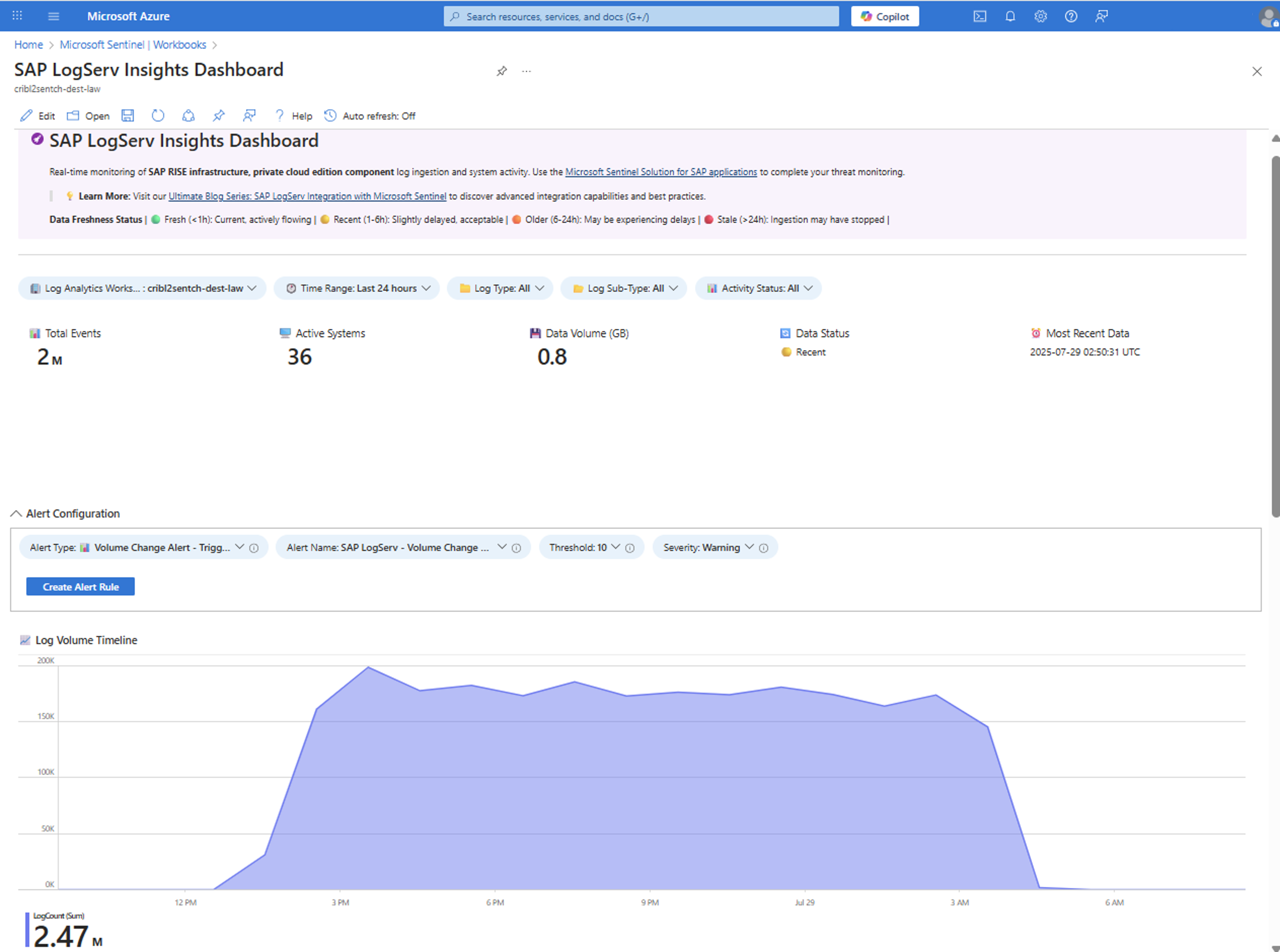
The workbook shows:
- An overview of Total Events, Active Systems, Data Volume, Data Status, and Most Recent Data, helping analysts quickly assess log ingestion health and freshness.
- A Data Freshness Status indicator using color-coded labels to highlight whether ingestion is current, delayed, or stale.
- Filters for Log Analytics Workspace, Time Range, Log Type, Log Sub-Type, and Activity Status to narrow down specific log sources and systems.
- An Alert Configuration section that lets you create alert rules directly from the workbook, with configurable alert type, name, threshold, and severity.
- A Log Volume Timeline that visualizes log ingestion trends over time, helping analysts identify spikes, drops, or anomalies that might be associated with infrastructure changes or security incidents.
For more information on how to customize and use the workbook, see Tutorial: Visualize and monitor your data.
Built-in analytic rules
The SAP LogServ solution and the Microsoft Sentinel Solution for SAP applications each provide analytics rules that target different layers of the SAP RISE stack:
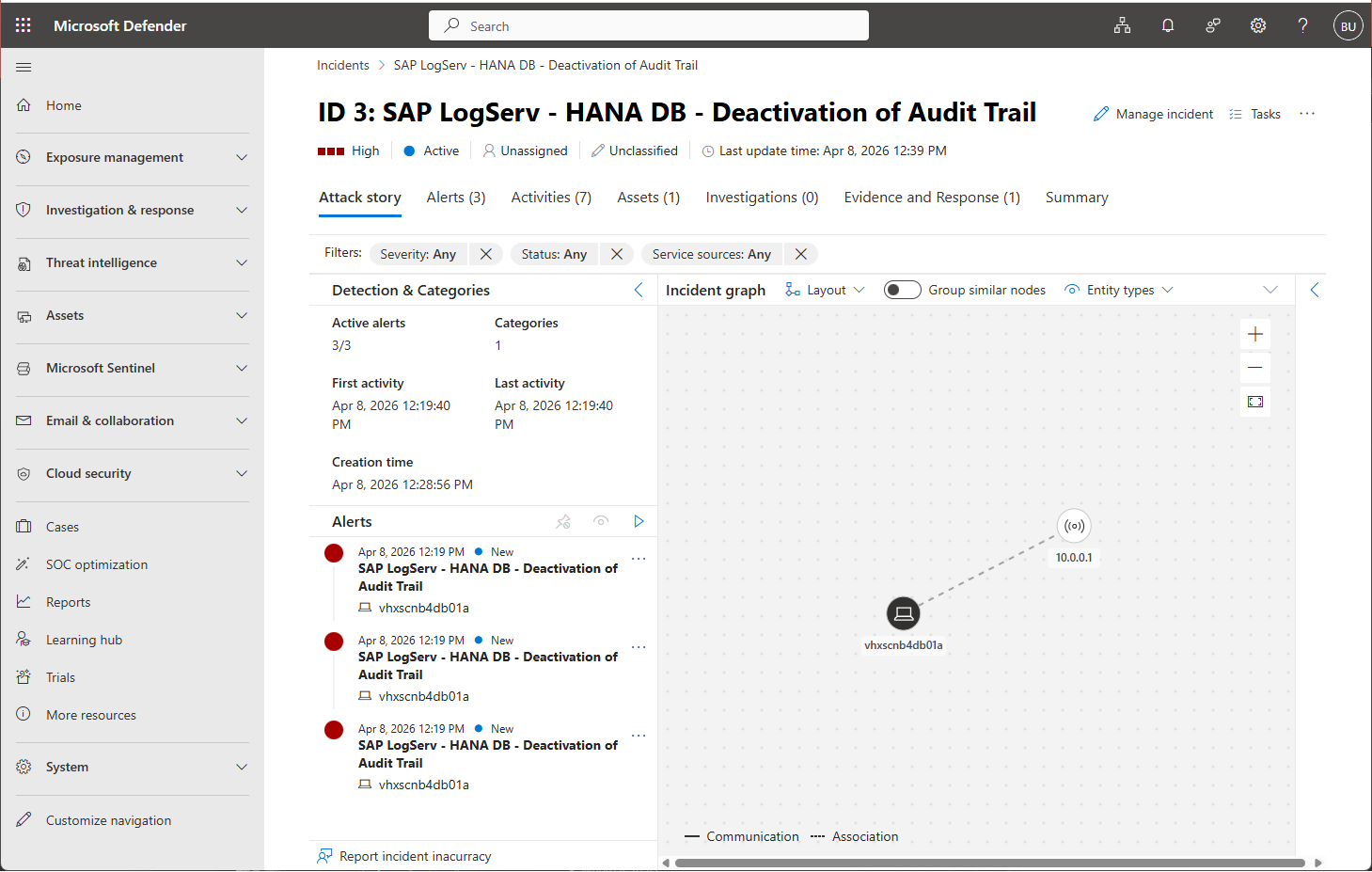
SAP LogServ analytics rules: Focus on infrastructure-layer detections, including SAP HANA audit trail deactivation, operating system anomalies, network activity, and firewall events from SAP-managed infrastructure. Through ASIM normalization, customers can benefit from existing Microsoft Advanced Security Information Model (ASIM) security content and investments they already have in place, without creating SAP RISE-specific analytics rules or altering existing security operations processes.
Microsoft Sentinel Solution for SAP applications analytics rules: Cover the application layer, including 60+ built-in rules for detecting privilege escalation, sensitive transactions, data exfiltration, and unauthorized user activity within the SAP business logic.
Deploy both solutions together for cross-layer detection coverage spanning from SAP HANA database and OS infrastructure up through the SAP application layer.
The following example shows an isolated SAP LogServ infrastructure-layer detection for a HANA database audit trail deactivation in Microsoft Sentinel, surfaced as an incident in Microsoft Defender portal. Find a end-to-end scenario in this social engineering attack replay.
Filter LogServ logs before ingestion
Not every log type that SAP LogServ forwards needs to land in your Analytics tier. Filtering happens in the Data Collection Rule (DCR) that the connector deploys, so excluded records are dropped before ingestion and don't incur ingestion cost.
The DCR routes records to several streams based on the clz_dir and clz_subdir attributes supplied by LogServ. For example:
Source (clz_dir / clz_subdir) |
Destination |
|---|---|
windows / security |
SecurityEvent |
windows / anything else |
WindowsEvent |
linux (selected sublogs), hana / hanaaudit |
Syslog |
dns |
ASimDnsActivityLogs |
webdispatcher / accesslog, denylog |
ASimWebSessionLogs |
| everything else | SAPLogServ_CL (catch-all) |
For filtering, identify and remove or narrow the data flow that selects the log type you want to exclude.
For example, to exclude SAP HANA database logs, delete the data flow that selects clz_dir == "hana". For the current data flow definitions, see the
SAPLogServ_DCR.json in the Microsoft Sentinel GitHub repository.
Edit the DCR with the transformation editor in the Azure portal, the ARM template export, or the Data Connectors REST API. We recommend that you export the current configuration first and use it as your working template, so you only replace the dataFlows section.
Note
Upgrading the solution from the Content Hub doesn't change DCRs that are already deployed, by design, to avoid unintended interruptions to log ingestion. Allow about 15 minutes for a DCR change to take effect before you verify the results.
Tip
If your goal is cost optimization rather than dropping data outright, use the filter and split capability to keep high-value log types in the Analytics tier and route lower-value, compliance-relevant LogServ data to the Microsoft Sentinel data lake.
Related content
- Learn more from Microsoft Sentinel and SAP LogServ co-engineering blog series
- Microsoft Sentinel Solution for SAP applications overview
- Deploy the Microsoft Sentinel solution for SAP applications
- Microsoft Sentinel Solution for SAP BTP overview
- Microsoft Sentinel solution for SAP - Partner add-ons
- Azure identity and security services with SAP RISE