Bilješka
Pristup ovoj stranici zahtijeva provjeru vjerodostojnosti. Možete pokušati da se prijavite ili promijenite direktorije.
Pristup ovoj stranici zahtijeva provjeru vjerodostojnosti. Možete pokušati promijeniti direktorije.
Microsoft Defender assesses posture risk for AI agents in your organization, including agents registered with Microsoft Agent 365 and local agents discovered on endpoint devices. Each agent is evaluated against risk indicators and assigned an overall risk level based on the likelihood of compromise and the potential impact if compromised.
How AI agent posture risk is assessed
A risk indicator represents a security condition associated with an agent. For example, an indicator might show that an agent is published, can run without human approval, has privileged access, or has active security alerts.
Risk indicators can be based on:
- The agent's configuration, tools, access, and settings.
- Runtime activity of the agent.
- Endpoint and user context for local agents.
- Active security alerts associated with the agent.
A risk indicator isn't always something that can be remediated. It might reflect the agent's intended purpose or design. For example, a chatbot might be intentionally accessible without authentication, or an agent might require access to critical business systems to perform its function. Even when not directly actionable, these indicators provide important security context that can help organizations prioritize risk and make informed decisions.
How the risk level is determined
Microsoft Defender combines all active risk indicators to determine the agent's overall risk level.
The result depends on:
- The severity of each active indicator.
- The combination of active indicators associated with the agent.
Indicators that are inactive or not assessed don't affect the risk level.
The resulting risk level can be:
| Risk level | Description |
|---|---|
| High | The agent has a serious combination of active risk indicators and should be prioritized for review. |
| Medium | The agent has notable risk that should be reviewed and mitigated. |
| Low | The agent has a minor active risk. |
| No known risk | Defender assessed the agent and found no active risk indicators. |
| Not evaluated | Defender didn't have enough information to assess the agent. |
Agent risk indicators
Agent risk indicators are derived from the agent's configuration, runtime activity, access, tools, settings, and active alerts.
Note
Not all risk indicators apply to all agent platforms. Microsoft Defender assesses an indicator only when the required platform support and data are available.
Risk indicators can reflect security conditions such as how users access an agent, what level of autonomy it has, what tools and systems it can use, whether it can access or modify sensitive data, and whether active alerts are associated with the agent.
Examples of agent risk indicators include:
- Weak Instructions: Indicates that an agent's instructions don't contain sufficient guidance to help ensure safe and predictable behavior.
- High-usage Agent: Indicates that an agent is used by multiple users and might be important to business operations.
- Indirect Prompt Injection Exposure: Indicates that an agent might be exposed to indirect prompt injection risks.
- Privileged Business-system Access: Indicates that the agent has write access to key business systems.
- Active Threat: Indicates that active security alerts are associated with the agent.
Local-agent risk indicators
Effective evaluation of local agents depends on the device and user context in which they operate. Local agents often run with broad permissions on the device and can execute under the user's identity, inheriting the user's access rights and privileges. Because of this, Microsoft Defender considers device and user context when assessing local-agent posture risk.
Examples of local-agent risk indicators include:
- Used by a critical user: Indicates that the agent is associated with a critical user.
- Running on a critical device: Indicates that the agent is running on a critical device.
- Running on a device with vulnerabilities: Indicates that the agent is running on a device with vulnerabilities.
- Privileged Software Development Access: Indicates that the agent has access to software development systems.
Security recommendations
Security recommendations identify actionable changes that can reduce an agent's exposure or address an unsafe configuration.
Recommendations are shown when Microsoft Defender identifies an actionable posture issue for an affected agent.
Each recommendation is mapped to the risk indicators it helps address. This mapping helps show how implementing the recommended control can reduce the agent's overall risk.
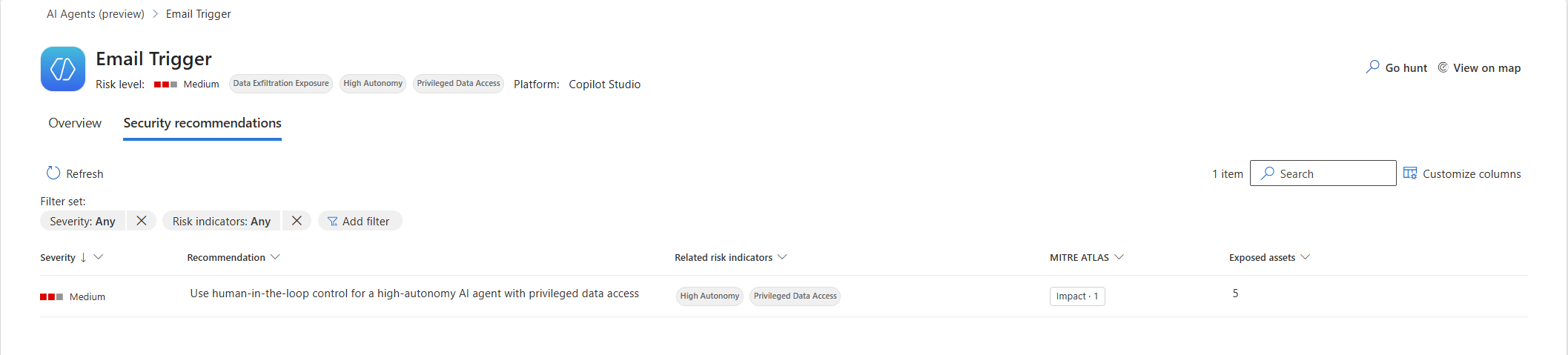
Recommendations are determined separately from the agent's risk level. A high-risk agent might have no recommendations when none of its active indicators match an available recommendation. A lower-risk agent might receive a recommendation when Defender identifies an actionable configuration issue.
Important
Review an agent's risk level and recommendations together. The risk level represents the agent's overall exposure, while recommendations identify available actions to improve its security posture.
For steps to review risk information and recommendations in the Microsoft Defender portal, see Discover AI agents and assess security posture using Microsoft Defender.
Related content
- Discover AI agents and assess security posture using Microsoft Defender
- Enable security for AI agents using Microsoft Defender
- Protect AI agents in real time using Microsoft Defender
- Detect and investigate threats to AI agents using Microsoft Defender
- Protect AI assets from emerging threats and vulnerabilities using Microsoft Defender