Bilješka
Pristup ovoj stranici zahtijeva provjeru vjerodostojnosti. Možete pokušati da se prijavite ili promijenite direktorije.
Pristup ovoj stranici zahtijeva provjeru vjerodostojnosti. Možete pokušati promijeniti direktorije.
Hybrid deployments between Exchange Online and on-premises Exchange 2010 organizations with Edge Transport servers require direct mail routing between Microsoft 365 and the Edge Transport servers. The Edge Transport servers used in hybrid mail flow must run one of the following versions of Exchange:
- Exchange 2010 Service Pack 3 (SP3) with Update Rollup 11 (RU11) or later.
- Exchange 2013 Cumulative Update 15 (CU15) or later.
You deploy Edge Transport servers in your perimeter network to handle internet-facing mail flow and to act as an SMTP relay for Microsoft Exchange servers in your internal network. Edge Transport servers prevent exposure of internal Client Access or Mailbox servers directly to the internet.
For more information about Edge Transport servers, see the following articles:
- Edge Transport servers in Exchange 2013.
- Overview of the Edge Transport Server Role in Exchange 2010.
Important
If you have other Exchange Edge Transport servers that aren't involved hybrid transport, they don't require a version of Exchange that supports hybrid. If you decide to use these Edge Transport servers in hybrid transport, you need to upgrade them to a supported version of Exchange for hybrid transport.
Adding an Edge Transport server to a hybrid deployment
Edge Transport servers aren't required for hybrid deployments. The Hybrid Configuration wizard allows you to select one or more Client Access servers and Mailbox servers for hybrid mail transport. Or you can select one or more Edge Transport servers to handle hybrid mail transport.
When you add an Edge Transport server to your hybrid deployment, it communicates with Microsoft 365 on behalf of the internal Exchange 2013 Client Access and Mailbox servers. The Edge Transport server is responsible for the following actions:
Mail relay between the on-premises Mailbox server and Microsoft 365 for outbound messaging from the on-premises Exchange organization to Exchange Online.
Mail relay between the on-premises Client Access server for inbound messaging from the Exchange Online organization to the on-premises Exchange organization.
The Edge Transport server handles connection security previously handled by the Client Access server. Recipient lookup, compliance policies, and other message inspection continue on the Client Access server.
Hybrid mail flow without an Edge Transport server in Exchange 2010
The following steps and diagram describe mail flow between an on-premises Exchange 2010 organization with no Edge Transport Server and Exchange Online in hybrid deployments:
A sender in the on-premises Exchange 2010 organization sends a message to a recipient in the Exchange Online organization. The Exchange 2010 Mailbox server relays the message to an Exchange 2010 Hub Transport server.
The Exchange 2010 Hub Transport server relays the message to the Exchange 2013 Mailbox server designated for hybrid transport.
In this example, the Client Access server role and Mailbox server roles are installed on the same Exchange 2013 server.
The Exchange 2013 Mailbox server relays the message directly to Microsoft 365.
Microsoft 365 delivers the message to the Exchange Online organization.
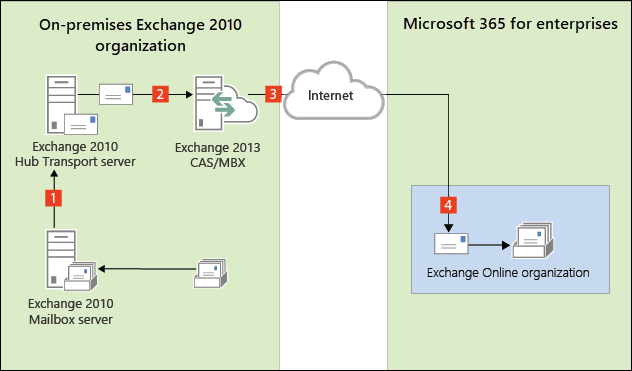
Messages sent from the Exchange Online organization to recipients in the on-premises Exchange 2010 organization follow the reverse route.
Hybrid mail flow with an Edge Transport server in Exchange 2010
The following steps and diagram describe mail flow between an on-premises Exchange 2010 organization with an Edge Transport Server and Exchange Online in hybrid deployments:
A sender in the on-premises Exchange 2010 organization sends a message to a recipient in the Exchange Online organization. The Exchange 2010 Mailbox server relays the message to an Exchange 2010 Hub Transport server.
The Exchange 2010 Hub Transport server sends the message to the Exchange 2013 Mailbox server.
In this example, the Client Access server role and Mailbox server roles are installed on the same Exchange 2013 server.
The Exchange 2013 Mailbox server relays the message to the Exchange 2013 or Exchange 2010 SP3 Edge Transport server designated for hybrid transport.
The Edge Transport server relays the message directly to Microsoft 365.
Microsoft 365 delivers the message to the Exchange Online organization.
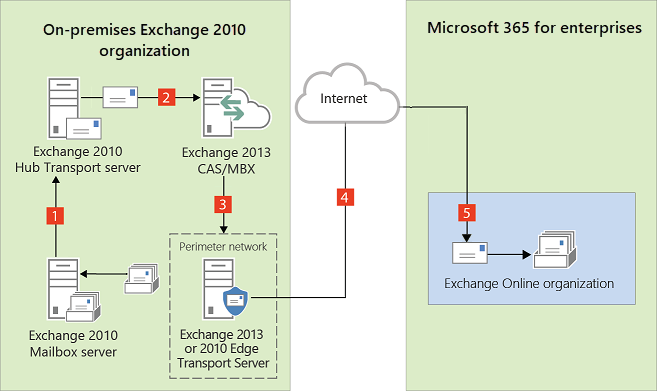
Messages sent from the Exchange Online organization to recipients in the on-premises Exchange 2010 organization follow the reverse route.