Bilješka
Pristup ovoj stranici zahtijeva provjeru vjerodostojnosti. Možete pokušati da se prijavite ili promijenite direktorije.
Pristup ovoj stranici zahtijeva provjeru vjerodostojnosti. Možete pokušati promijeniti direktorije.
This article describes the remedies that can be applied when troubleshooting issues related to the membership of a dynamic distribution group (DDG).
There are no members in my dynamic distribution group
If you're not seeing any members in your DDG, it may be because of one of the following reasons:
- The initial membership list is still being calculated. When a DDG is created, a background process calculates the membership list. The calculation can take up to 2 hours to complete. During this time, the DDG has no members.
- The membership list is being recalculated. When the membership rules of an existing DDG are modified, a background process recalculates the membership list. The recalculation can take up to 2 hours to complete. During recalculation, the DDG continues to use the previous membership list.
- No recipients match the membership rules. Check the membership rules again to see if you need to change them. For information on procedures that tell you how to do this, see Create a dynamic distribution group.
For details on the timing of membership population and recalculation, see Dynamic distribution group membership lifecycle.
The members of my DDG don't match what I expect
If the members of your DDG don't match what you expect, you can verify what the membership rules currently return by previewing them. See Preview dynamic distribution group membership.
If the preview returns the recipients you expect but the DDG members don't match, the membership list might be stale (the system refreshes members at least once every 24 hours), or a background process might still be recalculating membership after a recent change to the rules. For details on the timing, see Dynamic distribution group membership lifecycle.
If the preview also doesn't return the expected recipients, the membership rules likely need to be adjusted. See Create a dynamic distribution group for information on managing membership rules.
When was my dynamic distribution group last refreshed?
You can view the last time your DDG was refreshed by using Exchange admin center (EAC) or by using Exchange Online PowerShell.
- In the EAC, select Recipients > Groups > Dynamic distribution list. You can view when each DDG was last refreshed in the Last refreshed column.
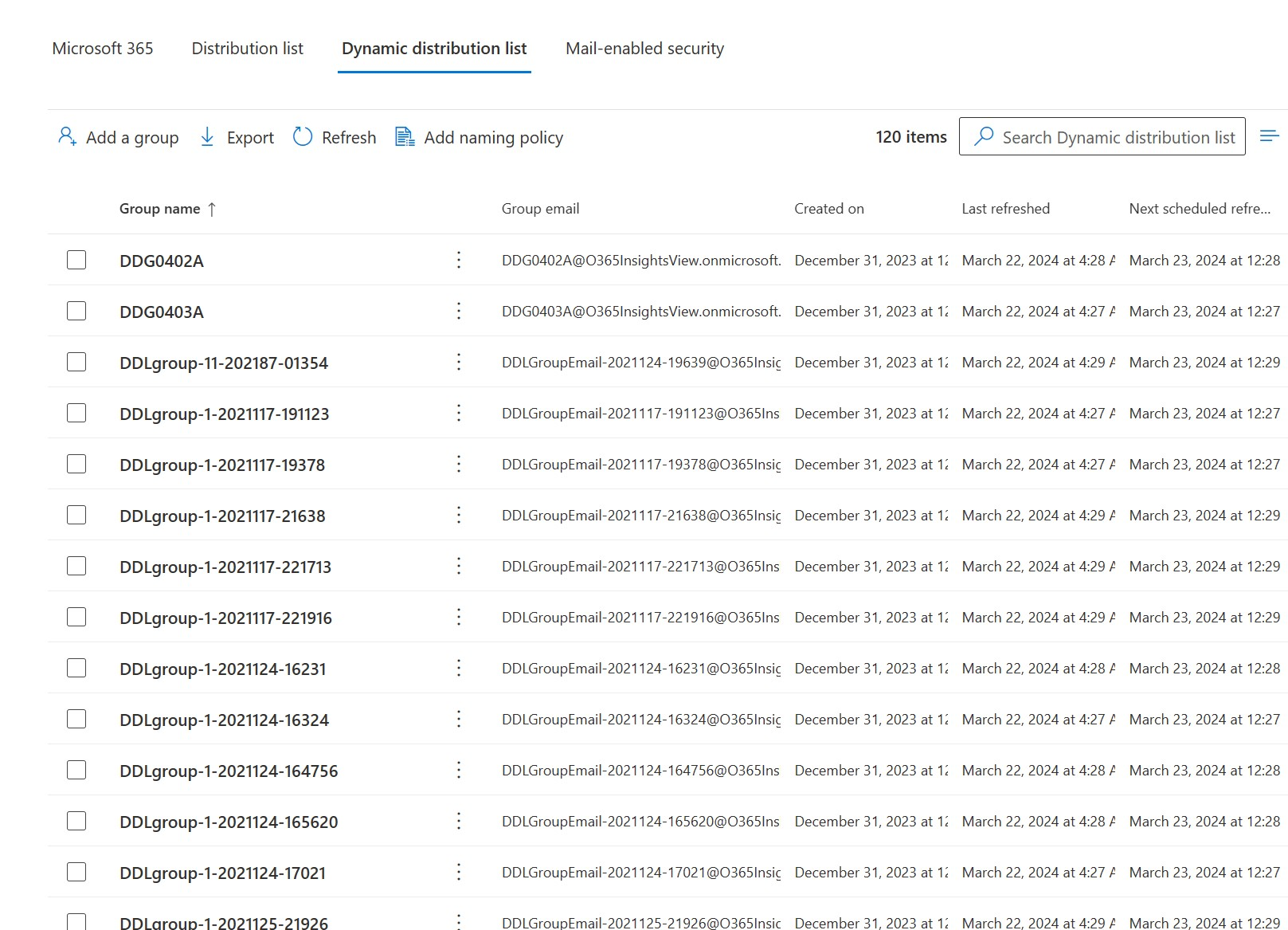
- With Exchange Online PowerShell, use the Get-DynamicDistributionGroup command to retrieve the CalculatedMembershipUpdateTime property, which indicates when the DDG was last refreshed. Replace
<DDGIdentity>with the name, alias, or email address of the DDG, and run the following command:
(Get-DynamicDistributionGroup -Identity <DDGIdentity>).CalculatedMembershipUpdateTime
I want to force refresh the membership list of a dynamic distribution group
You might want to consider forcing a membership refresh on the DDG if:
- The DDG membership list isn't populated more than 2 hours after the group was created.
- The DDG membership list isn't recalculated more than 2 hours after you modified the membership rules of the group.
- The DDG membership list isn't refreshed within the expected 24-hour refresh interval.
To perform a refresh, replace <DDGIdentity> with the name, alias, or email address of the DDG in the following command in Exchange Online PowerShell, and run it:
Set-DynamicDistributionGroup -Identity <DDGIdentity> -ForceMembershipRefresh
Note
You can run the refresh command only after more than 1 hour has passed since the last membership refresh. You can only refresh DDGs using Exchange Online PowerShell. You can't refresh DDGs in EAC.
Having problems? Ask for help in the Exchange Online forum at Exchange Online.