Bilješka
Pristup ovoj stranici zahtijeva provjeru vjerodostojnosti. Možete pokušati da se prijavite ili promijenite direktorije.
Pristup ovoj stranici zahtijeva provjeru vjerodostojnosti. Možete pokušati promijeniti direktorije.
dbt jobs in Microsoft Fabric provide a managed way to run dbt projects as part of the Fabric data platform. Use them when teams want modular SQL-based transformations, tests, dependency management, and source-controlled analytics engineering while Fabric provides ingestion, storage, orchestration, monitoring, and consumption.
There isn't a single correct medallion design. Bronze, Silver, and Gold can use Fabric Data Warehouse, Lakehouse, or both. The right choice depends on where data lands, which engine should execute transformations, how curated data is served, and whether dbt runs independently or as part of a larger Fabric pipeline.
Choose the pattern before you implement
Bronze keeps source-aligned data, Silver standardizes and validates it, and Gold organizes it for analytics. dbt can own the Silver boundary, the Gold boundary, or both. Keep the implementation as simple as the requirements allow, and make each responsibility explicit. Fabric pipelines can orchestrate ingestion, dbt execution, validation, notifications, and downstream activities across any of the patterns described in this guide.
At a glance
| Pattern | Bronze | Silver | Gold | Best fit |
|---|---|---|---|---|
| 1. Warehouse-only | Warehouse | Warehouse | Warehouse | SQL-first warehouse workloads |
| 2. Lakehouse landing + Warehouse | Lakehouse | Warehouse | Warehouse | Open-format landing, SQL serving |
| 3. Lakehouse refinement + Warehouse | Lakehouse | Lakehouse | Warehouse | Lake engineering, BI serving |
| 4. Lakehouse-only | Lakehouse | Lakehouse | Lakehouse | Delta-first workloads |
Pattern 1: Warehouse-only medallion
Keep Bronze, Silver, and Gold in Fabric Data Warehouse. Use schemas or separate Warehouse items to isolate layers.
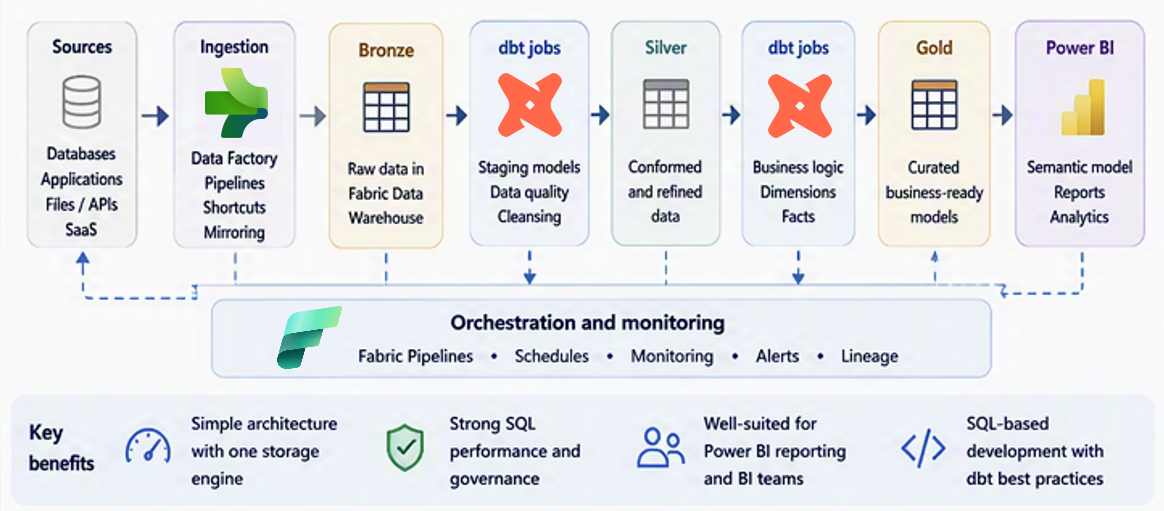
Figure 1. Warehouse-only medallion.
Use this pattern when: Sources are primarily relational, the team is SQL-first, and Warehouse is the natural transformation and serving platform.
Where dbt fits: dbt manages transformations, tests, model dependencies, and curated marts. Logical dbt layers such as staging, intermediate, and marts can map to Warehouse schemas without being treated as identical concepts.
Where Fabric fits: Warehouse stores and executes the models. Fabric pipelines can coordinate ingestion and execution. Power BI consumes the curated Gold layer.
Why choose it
- One SQL-centric platform for all layers.
- Avoids introducing Spark when the workload doesn't require it.
- Fits warehouse migrations and dimensional BI workloads.
Considerations
- Warehouse Bronze is relational rather than a file-native landing zone.
- Semi-structured or file-processing workloads might fit Lakehouse better.
- Separate development and production objects deliberately.
Pattern 2: Lakehouse landing with Warehouse transformation
Land raw data in Lakehouse, then build Silver and Gold models in Warehouse with dbt.
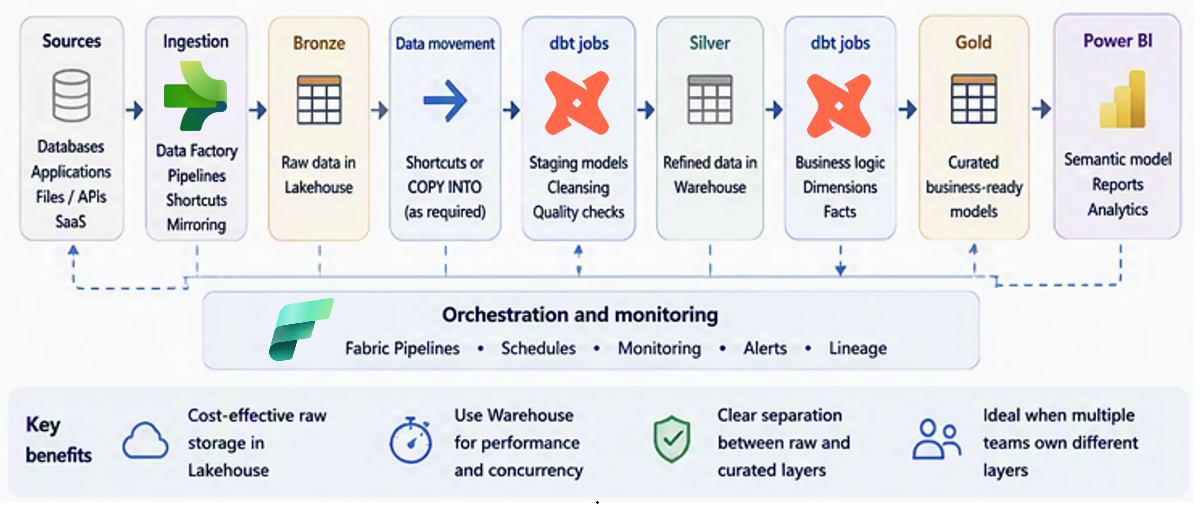
Figure 2. Lakehouse landing with Warehouse transformation.
Use this pattern when: Use this pattern when raw data lands in OneLake, but a SQL-first team wants to build both Silver and Gold models in Fabric Data Warehouse using T-SQL. This approach keeps transformation and serving in one relational engine.
Where dbt fits: dbt reads Lakehouse data through the read-only SQL analytics endpoint by using T-SQL cross-database queries and three-part naming, such as LakehouseName.dbo.TableName. This access path is limited to items in the same Fabric workspace. For cross-workspace scenarios, OneLake shortcuts can be used to expose required Delta tables.
Where Fabric fits: Lakehouse retains raw data. Warehouse stores conformed and curated relational models. Pipelines coordinate ingestion and dbt execution.
Why choose it
- Combines open-format raw storage with a SQL-first serving layer.
- Keeps Silver and Gold transformations in Fabric Data Warehouse, reducing the need to operate multiple transformation engines.
- Creates a clear transition from raw data to dimensional models.
Considerations
- Cross-workspace access requires OneLake shortcuts to make required Delta tables available in the consuming workspace.
- Only Delta tables in the Lakehouse Tables area are available through the SQL analytics endpoint.
- Account for metadata synchronization behavior and differences between supported Delta and T-SQL data types.
- The Lakehouse SQL analytics endpoint is read-only. dbt materializes Silver and Gold models in the target Warehouse.
- Using both Lakehouse and Warehouse introduces an additional operational boundary.
Pattern 3: Lakehouse refinement with Warehouse serving
Use Lakehouse for Bronze and Silver, then publish curated Gold models to Warehouse.
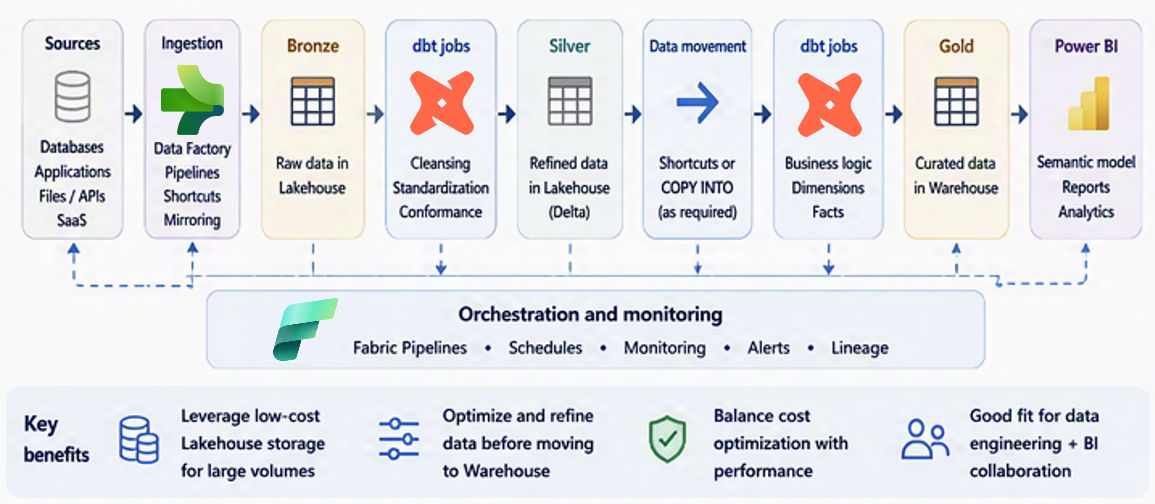
Figure 3. Lakehouse refinement with Warehouse serving.
Use this pattern when: Choose this pattern when data engineering teams refine and retain Bronze and Silver data in Lakehouse using Delta-oriented tools, while analytics or BI teams publish curated Gold models to Fabric Data Warehouse. This approach provides distinct Lakehouse refinement and Warehouse serving boundaries.
Where dbt fits: dbt can own Lakehouse transformations, Warehouse Gold models, or both through clearly separated projects or jobs. Keep each project aligned to its adapter, target, and ownership boundary.
Where Fabric fits: Lakehouse provides file-native storage and refinement. Warehouse provides relational serving. Pipelines enforce dependencies between transformation stages.
Why choose it
- Lets data engineering teams use Lakehouse for Delta-oriented refinement while analytics and BI teams use Fabric Data Warehouse for relational serving.
- Provides a curated Warehouse surface for dimensional BI.
- Preserves detailed Silver data for broader use.
Considerations
- Operating Lakehouse and Warehouse transformation stages requires skills across both engines and increases deployment, testing, and monitoring complexity.
- Avoid implementing the same rule in both Lakehouse and Warehouse.
- Define a clear contract between Silver and Gold.
Pattern 4: Lakehouse-only medallion
Keep Bronze, Silver, and Gold in Lakehouse. Use the Fabric Lakehouse adapter (dbt-fabricspark) to execute dbt models as Spark SQL through the Fabric Livy API and write the results as Delta tables in OneLake.
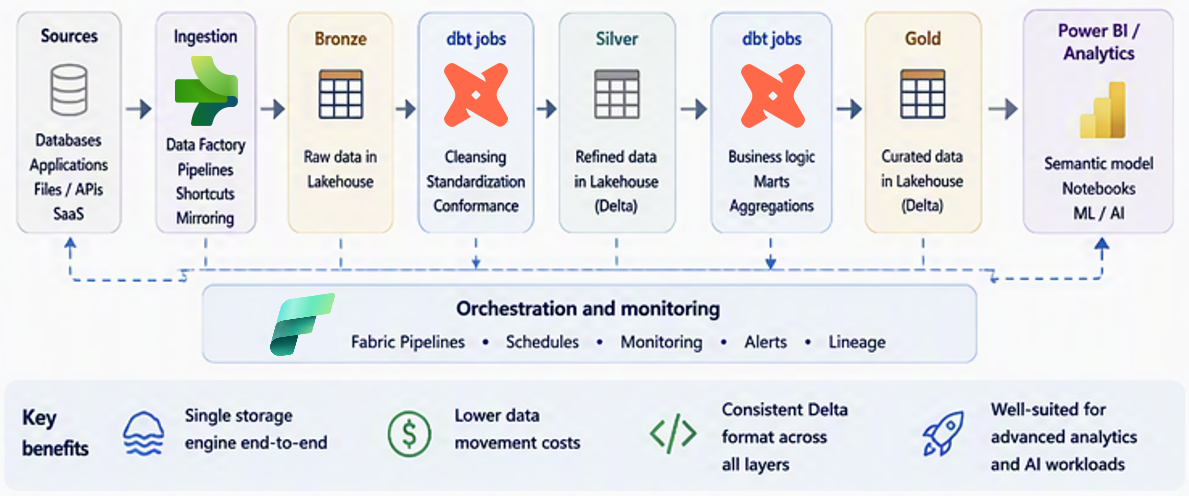
Figure 4. Lakehouse-only medallion.
Use this pattern when: The platform is Lakehouse-first, data should remain in Delta format, and the team wants dbt project structure and testing.
Where dbt fits: dbt owns selected Lakehouse transformations, tests, dependencies, and materializations. Decide whether physical separation uses schemas, separate Lakehouses, or another governance boundary.
Where Fabric fits: OneLake and Lakehouse store the data. Pipelines orchestrate ingestion and transformation. Power BI can consume curated Lakehouse data through Direct Lake, DirectQuery, or Import, depending on reporting and governance requirements.
Why choose it
- Keeps data in Delta format across the architecture.
- Reduces movement between Lakehouse and Warehouse.
- Fits lake-centric and Spark-oriented operating models.
Considerations
- The Lakehouse SQL analytics endpoint is read-only and isn't used to write dbt model results. If your transformations require T-SQL execution, use the Fabric Data Warehouse adapter instead.
- The Fabric Lakehouse and Fabric Data Warehouse adapters use different execution engines and support different capabilities.
- Confirm that the selected adapter supports the SQL dialect, materializations, packages, and commands required by your project.
- Consider a relational Gold layer in Fabric Data Warehouse for Warehouse-centric BI workloads.
Choose an orchestration model
After you choose a storage and transformation pattern, decide how to orchestrate the dbt job. You can schedule the job independently or run it as an activity in a Fabric pipeline.
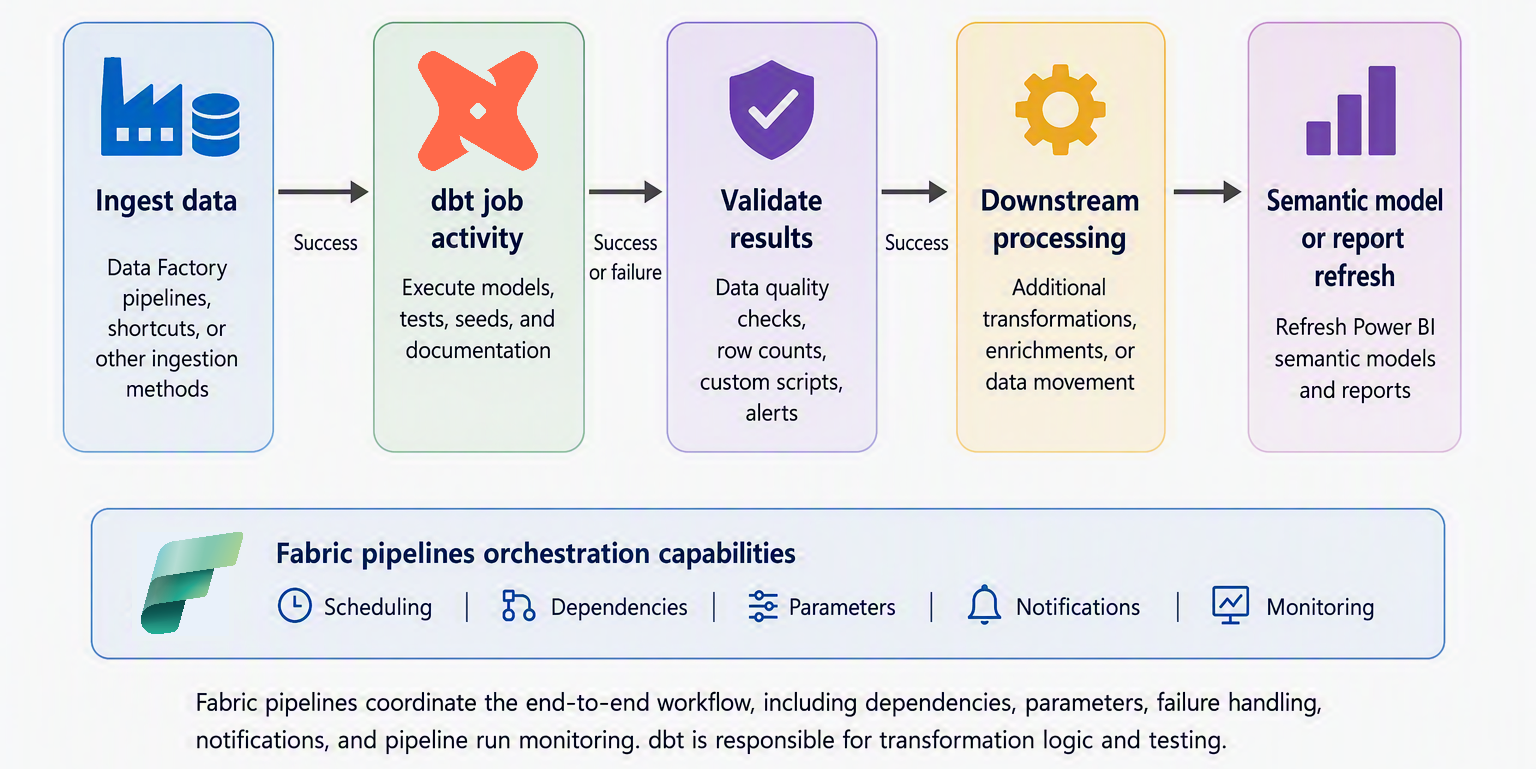
Figure 5. A Fabric pipeline orchestrating dbt with ingestion, validation, and downstream activities.
Use native scheduling when:
- The dbt job runs independently on a recurring schedule.
- The job doesn't depend on upstream or downstream Fabric activities.
- Job-level monitoring meets the operational requirements.
Use a Fabric pipeline when:
- Ingestion, dbt execution, validation, notifications, or downstream processing must run as one workflow.
- The workflow requires success, failure, or completion dependencies.
- Runtime settings must be parameterized with dynamic content.
- The team wants to monitor the end-to-end workflow through pipeline run history.
Fabric pipelines manage workflow dependencies, parameters, failure paths, notifications, and consolidated monitoring. dbt remains responsible for transformation logic, model selection, tests, dependencies, and materialization. Pipeline orchestration doesn't replace dbt project-level testing or dependency management.
Implementation principles
- Define clear ownership for ingestion, Silver refinement, Gold modeling, orchestration, and semantic modeling.
- Treat dbt staging, intermediate, and marts as logical model groups; they don't automatically equal Bronze, Silver, and Gold physical layers.
- Avoid duplicating transformation logic across dbt, notebooks, pipelines, and stored procedures.
- Use native scheduling for an independent job and Fabric pipelines for a multi-activity workflow.
- Account for runtime behavior. dbt job runtime V1.0 doesn't support build caching or artifact reuse. Each run compiles and executes the project from source. For large projects, include the full compilation and execution time when estimating scheduling windows and SLAs.