Bilješka
Pristup ovoj stranici zahtijeva provjeru vjerodostojnosti. Možete pokušati da se prijavite ili promijenite direktorije.
Pristup ovoj stranici zahtijeva provjeru vjerodostojnosti. Možete pokušati promijeniti direktorije.
The Mirror Azure Monitor feature makes operational data from Azure Monitor available to Microsoft Fabric workloads without copying or replicating the data. The data stays in Log Analytics storage. The mirrored item connects to the same Delta Lake storage that Azure Monitor uses.
Unlike other Fabric mirrored items (such as mirrored databases for SQL or Snowflake), mirroring Azure Monitor is based on a connection instead of replication. Nothing is duplicated, and no synchronization pipeline runs. Inside Fabric, combine the operational data with business data for cross-domain analytics, Power BI reports, real-time intelligence, data engineering workflows, and agentic scenarios.
The differentiated value is real-time reasoning across domains. Rather than sequential handoffs between siloed teams, Fabric brings IT signals and business data together so that a single event drives coordinated action for multiple audiences. One incident can drive multiple outcomes across the teams within the same workflow. Unifying business data (such as ERP and CRM) with observability data in OneLake, without copying it, turns raw telemetry into meaningful business insight.
For step-by-step setup instructions, see Tutorial: Configure the Mirror Azure Monitor solution.
Important
The Mirror Azure Monitor feature is in public preview. Capabilities, permissions, and billing might change before general availability.
Why use mirroring for Azure Monitor data?
Traditional approaches to using Log Analytics data outside Azure Monitor require an export pipeline, a destination store, and duplicate storage costs. Mirroring removes those steps. The mirrored item references the same Delta Lake storage that Azure Monitor uses.
- Data stays in Azure Monitor. No replication, no ingestion pipeline, no duplicate storage.
- Latency in Fabric matches Azure Monitor latency. Updates appear in Fabric in minutes.
- Operational telemetry sits next to business data in OneLake, ready for joins and aggregation.
- Existing Azure Monitor retention and lifecycle policies continue to govern the data.
The result is a single platform for telemetry and business data, supporting scenarios like correlating service health with revenue impact, building cross-domain dashboards, and running operations agents over combined data sources.
What analytics experiences are available?
When you create a mirrored Azure Monitor item, you also create a Fabric Eventhouse endpoint that connects selected Log Analytics tables as Delta Lake tables. From there, you get the following access paths:
- Database shortcuts are the primary access path. Shortcuts from Eventhouse expose the mirrored tables for real-time analytics. Build Real-Time Dashboards, run anomaly detection, and issue KQL queries that combine business and observability data.
- Eventhouse endpoint provides a KQL database experience over the mirrored data. The endpoint is created when you create the mirrored item. Use it directly or create shortcuts to the mirrored tables.
- OneLake shortcut into a Lakehouse for batch analytics. From a Lakehouse, run Spark notebooks, build Power BI semantic models, and create reports that join Azure Monitor data with other tables in Fabric.
These access paths read from the same Mirror Azure Monitor feature. You don't need a second copy of the data.
All Microsoft Fabric consumption experiences on shortcuts are supported across Real-Time Intelligence and OneLake scenarios, including Real-Time Dashboards, Operations agents, Power BI reports, and Spark jobs.
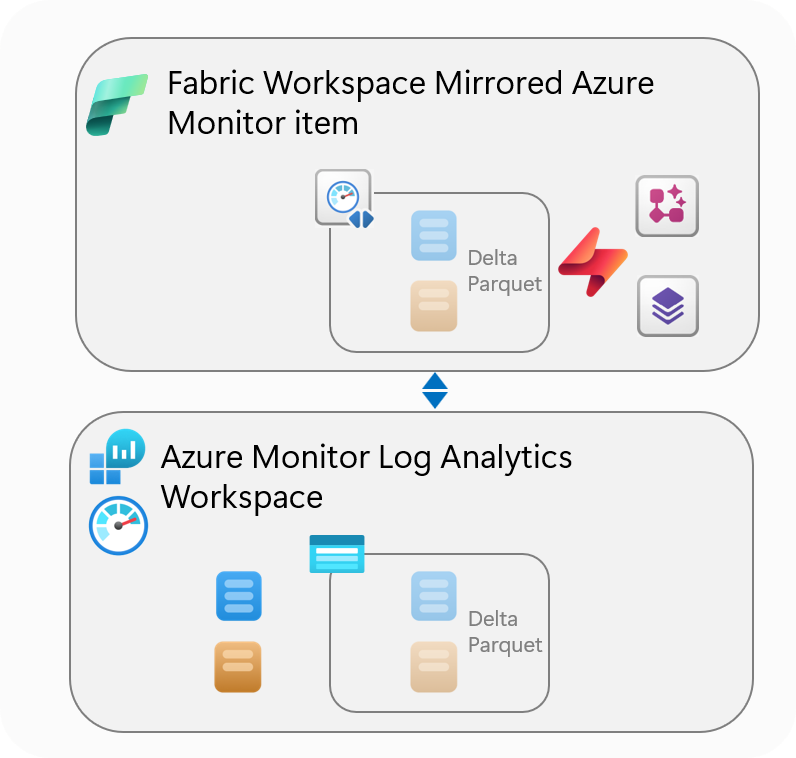
Architecture
A mirrored Azure Monitor item is a Fabric item that references Log Analytics data through an internal storage path, rather than a data pipeline that copies data into Fabric:
- All tables in the Log Analytics workspace are written internally as Delta Parquet files. This format is necessary to allow access in Fabric without an export.
- Fabric exposes the workspace tables through OneLake shortcuts that point at the Delta Parquet storage. The mirrored item carries the shortcut metadata, but the storage stays with Azure Monitor.
- Reads in Fabric go through the shortcut to Azure Monitor storage. The data is read-only in Fabric. New data continues to arrive through normal Azure Monitor ingestion.
- Tables selected at creation become visible in Fabric. Adding or removing tables later is a reconfiguration of the item, not a reload of the underlying data.
Common use cases
When you mirror an Azure Monitor item in a workspace, you unlock the following use cases:
Cross-domain real-time insights and actions:
- Evaluate signals with full business context, not as isolated alerts. See who and what is affected, and how much it's costing.
- Turn signals into operational and business action. Trigger the right response to mitigate the business impact of incidents before it grows.
Advanced Fabric analytics
- Use tools like Spark and Power BI for long-term analysis, machine learning, and a wide range of analytical scenarios.
Onboard with the Mirror Azure Monitor skill
Use your choice of AI coding agent with the Mirror Azure Monitor skill from the Skills for Fabric repository. This skill guides end-to-end onboarding of Azure Monitor data to Fabric, and turns that telemetry into impactful business insights.
| Skill for Fabric | Skill folder |
|---|---|
| Mirror Azure Monitor | azmon-mirroredcatalogs-operations-cli |
Security and permissions
Access to the source workspace flows through a connection. A connection is the object you create in Fabric that stores the authentication to the Log Analytics workspace. The internal integration the connection drives is the connector, which isn't something you interact with directly.
Creating a connection requires a custom role that grants the following actions, or as given by the Owner, User Access Administrator, or Role Based Access Control Administrator role.
| Type | Permission | Description |
|---|---|---|
| Actions | Microsoft.Authorization/roleAssignments/write |
Create role assignments on the source Log Analytics workspace |
| Actions | Microsoft.OperationalInsights/workspaces/query/read |
Run queries over the data in a workspace |
| Actions | Microsoft.OperationalInsights/workspaces/read |
Read existing workspaces |
After a connection exists, other users in the Fabric workspace reuse it to create their own mirrored items, each selecting a different subset of tables. Those users don't need an Azure role on the workspace, because the connection operates under the credentials of the authentication mode when it was created.
The connection uses those original credentials for ongoing operations, not just initial setup. Background refresh of the access token and updates to the mirrored table list both run under the authentication mode credentials, repeating on a regular interval. The authentication mode you choose therefore matters for production. For example, a connection created with an organizational account stops working if that user leaves the tenant or loses workspace access.
Roles and authentication modes
| Task | Permission required |
|---|---|
| Creating the connection to the source workspace | The Create connection custom role requirements on the source Log Analytics workspace, or as provided by the Owner, User Access Administrator, and Role Based Access Control Administrator built-in roles. |
| Reusing an existing connection to create an item | Fabric workspace access only. No Azure role on the source workspace is required. |
| Connecting the mirrored item to the source | Three authentication modes are supported, depending on tenancy and operational model |
Once you create the connection, these three authentication modes authenticate the mirrored item to the source workspace. You choose the mode when you create the connection and can't change it later.
| Auth mode | When to use | Notes |
|---|---|---|
| Workspace identity | Same-tenant, production | Authentication uses the Fabric workspace identity. Avoids dependence on any single user's lifecycle. |
| Service principal | Cross-tenant | Required when the Fabric tenant differs from the Log Analytics tenant. Provide tenant ID, client ID, and client secret. Authentication uses a SAS token that isn't tied to a user. Anyone who holds the token can perform every operation the token allows, so store it securely and rotate it. |
| Organizational account (OAuth) | Interactive same-tenant scenarios | The signed-in user authenticates against the Log Analytics tenant. Best for exploration and individual ownership. |
For production workloads, prefer workspace identity (same tenant) or service principal (cross tenant) over an organizational account. Shortcuts that depend on a user's OAuth credentials stop working if that user leaves the tenant or loses workspace access.
Azure RBAC and Fabric permissions are independent
Azure RBAC on the Log Analytics workspace and Fabric workspace permissions on the mirrored item are separate systems with no identity correlation:
- A user who is denied access to a Log Analytics table in Azure can still read that table through the mirrored item if Fabric workspace permissions allow it.
- Granular row-level or column-level security configured in Log Analytics doesn't carry through to the mirrored item.
- Azure Monitor table-level protection isn't enforced on the mirrored item. During public preview, all tables in the connected workspace are available through the mirrored item, regardless of table-level protection settings in Azure Monitor.
Validate the security model end to end before exposing a mirrored item to a broader Fabric audience. Treat the mirrored item as a new attack surface that needs its own access review.
Considerations
The following constraints apply during public preview:
- Table count. A mirrored Azure Monitor item supports approximately 500 tables. This limit is soft during preview and might change. For larger workspaces, create multiple mirrored items, each scoped to a subset of tables.
- No historical backfill. During public preview, mirrored Azure Monitor items show new data only. Data that arrived in the workspace before the table was mirrored isn't backfilled into Fabric.
- Read-only. Mirrored items are read-only in Fabric. Writing back to Azure Monitor through the mirrored item isn't supported.
- Regional availability. Available in all supported Microsoft Fabric regions, which are a subset of Azure regions. For the current list, see Microsoft Fabric region availability.
- Initial setup latency. Tables typically take about 15 minutes to appear in OneLake and Eventhouse after the mirrored item is created. The item itself appears immediately.
- Cross-region behavior. Reads work across regions, but network egress might apply. See Cost considerations.
- Auth lifecycle. Mirrored items created with organizational-account authentication break if the creating user leaves the tenant or loses workspace access. See Security and permissions.
- Data purge requires two steps. After onboarding to Fabric, purging data requires two separate operations: the Log Analytics data purge API for the copy in Azure Monitor, and the Lake Data Purge API for the copy in OneLake storage. Purging one doesn't purge the other. During public preview, if you must purge data before the Lake Data Purge API is available, contact support.
- Some columns aren't available. Mirrored tables don't include the
_ResourceId,_SubscriptionId, andTypesystem columns, all of typestringduring preview.
Cost considerations
Mirroring an Azure Monitor Log Analytics workspace into Fabric doesn't introduce extra storage or pipeline costs. The cost model splits along the natural boundary between the two services:
- Azure Monitor charges for log ingestion and retention as it does today. Queries that run inside Azure Monitor (Log Analytics UI, KQL through the API, alert rules) continue to use Azure Monitor query compute.
- Fabric charges for compute consumed inside Fabric: Eventhouse queries, Spark notebooks, Power BI semantic model refreshes, and other Fabric workloads.
- Storage isn't duplicated, so no additional storage charge applies on either side.
- Queries issued through the Eventhouse endpoint, an Eventhouse shortcut, or a Lakehouse shortcut consume Fabric capacity rather than Azure Monitor query compute. For high-volume analytics, this difference can reduce Azure Monitor query costs. Use the Eventhouse endpoint for occasional exploration, and an Eventhouse or Lakehouse shortcut for ongoing queries.
For pricing details, see Microsoft Fabric pricing and Azure Monitor pricing.