Bilješka
Pristup ovoj stranici zahtijeva provjeru vjerodostojnosti. Možete pokušati da se prijavite ili promijenite direktorije.
Pristup ovoj stranici zahtijeva provjeru vjerodostojnosti. Možete pokušati promijeniti direktorije.
The Event schema registry page provides a central view of event schemas registered through Fabric Real-Time hub or Fabric event schema sets. An event schema defines the structure of the events in a stream, such as the fields each event contains and their data types. Real-Time hub and Fabric event schema sets register these schemas so that producers and consumers agree on the shape of the data. Where the other pages help you work with the events themselves, this page helps you manage the definitions behind them.
On this page, you get a central view of the event schemas registered across your workspaces. You can search and filter schemas by name, schema set owner, schema set name, or workspace, and review details such as the owner, containing schema set, and endorsement status. From here, you can also create an event schema, open the schema set that contains a schema, or endorse a schema.
Important
This feature is in preview.
To open the page, select Event schema registry on the left navigation menu in Real-Time hub.
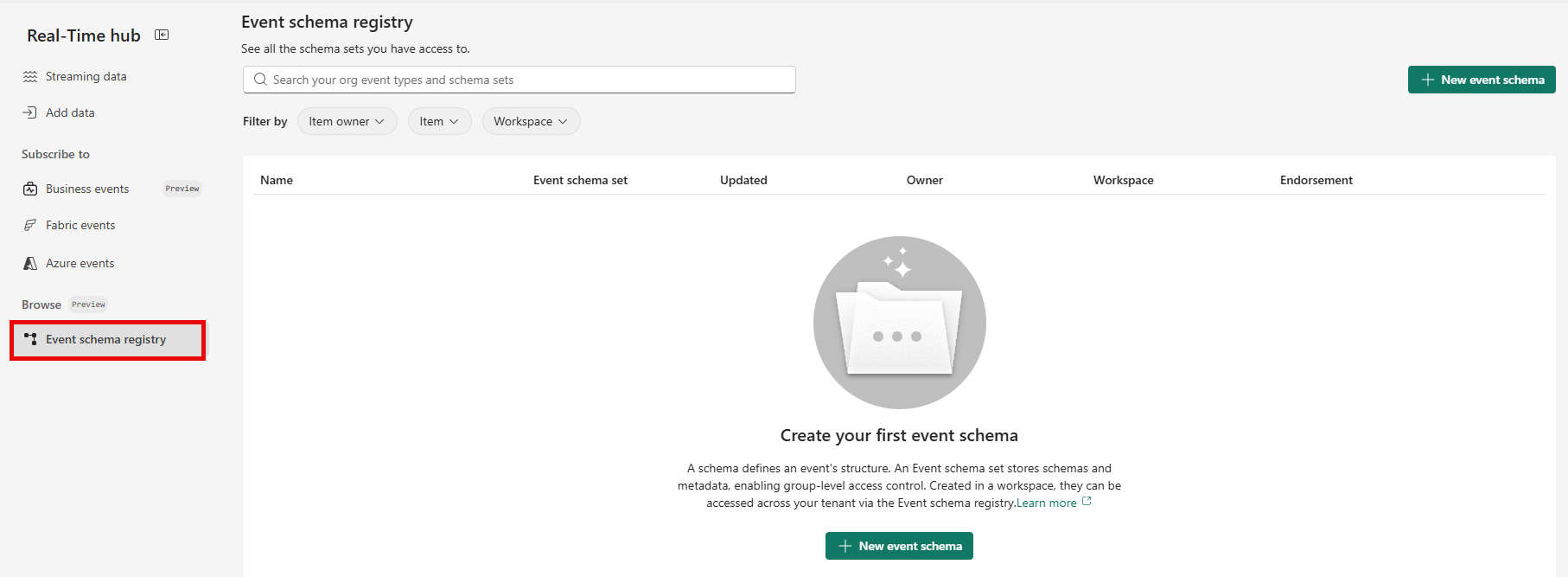
Schema list
The page lists registered schemas in the following columns:
| Column | Description |
|---|---|
| Name | Name of the schema. |
| Event schema set | Event schema set that contains the schema. |
| Updated | Date and time when the schema was last updated. |
| Owner | Owner of the schema. |
| Workspace | Workspace that contains the event schema set. |
| Endorsement | Endorsement status of the schema. |
Search and filters
Use the search box to find a schema by name. You can also filter schemas by the following properties:
- Schema set owner.
- Schema set name.
- Fabric workspace.
Schema actions
From the Event schema registry page, you can create an event schema, open the event schema set that contains a schema, or endorse a schema. For step-by-step instructions, see Create and manage event schemas in Real-Time hub.