Bilješka
Pristup ovoj stranici zahtijeva provjeru vjerodostojnosti. Možete pokušati da se prijavite ili promijenite direktorije.
Pristup ovoj stranici zahtijeva provjeru vjerodostojnosti. Možete pokušati promijeniti direktorije.
Note
Some of the information in this article might not apply to Microsoft 365 operated by 21Vianet.
Microsoft continuously adds new features to the Microsoft 365 admin center, fixes problems, and makes changes based on your feedback. Some features roll out at different speeds to customers. If you don't see a feature yet, try adding yourself to targeted release.
Looking for more options and guides?
If you want step-by-step guidance beyond the monthly updates in this article, use these resources:
- Advanced deployment guides & assistance
- Choose standard release or targeted release options
- Track upcoming changes on the Microsoft AI at Work Roadmap
- Open a support request in the admin center
To learn about what's new with other Microsoft cloud services, see the following sections:
- What's new in Microsoft Entra ID
- What's new in the Exchange admin center
- What's new in Microsoft Intune
- What's new in the Microsoft Purview portal
- What's new in Microsoft Defender XDR
- What's new in the SharePoint admin center
- What's new for Teams admins
- Microsoft 365 updates
- How to check Windows release health
Important
Use roles with the fewest permissions. Lower permissioned accounts help improve security for your organization. Global Administrator is a highly privileged role. Limit its use to emergency scenarios when you can't use an existing role. For more information, see About admin roles in the Microsoft 365 admin center.
August 2026
Use these statuses to view the status of your service requests in the Enhanced engagements portal.
Nudge status: Track each nudge end-to-end through three stages- Nudge Initiated, Nudge Acknowledged, and Nudge Actioned- directly in the MCS Portal.
Nudge timeline: Select an open service request to view its nudge history- including follow-up nudges, who nudged, and when - directly in the request details pane.
November 2025
The Engineering direct portal is now renamed to Enhanced Engagements.
Inside Engagements there are four new options:
- Service requests are now Engineering escalations
- Business Process Awareness (BPAs)
- Customer Advisory Board (CAB)
- Incident Analysis
June 2025
Copilot Search admin experience
The Microsoft 365 admin center now includes the Copilot Search Admin experience, giving you powerful tools to manage and optimize search across your organization. This release introduces enhanced support for Acronyms and Bookmarks, enabling you to deliver more relevant and contextual search results to users.
Key highlights
Acronyms
- Define and manage organization-specific acronyms to improve search clarity.
- Upload acronyms in bulk via CSV or add them individually.
- Discover acronyms across Microsoft Search endpoints like SharePoint.
Bookmarks
- Create quick access links to frequently used resources.
- Boost visibility of important tools, sites, or documents in search results.
- Customize bookmark metadata including title, URL, description, and audience targeting.
These features help ensure that users find the right information faster, especially when navigating internal terminology or frequently accessed content.
To learn more, see Microsoft 365 Copilot Search.
April 2025
Microsoft 365 Copilot network connectivity test
A new addition to the Microsoft 365 network connectivity test tool enables users to run diagnostics specifically for Microsoft 365 Copilot. The tool helps users evaluate the network performance between their device and Microsoft 365 endpoints, specifically for Microsoft 365 Copilot. It runs a series of tests from the user's location and generates a detailed report that you can share with others or Microsoft support to help troubleshoot connectivity issues.
The test includes:
- Latency measures the time it takes for data to travel between the device and Microsoft 365 services
- Throughput evaluates the data transfer rate
- Service reachability checks whether required Microsoft 365 services are accessible
Admins and users can go to Microsoft 365 network connectivity test to run the test.
To learn more, see Microsoft 365 network connectivity test tool.
March 2025
Exchange Web Services usage report
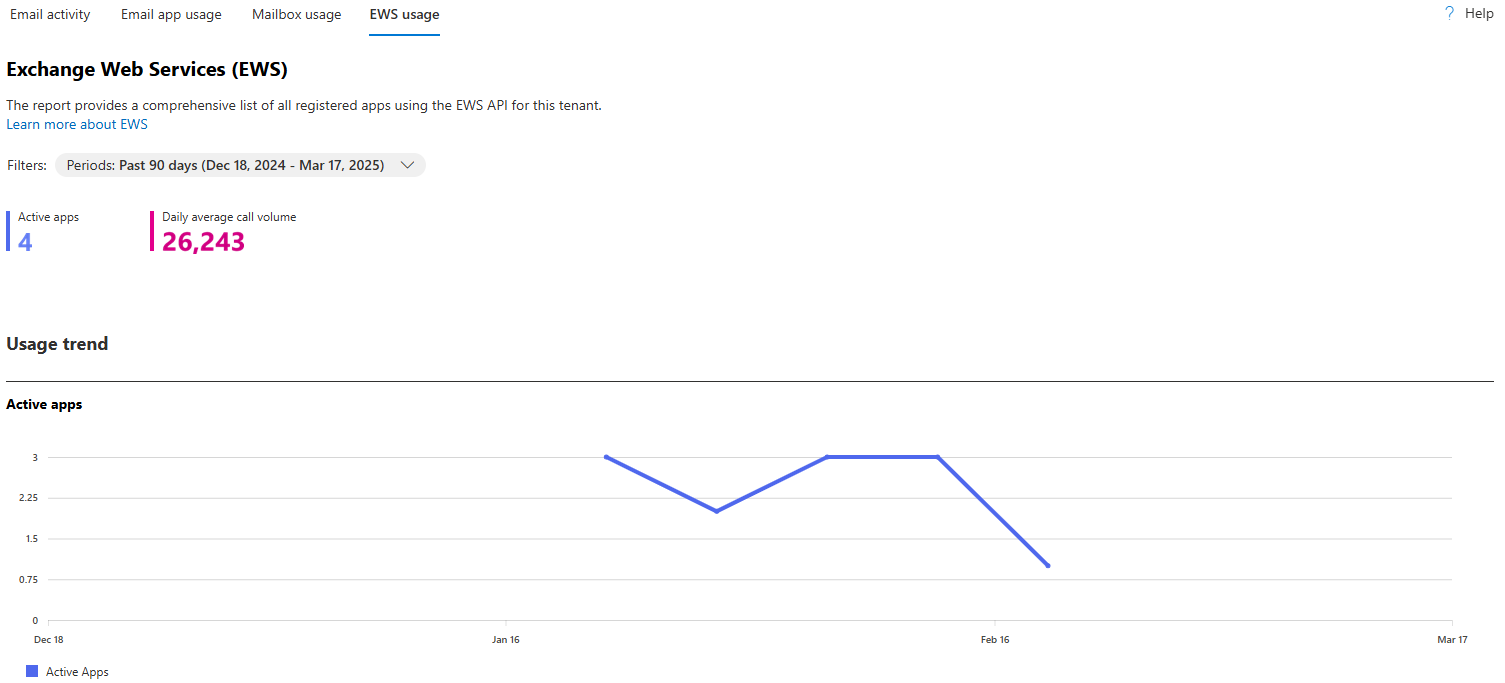
The Microsoft 365 admin center now includes a new Exchange Web Services (EWS) usage report that provides insights into the non-Microsoft (third-party) applications in your tenant that use EWS. The report provides detailed information on the specific actions performed by these applications and their call volumes over a selected period. The report enhances your ability to understand EWS activity before EWS deprecation in Microsoft Exchange Online.
The report is available by default in the Microsoft 365 admin center under Reports > Usage > Exchange > EWS usage.
To learn more, see Microsoft 365 Reports in the admin center - EWS usage.
February 2025
Provide admin-initiated feedback for Microsoft 365 Copilot
You can provide feedback about Microsoft 365 Copilot on behalf of your users within the Microsoft 365 admin center, supplementing the user-initiated feedback process. Feedback helps Microsoft receive comprehensive diagnostic data to aid in debugging and improving the quality and relevance of Copilot's responses. Recent enhancements to the feature include:
- Role expansion The feature now includes the AI Admin role in addition to the Global Admin role, ensuring that more administrators can access and manage Copilot diagnostics.
- Selecting chat log prompt-response pairs You can review and select specific chat log prompt-response pairs for feedback, giving you more control over the data being shared.
- Date range selection You can select a specific date range for a feedback submission, up to the past 30 days, so you can focus on issues within a particular time frame.
- Product selection You can choose from a list of Copilot products when submitting feedback, ensuring that the feedback is relevant to the specific product.
- List of frequently occurring issues You can select from a predefined list of frequently occurring issues or enter issue details in a text box, streamlining the feedback process.
As an admin, you play a pivotal role in setting the tone for how your organization adopts and benefits from new technologies. By using admin-initiated feedback, you can help improve Copilot while ensuring the security and ownership of your organization's data.
These enhancements provide more control and flexibility, ensuring that feedback is accurate and relevant.
January 2025
AI Administrator role in Microsoft 365 admin center
The AI administrator role manages all settings related to Copilot within the Microsoft 365 admin center. Use the Copilot page in the admin center to manage Copilot settings. This page is the central hub for all Copilot controls. For more information about the Copilot page, see Manage Microsoft 365 Copilot settings in the Microsoft 365 admin center.
By using the AI administrator role, you can:
- Manage AI-related services and extensibility Manage all aspects of Microsoft 365 Copilot, AI-related enterprise services, and agents from the Integrated apps page in the Microsoft 365 admin center.
- Oversee app installations and configurations Install apps or install apps for users in the organization. Read and configure Azure and Microsoft 365 service health dashboards.
- Access insights and support View usage reports, adoption insights, organizational insights, and create and manage support tickets in Azure and the Microsoft 365 admin center.
This new role provides specialized administrative capabilities for managing AI-related enterprise services, starting with Microsoft 365 Copilot, and slowly extending to other AI-driven functionalities. For more information about the AI administrator role and other roles in the admin center, see About admin roles in the Microsoft 365 admin center.
Note
The AI administrator role is currently limited. For full administrative capabilities, use the Global Admin role until the AI administrator role is fully functional. Microsoft is continuously expanding support for more functionalities to enhance the AI administrator role.
May 2023
Sign up for Windows release health email notifications
You can now sign up for email notifications about Windows known issues and informational updates. Notifications include changes in issue status, new workarounds, and issue resolutions. To subscribe to notifications:
- Go to the Windows release health page.
- Select Preferences > Email, and then select Send me email notifications about Windows release health.
- Specify the following information:
- Email address for the notifications
- Each admin account can specify up to two email addresses under their email preferences
- Windows versions to be notified about
- When a single known issue affects multiple versions of Windows, you receive only one email notification, even if you selected notifications for multiple versions. Duplicate emails aren't sent.
- Email address for the notifications
- Select Save when you're finished specifying email addresses and Windows versions. It might take up to eight hours for these changes to take effect.
For more information, see How to check Windows release health.
April 2023
The Suggested training feature is part of the Experience Insights dashboard. It gives you deeper insights into the Microsoft 365 help and training articles that your signed-in users read on support.microsoft.com and in-app help panels. It provides these three insights:
Top viewed articles for your organization shows you help and training articles that get the most views by people in your organization.
Trending across organizations shows you the help and training articles that are moving up the most in your organization's most viewed list.
Commonly viewed together gives you insights into the other help articles users in all Microsoft 365 organizations are reading, along with the top viewed and top trending articles. You can use this info to put together and share training packages for your users.
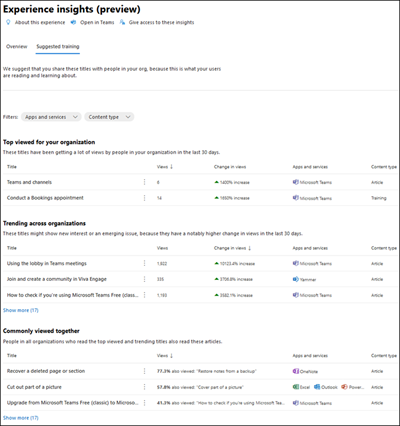
Use this data to decide which help articles and training resources to share with your users about these products and apps. Or make sure your helpdesk is aware of these areas so they can answer any user questions. If your organization doesn't have enough views on help and training articles, you can see data from other Microsoft 365 organizations.
You can get to the Experience insights dashboard in a couple of ways:
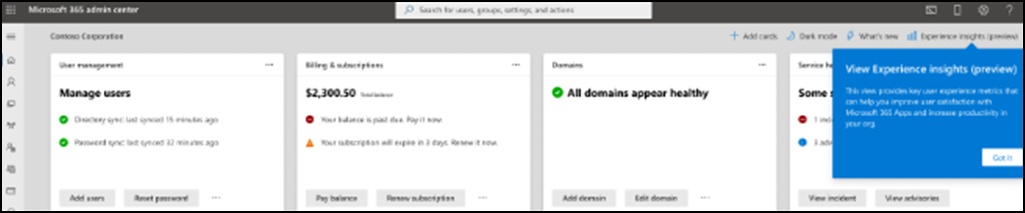
If you're a member of the Global reader roles, when you sign in to the Microsoft 365 admin center, you see a one-time prompt to go to the Experience insights (preview) dashboard. You can access it at any time by selecting Experience insights (preview) from the admin home page.
If you're a member of the Reports reader role or the User Experience success manager roles, once you sign into the admin center, you automatically go to the Experience insights (preview) dashboard page. You can switch back to the admin center Dashboard view by selecting that option in the top right.
For more information, see Microsoft 365 Experience insights dashboard.
December 2022
Advanced deployment guides for Microsoft 365
To help you easily find guides for the services you're deploying, the Microsoft 365 admin center updated the search tools, recommendations, and layouts for the Advanced deployment guides & assistance page. You can also find these updates at setup.microsoft.com.
In this update, you can now:
- Save valuable time by exporting your progress in Excel and share your progress as needed.
- View the most important actions front and center in the Suggested guides section.
- Use tags to notify you when a new or updated guide is released after your last visit to the page.
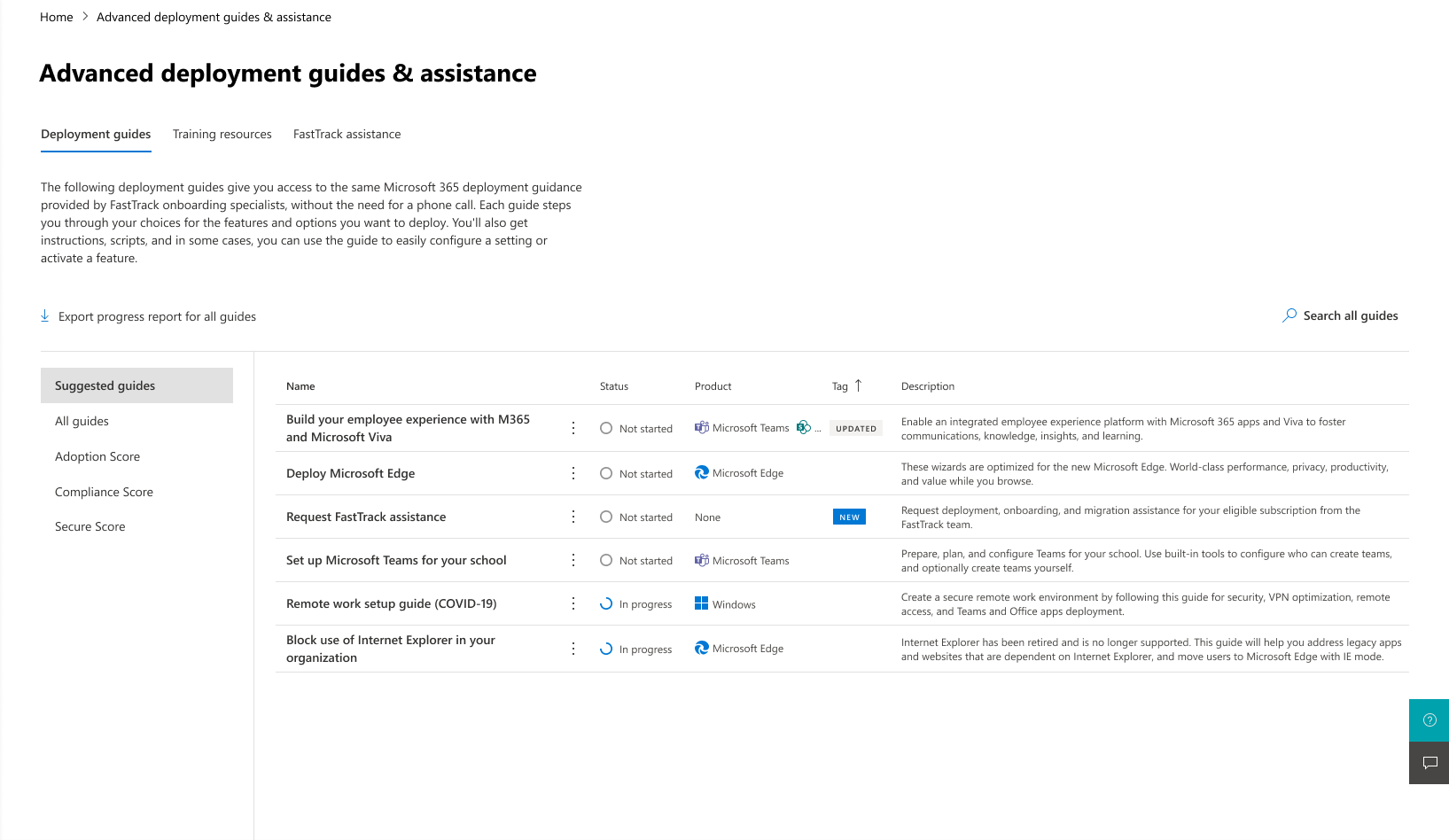
To get to Advanced deployment guides, sign in to the Microsoft 365 admin center and go to Setup > Advanced deployment guides & assistance.
You can now find all the same guides from the Microsoft 365 admin center on setup.microsoft.com. Key updates to this site include:
- Expanded searchability to quickly find guides.
- Better page organization to help you navigate to the right view.
- Addition of all guides previously only available in the Microsoft 365 admin center (early 2023).
The Microsoft 365 team also released a new advanced deployment guide for setting up your Microsoft Zero Trust security model and is planning the release of a new guide for Windows 365 Cloud PC configuration in early 2023.
To learn more, see Simplify deployment of Microsoft 365 with new and updated deployment guides.
November 2022
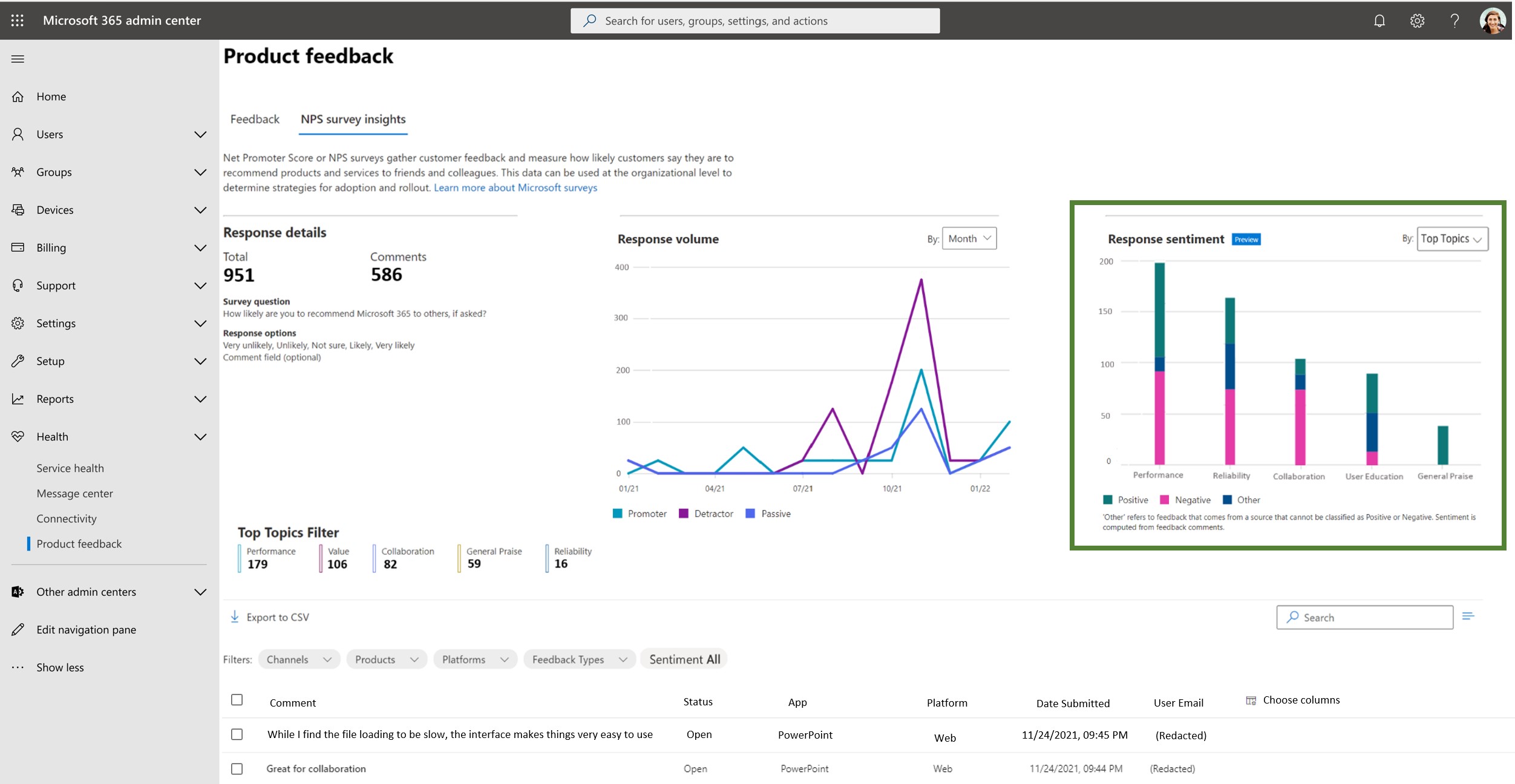
Sentiment per topic available in the NPS survey insights dashboard
To empower IT admins like you, the Net Promoter Score (NPS) survey insights dashboard released the new Sentiment per Topic feature under the sentiment section.
By using this new feature, you can identify the sentiment that is associated with each topic available. The sentiment is calculated for each NPS feedback comment and tied to a specific topic. By using this new addition, you can discover what trending topics your users are talking about and understand the feeling they're experiencing regarding that specific topic.
By using the new sentiment per topic feature on the NPS survey insights dashboard, you can:
- Identify the sentiment for each topic
- Choose between three sentiments: Positive, Negative, Other
Here are the topics available:
- Change Management
- Collaboration
- Complexity
- Navigation
- Performance
- Reliability
- User Education
- Value
To access the sentiment per topic insights, sign in to the Microsoft 365 Admin Center and go to Health > Product feedback > NPS survey insights tab.
August 2022
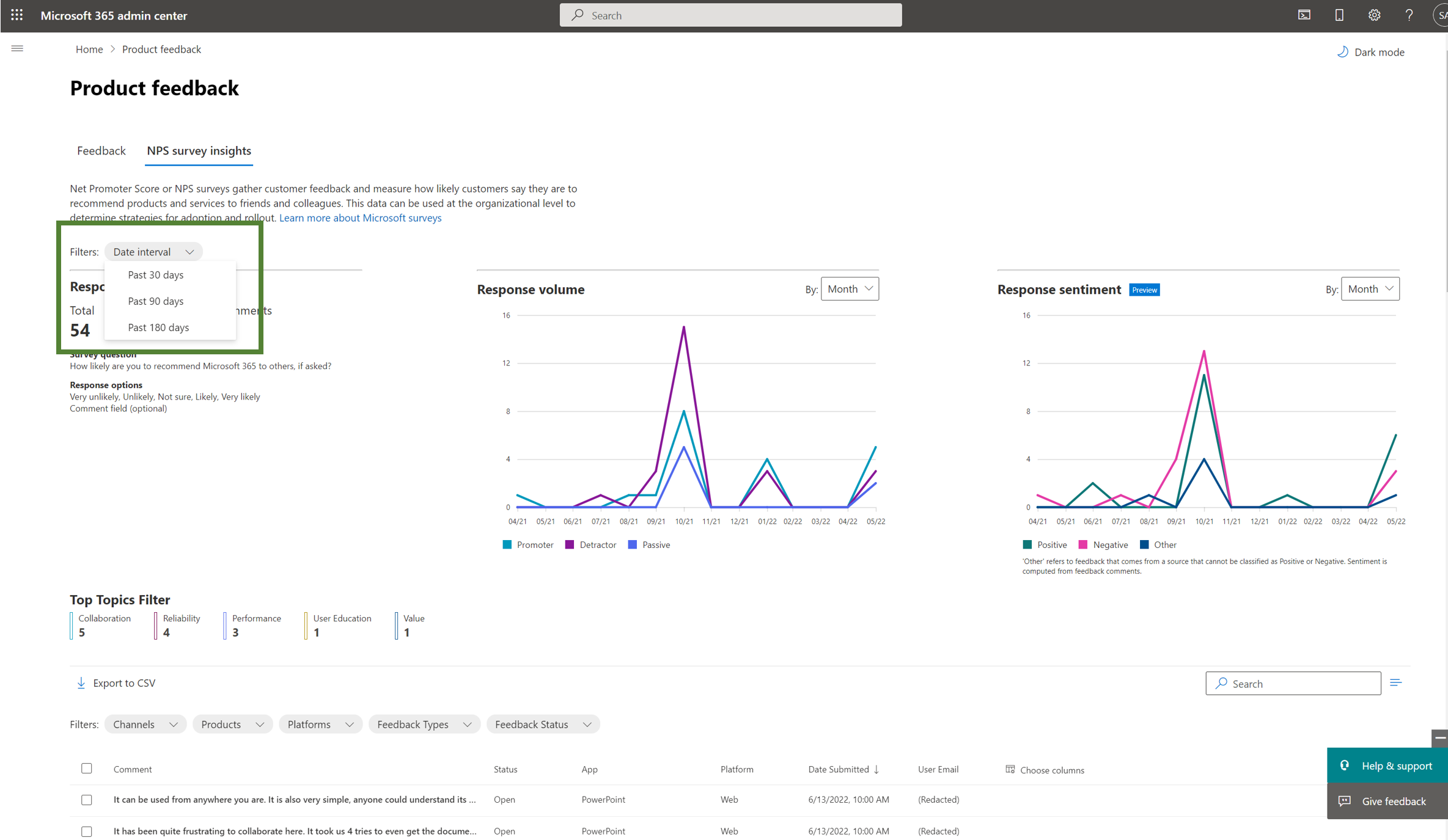
Date filter in the Net Promoter Score (NPS) survey insights dashboard
Based on your feedback, Microsoft is introducing a new function in the NPS survey insights dashboard that admins can use to filter the Net Promoter Score (NPS) data and insights by date. You can access details based on your date range preference.
By using this change, you can view the NPS survey insights based on the following date ranges:
- Past 30 days
- Past 90 days
- Past 180 days
To access, go to Health > Product feedback > NPS survey insights tab.
July 2022
Multitenant billing relationships
You can now create multitenant billing relationships with other tenants. A multitenant billing relationship lets you securely share your organization's billing account with other tenants while maintaining control over your billing data.
This feature is available to organizational account customers with a Microsoft Customer Agreement.
For more information, see Manage billing across multiple tenants in the Microsoft 365 admin center.
May 2022
Role based access controls (RBAC)
The Microsoft 365 admin center includes four new roles for managing custom security attributes. Everyone can use these roles in the Microsoft 365 admin center under Roles.
Attribute Assignment Administrator Assign custom security attribute keys and values to supported Microsoft Entra objects.
Attribute Assignment Reader Read custom security attribute keys and values for supported Microsoft Entra objects.
Attribute Definition Administrator Define and manage the definition of custom security attributes.
Attribute Definition Reader Read the definition of custom security attributes.
There's also a new role that you can use to give admins only the access they need to manage Virtual Visits.
- Virtual Visits Administrator Manage and share Virtual Visits information and metrics from admin centers or the Virtual Visits app.
For more information about these roles, see Microsoft Entra ID built-in roles.
Quick Assist
To enhance the performance and security of the app, Microsoft moved Quick Assist to the Microsoft Store. The Windows Quick Assist app helps you and your end users receive or provide PC assistance over a remote connection.
By using the new Quick Assist Store app, you see a significant improvement in passcode generation times and a reduction in application errors.
For more information, see Solve PC problems over a remote connection and Install Quick Assist.
April 2022
NPS Sentiment Insights
NPS survey insights is an AI-driven dashboard available in the Microsoft 365 admin center.
In the admin center, go to Health > Product feedback > NPS survey insights.
This feature helps admins like you obtain actionable insights derived from Microsoft NPS surveys your users responded to.
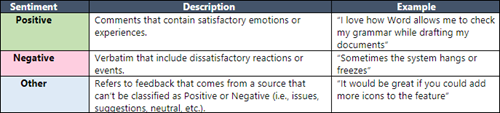
Based on your feedback, Microsoft is introducing a new feature that identifies the sentiment for each NPS verbatim feedback, so that you can learn what your users feel regarding Microsoft 365 products. Sentiment labels such as Positive, Negative, and Other are assigned to the NPS verbatim feedback.
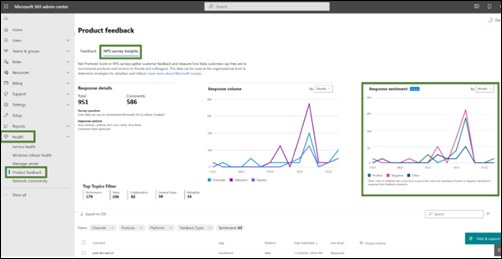
With the sentiment feature on the NPS survey insights dashboard, you can:
Visualize the sentiment trend for the last 12 months based on the NPS verbatim feedback.
Identify the sentiment per app and platform.
Three sentiments are available:
To provide you with a better experience using the NPS survey insight dashboard, check the following items:
Encourage your users to submit feedback.
Confirm in-product survey policies are enabled.
Improve diagnosability by enabling Windows Error Reporting.
Microsoft 365 admin center search
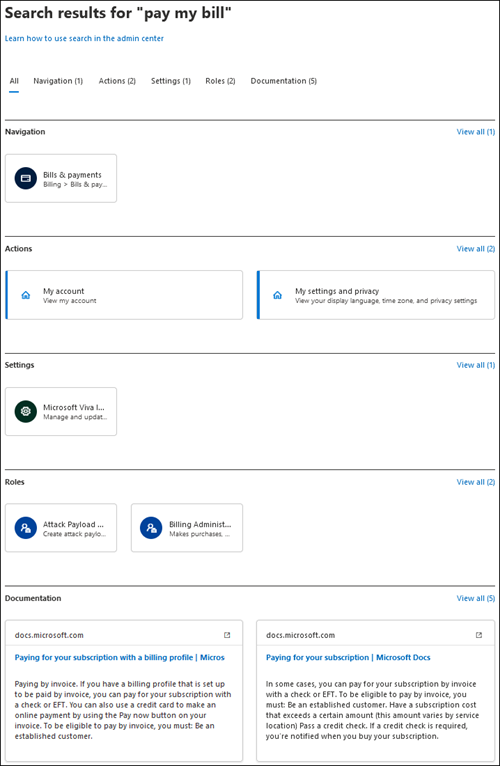
You can now view all search results in a separate browser page by searching in global search and selecting Enter.
With our new separate page of search results, you can explore a more comprehensive list of results and easily return to the browser page for a more efficient search experience.
Search in distribution lists to add Priority Accounts
Previously, you could only tag priority accounts by searching for them using the person's name, e-mail address, or job title. With this update, you can now search for people to add to priority accounts in a distribution list. The update allows you to bulk add people in an efficient way and reduces the time needed to tag individual people in your organization.
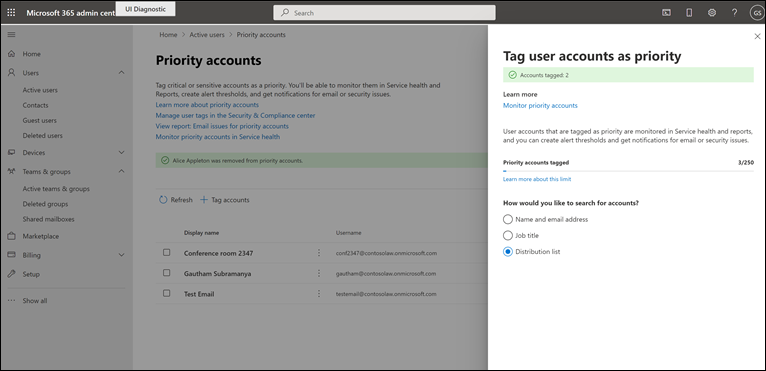
You can tag up to 50 users from a distribution list as priority accounts in a single action.
Additional information about the user like department and job title is introduced on the Priority Accounts page.
You can only tag user accounts within distribution lists, and not the list itself. Users who are already tagged don't show up in your distribution list search.