Describe use cases and capabilities of model-driven apps
Model-driven apps take a fundamentally different approach to app creation. Instead of starting with the user interface and connecting data to it, model-driven apps start with the data model—the tables, columns, relationships, and business logic defined in Microsoft Dataverse—and generate the user interface automatically based on that model. This data-first approach makes model-driven apps well suited for complex, data-rich business management scenarios where consistent structure, security, and business process enforcement are more important than design flexibility.
The data-first design principle
When you build a model-driven app, most of your development time is spent in Dataverse—defining the tables that represent your business entities, the relationships between those tables, the forms that display and collect data, the views that filter and sort records, and the business rules that enforce data policies. Once the data model is in place, the model-driven app designer assembles the application by selecting which tables, views, forms, dashboards, and charts to include. The platform then generates a responsive, consistent user interface that works across browsers, tablets, and phones without additional design work.
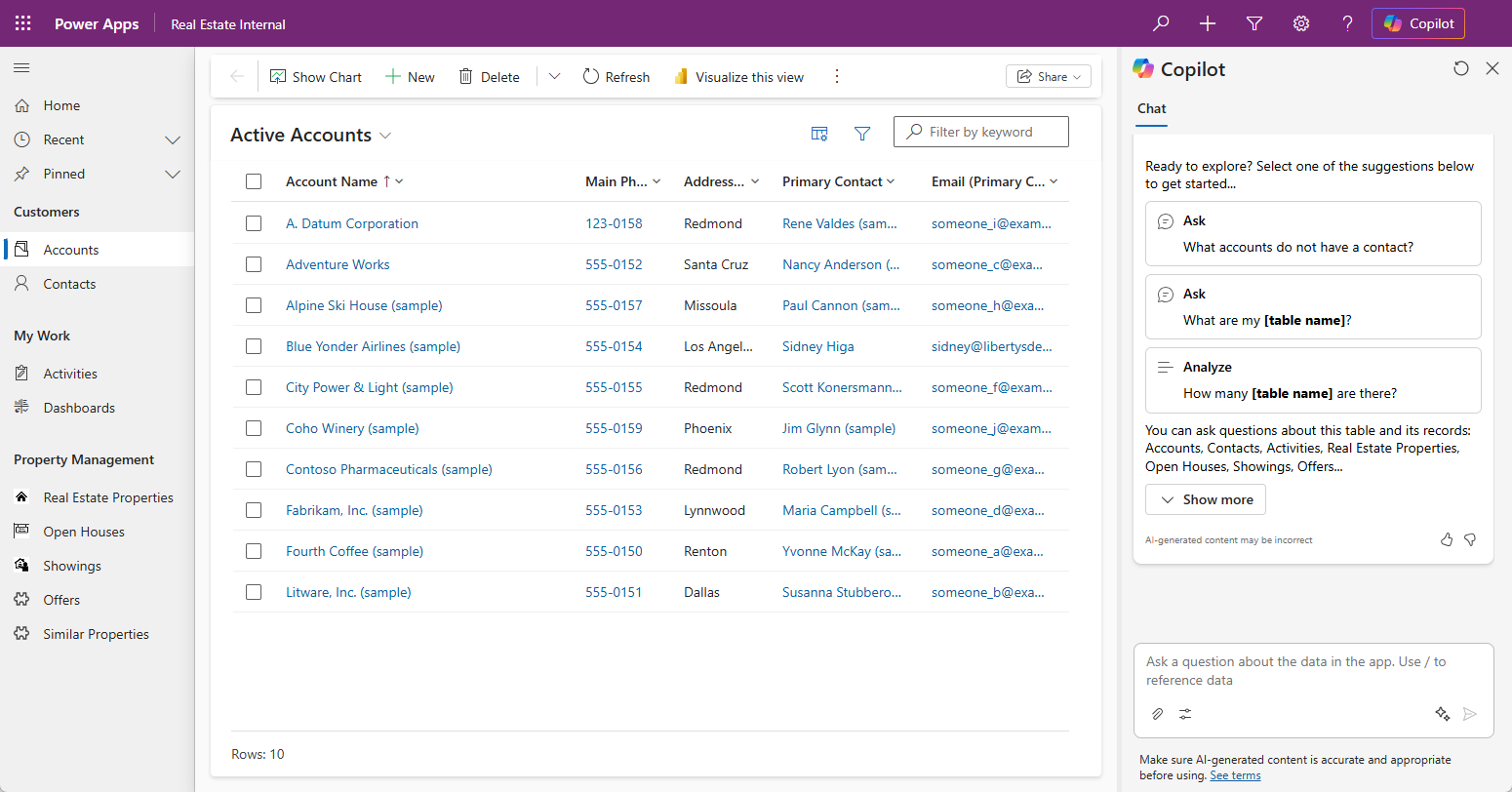
This approach is the same one used to build Microsoft Dynamics 365 applications. Dynamics 365 Sales, Customer Service, Field Service, and other Dynamics 365 apps are themselves model-driven apps built on Dataverse. Organizations using model-driven apps benefit from the same architectural patterns that power Microsoft's own enterprise applications.
Key capabilities of model-driven apps
Automatically generated, responsive UI: The user interface adapts to any device and screen size without additional design work. Makers focus on the data model; the platform handles the presentation.
Built-in forms and views: Dataverse forms define how individual records are displayed and edited. Views define the filtered, sorted lists of records users see when browsing a table. Both are configured in Dataverse and automatically appear in any model-driven app that includes that table.
Dashboards and charts: Model-driven apps include built-in dashboard capability for visualizing data without a separate Power BI integration. Makers can configure charts, graphs, and key performance indicator (KPI) metrics that appear on the app's home page.
Business process flows: Business process flows are guided, stage-based processes that appear across the top of a record and walk users through a predefined sequence of steps—such as lead qualification, case resolution, or onboarding.
Role-based security: Model-driven apps inherit Dataverse's security model, including security roles, business unit hierarchies, row-level access controls, and column-level security—without requiring any additional security configuration in the app.
Timeline and activity tracking: Every record in a model-driven app includes a built-in activity timeline that tracks emails, phone calls, tasks, appointments, and notes associated with that record.
Offline access on mobile: Model-driven apps support offline mode through the Power Apps mobile app, allowing field users to view and edit records when connectivity is unavailable.
Power BI integration: Users can generate Power BI reports directly from model-driven app views using the Visualize this view option, and Power BI dashboards can be embedded within the app.
Common use cases for model-driven apps
Model-driven apps work best for scenarios that involve managing complex, related business data at scale—particularly when multiple users with different roles need to work with the same data according to defined business rules and processes.
Customer relationship management: Sales teams use model-driven apps to manage accounts, contacts, leads, opportunities, and activities across the sales pipeline. The built-in business process flow guides sellers through qualification, proposal, and closing stages.
Case and incident management: Support teams use model-driven apps to create, route, escalate, and resolve customer service cases, with the activity timeline providing full context for every interaction.
Field service management: Operations managers use model-driven apps to dispatch work orders, track technician assignments, manage service agreements, and analyze field service performance.
HR and employee management: HR teams use model-driven apps to manage employee records, onboarding workflows, performance reviews, and benefit enrollments.
Project and program management: Project managers use model-driven apps to track projects, milestones, tasks, resources, budgets, and risks in a structured, governed environment.
Management dashboards: Leaders use model-driven app dashboards to monitor KPIs, review operational metrics, and drill into underlying records without switching to a separate reporting tool.
Copilot capabilities in model-driven apps
Copilot is available throughout the model-driven app experience—both during app creation and for app users in production.
Building a model-driven app with Copilot
When you create a model-driven app, use Copilot to describe what the app should track and manage in natural language. Copilot generates the underlying Dataverse table structure, defines column types and relationships, and produces an initial app configuration. This conversation-driven creation process is covered in the "Create a model-driven app through conversations" unit later in this module.
Within the model-driven app designer, Copilot can also generate descriptions for published apps—automatically writing descriptions based on the app's components and purpose. Use this feature during the publish step or at any time through the app's Settings pane.
Copilot for app users in model-driven apps
Note
Microsoft 365 Copilot for app users in model-driven apps is currently in preview. Preview features aren't meant for production use and may not be available in all regions.
Once a model-driven app is published, Microsoft 365 Copilot can be enabled to give users a conversational AI experience within the app. Users can ask natural language questions about their business data—for example, "Which technician has the most open assignments this week?" or "Show me all hardware requests submitted by the Finance department."—and receive answers grounded in the app's Dataverse data, respecting each user's security role.
Choosing between canvas apps and model-driven apps
Understanding the differences between canvas and model-driven apps helps you choose the right tool for each scenario.
| Consideration | Canvas apps | Model-driven apps |
|---|---|---|
| Data source | Any data source—SharePoint, SQL, Dataverse, and 200+ connectors | Microsoft Dataverse only |
| Design control | Complete—maker controls every element on every screen | Automatic—layout generated from the data model |
| Best for | Task-focused, process-specific apps with custom UI requirements | Data management apps with complex relationships and business logic |
| Responsive design | Maker must design for multiple screen sizes | Automatic—adapts to any device without additional work |
| Business process flows | Not natively supported (requires custom build) | Built in—stage-based guided process experiences |
| Security model | Controlled at the app level | Inherits full Dataverse role-based and row-level security |
| Copilot for makers | Build through conversation; edit with natural language in Studio | Build through conversation; generate app descriptions with AI |
| Copilot for users | Microsoft 365 Copilot for Dataverse-backed apps | Microsoft 365 Copilot and App Skills (generally available in Dynamics 365) |