Note
Access to this page requires authorization. You can try signing in or changing directories.
Access to this page requires authorization. You can try changing directories.
Applies to:  SQL Server Analysis Services
Azure Analysis Services
SQL Server Analysis Services
Azure Analysis Services  Fabric/Power BI Premium
This article introduces Analysis Management Objects (AMO), explains how AMO relates to other Azure Analysis Services tools and libraries, and describes the major AMO objects.
AMO provides a complete collection of management classes in the Microsoft.AnalysisServices namespace for use in a managed environment. The classes are included in the AnalysisServices.dll file, which you usually find where setup installs the files, under the folder \100\SDK\Assemblies\. To use the AMO classes, include a reference to this assembly in your projects.
By using AMO you can create, modify, and delete objects such as cubes, dimensions, mining structures, and databases. You can perform actions over all these objects from your application in the .NET Framework. You can also process and update the information stored in databases.
AMO in the Analysis Services architecture
AMO manages objects only and doesn't query data. To query data from a client application, use ADOMD.NET.
AMO architecture
AMO is a complete class library for managing an Analysis Services instance from client applications that use managed code in .NET Framework 2.0 or later.
The AMO class library uses a hierarchy in which you instantiate some classes before you use others. You can instantiate auxiliary classes at any time, but you typically use them after you instantiate one or more hierarchy classes.
The following illustration is a high-level view of the AMO hierarchy that includes major classes. The illustration shows the placement of the classes among their containers and their peers. A Dimension belongs to a Database and a Server, and can be created at the same time as a DataSource and MiningStructure. Certain peer classes must be instantiated before you can use others. For example, you have to create an instance of DataSource before adding a new Dimension or MiningStructure.
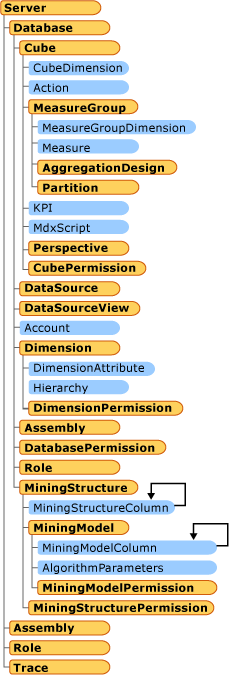
A major object is a class that represents a complete object as a whole entity and not as a part of another object. Major objects include Server, Cube, Dimension, and MiningStructure, because these are entities on their own. However, a Level is not a major object, because it is a constituent part of a Dimension. Major objects can be created, deleted, modified, or processed independent of other objects. Minor objects are objects that can only be created as part of creating the parent major object. Minor objects are usually created upon a major object creation. Values for minor objects should be defined at creation time because there is no default creation for minor objects.
The following illustration shows the major objects that a Server object contains.
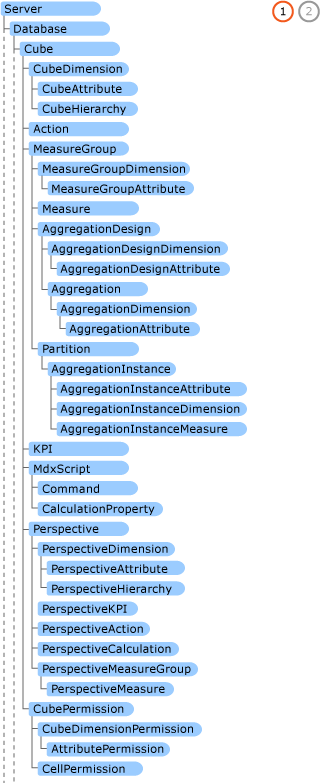

When programming with AMO, the association between classes and contained classes uses collection type attributes, for example Server and Dimension. To work with one instance of a contained class, you first acquire a reference to a collection object that holds or can hold the contained class. Next, you find the specific object that you're looking for in the collection, and then you can obtain a reference to the object to start working with it.
AMO classes
AMO is a library of classes designed to manage an instance of Analysis Services from a client application. You can think of the AMO library as logically related groups of objects that you use to accomplish specific tasks. You can categorize AMO classes as follows:
| Class set | Purpose |
|---|---|
| AMO fundamental classes | Classes required to work with every other class set. |
| AMO OLAP classes | Classes that let you manage OLAP objects. |
| AMO data mining classes | Classes that let you manage data mining objects. |
| AMO security classes | Classes that let you control access to other objects and maintain security. |
| AMO other classes and methods | Classes and methods that help OLAP and data mining admins complete their daily tasks. |
Using AMO
Use AMO to automate repetitive tasks, such as creating measure group partitions from new fact table data or retraining a mining model with new data. These object creation tasks typically run monthly, weekly, or quarterly. The application can name new objects based on the new data.
Analysis Services administrators
Use AMO to automate database processing. Use Visual Studio to design and deploy databases.
Developers
Use AMO to build administrative interfaces for specific user groups. These interfaces restrict access to objects and limit users to specific tasks. For example, create a backup application that lets users view all database objects, select a database, and back it up to one of a specific set of devices.
Use AMO to embed application logic that creates cubes, dimensions, mining structures, and mining models based on user input or other factors.
OLAP advanced users
Advanced OLAP users are typically data analysts or other experienced data users with strong programming skills who want to work more directly with data objects. If you work offline, use AMO to automate local cube creation before you go offline.
Data mining advanced users
For data mining advanced users, AMO is most useful if you have large sets of models that periodically need retraining.
Automating administrative tasks with AMO
Most repetitive tasks are best designed, deployed, and maintained if they are developed by using Integration Services than if they are developed as an application in any language of your choice. However, for repetitive tasks that cannot be automated by using Integration Services, you can use AMO.
Automatic object management
With AMO, you can easily create, update, or delete objects (for example, Database, Dimension, Cube, mining MiningStructure, and MiningModel, or Role) based on user input or newly acquired data. AMO is ideal for setup applications that deploy a developed solution from an independent software vendor to a final customer. The setup application can verify that an earlier version exists and can update the structure, remove no longer useful objects, and create new ones. If there's no earlier version, the setup application can create everything from scratch.
AMO can be powerful when creating new partitions based on new data, and can remove old partitions that go beyond the scope of the project. For example, for a finance analysis solution that works with the last 36 months of data, as soon as you receive a new month of data, the 37th old month could be removed. To optimize performance, you can design new aggregations based on usage and apply them to the last 12 months.
Automatic object processing
Use AMO to achieve object processing and updated availability in response to certain events beyond the ordinary flow of data and scheduled tasks that use Integration Services.
Automatic security management
Automate security management to add users to roles, grant permissions, and remove users when their access expires. Create interfaces that simplify security management for security admins. This approach can be simpler than using Visual Studio.
Automatic backup management
Use Integration Services tasks or specialized AMO applications to automate backup management. By using AMO, you can also develop backup interfaces that help operators with daily jobs.
Tasks AMO is not intended for querying data
AMO doesn't support data queries. Use ADOMD.NET in a user application to query data, including cubes and mining models. For more information, see Developing with ADOMD.NET.