Hey there, Cory Karl
there is no way to change them on the parent dashboard.
The Microsoft Family Safety page does not allow you to reset a family members password, even if they are listed as a child. In order to reset your children's password, you have to reset the password when trying to log into their accounts.
Please open an InPrivate browsing session, then go to: https://account.microsoft.com/account
You will then need to select "Sign in"
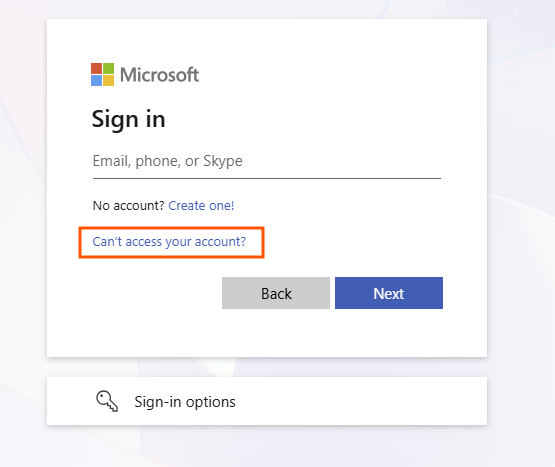
When you are asked to enter the email address, please click onto the blue hyperlink that says "Can't access your account?"
You will then want to select "Personal account"
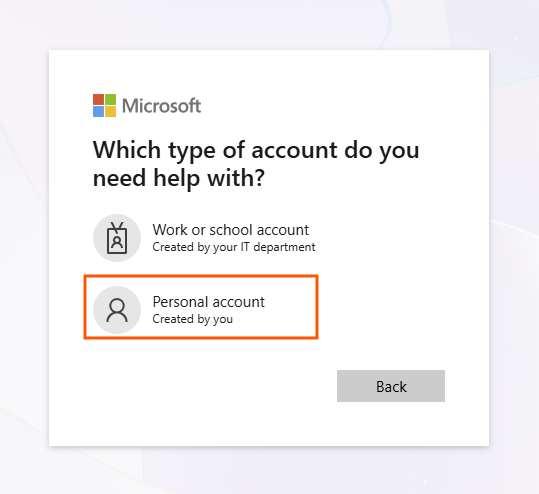
You will then need to go through the Microsoft account recovery workflow. This will ask you for your child's email address. You should be able to reset your child's password using the recovery methods on their account.
Hope this helps,
Nathan
' cx='32' cy='32' r='32' /%3E%3Ctext x='50%25' y='55%25' dominant-baseline='middle' text-anchor='middle' fill='%23FFF' %3ECK%3C/text%3E%3C/svg%3E)

