Hi stacie,
Welcome to the Microsoft Q&A forum.
Based on your description, you would like the Order Trusses task to automatically update whenever the Set Trusses date changes.
You can configure it as shown below:
- In the Predecessors field, enter: 1SS-4wks
- Then select both tasks and click Auto Schedule.
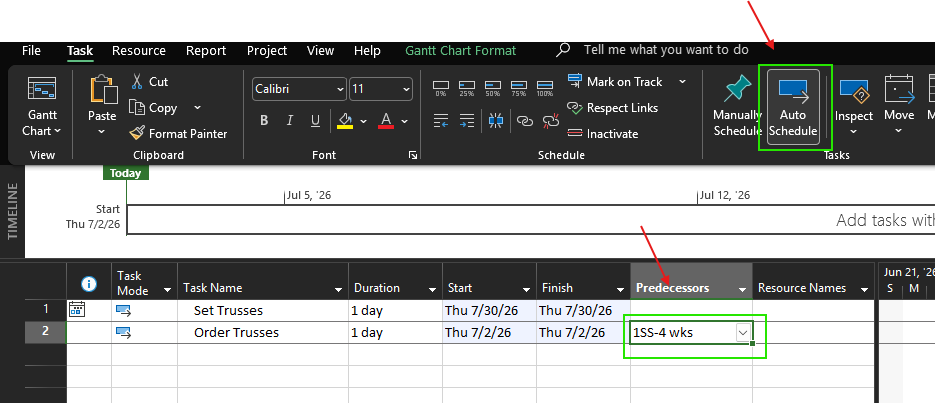
The formula 1SS-4wks means:
- 1SS: The ID of the Set Trusses task (this value may vary depending on your project file).
- -4wks: Automatically schedules the task 4 weeks earlier than the linked task.
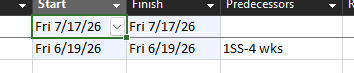
Below is the result after applying this configuration.

I hope this information is helpful. Please follow these steps and let me know if it works for you. If not, we can work together to resolve this.
Thank you for your patience and your understanding. If you have any questions or need further assistance, please feel free to share them in the comments on this post so I can continue to support you.
I look forward to continuing the conversation.
If the answer is helpful, please click "Accept Answer" and kindly upvote it.
Note: Please follow the steps in our documentation to enable e-mail notifications if you want to receive the related email notification for this thread.
' cx='32' cy='32' r='32' /%3E%3Ctext x='50%25' y='55%25' dominant-baseline='middle' text-anchor='middle' fill='%23FFF' %3ESM%3C/text%3E%3C/svg%3E)

' cx='32' cy='32' r='32' /%3E%3Ctext x='50%25' y='55%25' dominant-baseline='middle' text-anchor='middle' fill='%23FFF' %3ERN%3C/text%3E%3C/svg%3E)