Note
Access to this page requires authorization. You can try signing in or changing directories.
Access to this page requires authorization. You can try changing directories.
This article describes the key challenges that occur when you expose Foundry Models data plane APIs directly to consumers. It evaluates these challenges against the five pillars of the Azure Well-Architected Framework. The article also explains how you can mitigate these challenges by inserting a gateway. The guidance focuses on the architectural pattern rather than specific gateway implementation details.
Microsoft Foundry exposes HTTP APIs that let your applications perform embeddings or completions by using language models. Intelligent applications call these HTTP APIs directly from clients or orchestrators. Examples of clients include chat UI code and custom data processing pipelines. Examples of orchestrators include Microsoft Agent Framework, Semantic Kernel, LangChain, and Foundry Agent Service. When your workload connects to one or more Foundry resources or Foundry model instances, you must decide whether these consumers connect directly or through a reverse proxy API gateway.
You can use a gateway to solve specific scenarios that might not be present in every workload. For more information, see specific scenarios for examples of gateway usage.
Key challenges
When there's no API gateway, you need to implement your own retry mechanisms, circuit breakers, and backoff strategies. However, you might not have the ability to modify the client code or the code might be restricted to specific SDK usage. Multiple clients or multiple Foundry resource instances and model deployments present further challenges, such as coordination of safe deployments and observability.
This section provides examples of specific challenges that you might face if your architecture only supports direct access to Foundry Models from consumers. The challenges are organized by using the Well-Architected Framework pillars.
Reliability challenges
The reliability of the workload depends on several factors, including its capacity for self-preservation and self-recovery, which are often implemented through replication and failover mechanisms. Without a gateway, all reliability concerns must be addressed exclusively by using client logic and your model platform features. Workload reliability is compromised when there isn't enough reliability control available in either of those two surfaces.
Load balancing or redundancy: Failing over between multiple Foundry resources or model instances based on service availability is a client responsibility that you need to control through configuration and custom logic.
The choice of deployment type doesn't change the regional endpoint availability of the Foundry resource. Deployments can be Global or Data Zone, either standard or provisioned. Failover logic remains your responsibility regardless of deployment type.
Scale out to handle spikes: When your applications experience sudden increases in demand, you need to fail over to Foundry Model instances that have available capacity. This failover is a client responsibility that you need to control through configuration and custom logic. Rolling out that configuration change across multiple clients introduces deployment risk and can be difficult to implement quickly. The same challenge applies whenever you need to update client logic, such as rerouting low-priority requests to a queue during high-demand periods.
Throttling: Foundry APIs throttle requests by returning an HTTP 429 error response code to requests that exceed the tokens per minute (TPM) or requests per minute (RPM) limits in the standard model. Foundry APIs also throttle requests that exceed provisioned capacity for the pre-provisioned billing model. Client implementations are solely responsible for handling appropriate back-off and retry logic.
Most workloads should solve this specific issue by using Global and Data Zone deployments of models. Those deployments use model capacity from data centers that have enough capacity for each request. Using Global and Data Zone deployments significantly decreases service throttling without the added complexity of custom gateways. The Global and Data Zone deployments are themselves a gateway implementation.
Security challenges
Security controls help protect workload confidentiality, integrity, and availability. Without a gateway, you must address all security concerns exclusively through client logic and Foundry features. Workload requirements might demand more than what's available for client segmentation, client control, or service security features for direct communication.
Identity management - authentication scope: Foundry exposes data plane APIs that you can secure in one of two ways: API key or Azure role-based access control (RBAC). In both cases, authentication happens at the Foundry resource level or project level, not the individual model deployment level. Enforcing least-privilege access or isolating identity scope to a specific model deployment becomes more complex.
Identity management - identity providers: Clients that can't use identities located in the Microsoft Entra tenant that backs the Foundry resource instance must share a single full-access API key. API keys have security usefulness limitations and are problematic when multiple clients are involved and all share the same identity.
Network security: Depending on client location relative to your Foundry resource instances, public internet access to language models might be necessary.
Data sovereignty: Specific countries and regions have regulatory requirements related to storing and processing data. Your workload needs to ensure regional affinity so that clients can comply with data residency and sovereignty laws. This process involves multiple Foundry resource instances.
When you use Global or Data Zone deployments, data at rest remains in the designated Azure geography. But data might be transmitted and processed for inferencing in any Foundry model location.
Cost optimization challenges
Workloads benefit when architectures minimize waste and maximize utility. Strong cost modeling and monitoring are important requirements for any workload. Without a gateway, tracking provisioned utilization or attributing costs per client depends entirely on what you can aggregate from Foundry telemetry.
Cost tracking: Being able to provide a financial perspective on Foundry usage is limited to data aggregated from Foundry telemetry. When required to do chargeback or showback, you need to attribute that usage telemetry with various clients across different departments or even customers for multitenant scenarios.
Provisioned throughput utilization: To avoid paying for unused provisioned throughput, you must trust clients to coordinate to exhaust provisioned model deployments before falling back to standard deployments.
Operational excellence challenges
Without a gateway, your visibility into system behavior, your ability to control change, and your deployment practices are all constrained by what each individual client exposes.
Quota control: Clients receive HTTP 429 response codes directly from Foundry when the HTTP APIs are throttled. You must ensure that enough quota is available for legitimate usage and that misbehaving clients don't consume in excess. When your workload consists of multiple model deployments or multiple data zones, understanding quota usage and quota availability can be difficult to visualize.
Monitoring and observability: Foundry default metrics are available through Azure Monitor. However, there's latency with the availability of the data and it doesn't provide real-time monitoring.
Safe deployment practices: Your GenAIOps process requires coordination between clients and the models that are deployed in Foundry. For advanced deployment approaches, such as blue-green or canary, you need to handle logic on the client side.
Performance efficiency challenges
Without a gateway, your workload puts responsibility on clients to be individually well-behaved and to behave fairly with other clients against limited capacity.
Performance optimization - priority traffic: Prioritizing high-priority client requests over low-priority requests requires extensive, and likely unreasonable, client-to-client coordination. Some workloads might benefit from having low-priority requests queued to run when model utilization is low.
Performance optimization - client compliance: To share capacity, clients need to be well-behaved. For example, clients can ensure that
max_tokensandbest_ofare set to approved values. Without a gateway, you must trust clients to act in the best interest of preserving the capacity of your Foundry model instance.Minimize latency: Network latency is usually a small component of the overall prompt and completion request flow. However, ensuring that clients are routed to a network endpoint and model close to them might be beneficial. Without a gateway, clients need to self-select which model deployment endpoints to use and what credentials are necessary for that specific Foundry data plane API.
Solution
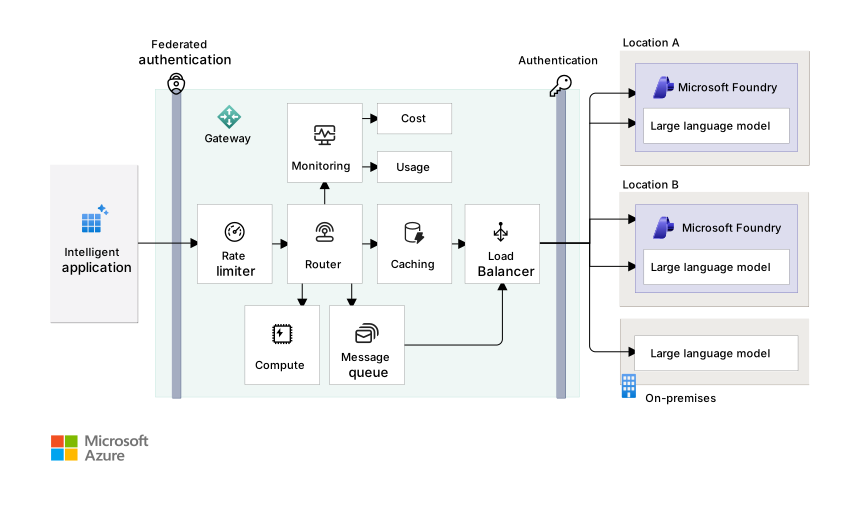
Download a Visio file of this architecture.
To address the challenges of exposing Foundry Models data plane APIs directly to consumers, you can inject a reverse proxy gateway to decouple the intelligent application from Foundry. The Gateway Offloading pattern shifts responsibility, complexity, and observability away from clients. It gives you an opportunity to augment Foundry by providing other capabilities that aren't built in. These capabilities include:
Potential to implement federated authentication.
Ability to control pressure on models through rate limiting.
Cross-cutting and cross-model monitoring.
Ability to introduce gateway aggregation and advanced gateway routing to multiple services, like routing low-priority messages to a queue for queue-based load leveling or to compute resources to handle tasks.
Load balancing that uses health endpoint monitoring to route only to healthy endpoints by circuit breaking on unavailable or overloaded model deployments.
Caching strategies to improve performance and cost optimization.
Some specific scenarios have more guidance available that directly addresses an API gateway and Foundry. Those scenarios are listed in the Next steps section.
Considerations
These considerations implement the pillars of the Well-Architected Framework, which is a set of guiding tenets that you can use to improve the quality of a workload. For more information, see Well-Architected Framework.
Make the decision to add a gateway as part of the application design, which is described in the Well-Architected Framework AI workloads on Azure guidance. As an architect, you need to decide whether to include this component.
When you introduce a new component into your architecture, you need to evaluate the newly introduced trade-offs. When you inject an API gateway between your clients and the Foundry data plane, you introduce new considerations into your architecture. Carefully evaluate whether the workload impact across these architectural considerations justifies the added value or utility of the gateway.
Reliability
Reliability helps ensure that your application can meet the commitments that you make to your customers. For more information, see Design review checklist for Reliability.
The gateway solution can introduce a single point of failure. This failure could come from service availability of the gateway platform, interruptions because of code or configuration deployments, or even misconfigured critical API endpoints in your gateway. Design your implementation to meet your workload's availability requirements. Consider resiliency and fault tolerance capabilities in the implementation by including the gateway in the failure mode analysis of the workload.
Your solution might require global routing capabilities if your architecture requires Foundry resource instances in multiple regions to increase the availability of your Foundry endpoints, such as the ability to continue to serve requests during a regional outage. That requirement adds topology complexity, including extra fully qualified domain names, TLS certificates, and global routing infrastructure to manage.
Important
Don't implement a gateway if it jeopardizes your workload's ability to meet agreed-upon service-level objectives (SLOs).
Security
Security provides protections against deliberate attacks and the misuse of your valuable data and systems. For more information, see Design review checklist for Security.
The addition of a gateway expands the workload's attack surface. Each new Azure resource requires its own identity and access management (IAM) configuration, hardening, and ongoing security maintenance.
The gateway can act as a network boundary transition between client network space and private Foundry network space. Even though the gateway makes a previously internet-facing Foundry endpoint private by using Azure Private Link, the gateway becomes the new point of entry and must be adequately secured.
A gateway is in a unique position to see raw request data and formulated responses from the language model, which could include confidential data from either source. Data compliance and regulatory scope now cover this other component.
A gateway can extend the scope of client authorization and authentication beyond Microsoft Entra ID and API key authentication, and potentially across multiple identity providers (IdP).
Data sovereignty must be factored into your multiple-region implementations. Ensure that your gateway compute and routing logic meet the sovereignty requirements placed on your workload.
Important
Don't implement a gateway if it leaves your workload unable to protect the confidentiality, integrity, or availability of itself or its users' data.
Cost Optimization
Cost Optimization focuses on ways to reduce unnecessary expenses and improve operational efficiencies. For more information, see Design review checklist for Cost Optimization.
All API gateways incur runtime costs that grow as you add reliability, security, and performance features. Introducing APIOps management also increases operational costs. Weigh those costs against the value that the gateway delivers. The goal is a net-positive trade-off where gateway capabilities justify the implementation and maintenance investment. In some workloads, you can offset costs by charging back usage to consumers.
To help manage costs when you develop and test a gateway, consider using a simulated endpoint for Foundry models. For example, use the solution in the Azure OpenAI API simulator GitHub repository.
Implement caching strategies in the gateway to optimize costs. Caching can help reduce the number of calls made to Foundry, which can save costs, especially for frequently accessed data or common requests. However, you need to carefully design caching strategies to ensure that they don't serve stale data or interfere with the freshness requirements of your workload.
Operational Excellence
Operational Excellence covers the operations processes that deploy an application and keep it running in production. For more information, see Design review checklist for Operational Excellence.
Your workload's monitoring solution needs to include the gateway. In some cases, clients might also need to monitor the gateway. You need to include gateway compute and operations in the workload's health modeling.
Your safe deployment practices need to address the deployment of the API gateway infrastructure and the code or configuration of the gateway routing. Your infrastructure automation and infrastructure as code (IaC) solution needs to consider how to treat your gateway as a long-lived resource in the workload.
You need to build or extend your APIOps approach to cover the APIs exposed in the gateway.
Some gateway functionality overlaps with capabilities already built into Azure AI Services or the Foundry data zone load distribution.
Performance Efficiency
Performance Efficiency refers to your workload's ability to scale to meet user demands efficiently. For more information, see Design review checklist for Performance Efficiency.
The gateway service might introduce a throughput bottleneck. Ensure that the gateway has adequate performance to handle full concurrent load and can easily scale in line with your growth expectations. Ensure elasticity in the solution so that the gateway can reduce supply, or scale down, when demand is low.
The gateway service must run processes for each request, and it introduces added latency for each API invocation. Optimize your routing logic to keep requests fast and reliable.
In most cases, the gateway should be geographically near both the users and Foundry resource instances to reduce latency. Network latency is usually a small percentage of time in overall API calls to language models, but it might be a competitive factor for your workload.
The gateway service might affect Foundry features that depend on persistent connections or stateful behavior. For example, streaming responses require the gateway to support long-lived connections without premature timeouts or buffering. Stateful interactions, such as the Responses API, require the gateway to maintain session affinity so that subsequent requests from the same session are routed to the same back-end instance. Ensure that your gateway implementation supports these capabilities when your workload relies on them.
Evaluate caching strategies that you can implement in the gateway to improve performance and cost optimization.
Important
Don't implement a gateway if it makes achieving negotiated performance targets impossible or there are too many other trade-offs.
Implementation options
Foundry provides the ability to configure an AI Gateway, which is backed by Azure API Management and natively integrated into the Foundry portal. This gateway is designed to support ingress to a single Foundry resource and doesn't span multiple resources. Workload teams can also implement their own gateway by using a standalone API Management instance or a custom-built gateway solution.
Use Azure API Management
Foundry has built-in integration with API Management as an AI gateway. You can use API Management integrated with Foundry or use API Management as a standalone gateway.
API Management is a platform-managed service designed to offload cross-cutting concerns for HTTP-based APIs. API Management has AI gateway capabilities. API Management is configuration driven and supports customization through its inbound and outbound request processing policy system. It supports highly available, zone-redundant, and even multiple-region replicas by using a single control plane.
Most of the gateway routing, security, caching, and request handling logic must be implemented in the policy system of API Management. You can combine built-in policies specific to AI, such as limiting large language model API token usage, emitting metrics for consumption of large language model tokens, enforcing content safety or caching responses, and editing your own custom policies. The GenAI gateway toolkit GitHub repository contains multiple custom API Management policies, along with a load-testing setup for testing the behavior of the policies.
When you design a solution that involves API Management, use the architecture best practices.
Using API Management for your gateway implementation is generally the preferred approach to building and operating a Foundry gateway. It's preferred because the service is a platform as a service (PaaS) that offers rich built-in capabilities, high availability, and networking options. It also has robust APIOps approaches to manage your completion APIs.
Use custom code
The custom code approach requires a software development team to create a custom coded solution and to deploy that solution to an Azure application platform of their choice. Building a self-managed solution to handle the gateway logic can be a good fit for workload teams proficient at managing network and routing code.
The workload can usually use compute that they're familiar with, such as hosting the gateway code on Azure App Service, Azure Container Apps, or Azure Kubernetes Service (AKS).
Custom code deployments can also be fronted with API Management when it's used exclusively for its core HTTP API gateway capabilities between your clients and your custom code. In this approach, your custom code interfaces exclusively with your Foundry HTTP APIs based on the necessary business logic.
The use of non-Microsoft gateway technology can be considered as part of this approach.
Example architecture
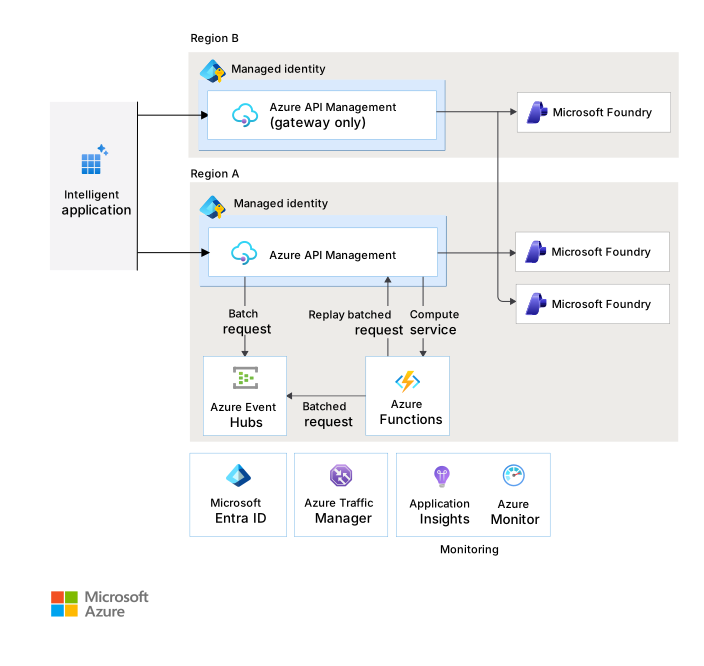
Download a Visio file of this architecture.
Next steps
The following articles cover specific scenarios where deploying a gateway between an intelligent application and Azure Foundry deployments addresses workload requirements:
- Use a gateway in front of multiple model deployments or instances
- Provide custom authentication to Foundry Models through a gateway
- Implement advanced monitoring for Foundry Models through a gateway