Note
Access to this page requires authorization. You can try signing in or changing directories.
Access to this page requires authorization. You can try changing directories.
Identity and access management (IAM) is a foundational element of cloud architecture. In on-premises systems, internal networks establish security boundaries. In cloud environments, perimeter networks and firewalls alone aren't sufficient for managing access to apps and data. Instead, public cloud systems rely on identity solutions for boundary security.
An identity solution controls access to an organization's apps and data. Users, devices, and applications have identities. IAM components support the authentication and authorization of these identities. Authentication controls who or what uses an account. Authorization controls what a user can do in applications.
Azure services for identity
Azure provides a range of services for identity:
Microsoft Entra ID is the core cloud-based identity and access management service that provides authentication, policy enforcement, and protection for users, devices, apps, and resources.
Microsoft Entra Domain Services is for managed domain services.
Microsoft Entra External ID is for customer and partner identity scenarios.
Microsoft Entra Private Access is for secure private network access.
Microsoft Entra Internet Access is for secure internet access.
Architecture
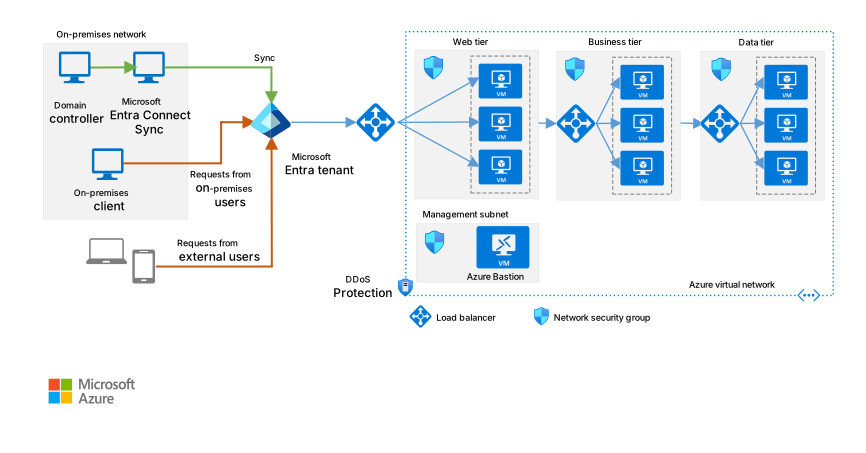
Download a Visio file of this architecture.
The previous diagram demonstrates a typical basic or baseline identity implementation. For real-world solutions that you can build in Azure, see Identity architectures.
Explore identity guides, architectures, and solution ideas
The articles in this section include guides and fully developed architectures that you can deploy in Azure and expand to production-grade solutions. Solution ideas demonstrate implementation patterns and possibilities to consider as you plan your identity proof-of-concept (POC) development. These articles can help you decide how to use identity technologies in Azure.
Identity guides
Technology choices. The following articles help you evaluate and select the best identity technologies for your workload requirements:
Compare self-managed Active Directory Domain Services, Microsoft Entra ID, and managed Microsoft Entra Domain Services: Compare three services that provide access to a central identity to determine the best fit for your scenario.
Choose the right authentication method for your Microsoft Entra hybrid identity solution: Evaluate authentication options, including password hash synchronization, pass-through authentication, and federation.
Multitenant identity
Architectural considerations for identity in a multitenant solution: Understand identity requirements for multitenant solutions, including authentication, authorization, and tenant isolation.
Architectural approaches for identity in multitenant solutions: Explore implementation approaches for identity in multitenant solutions, including Microsoft Entra ID and External ID.
Identity architectures
The following production-ready architectures demonstrate end-to-end identity solutions that you can deploy and customize.
Hybrid identity
Integrate on-premises Active Directory domains with Microsoft Entra ID: Best practices for integrating on-premises Active Directory domains with Microsoft Entra ID to provide cloud-based identity authentication.
Create an AD DS resource forest in Azure: Create a separate Active Directory domain in Azure that's trusted by domains in your on-premises Active Directory forest.
Deploy AD DS in an Azure virtual network: Extend an on-premises Active Directory domain to Azure to provide distributed authentication services.
Extend on-premises AD FS to Azure: Extend your on-premises network to Azure and use Active Directory Federation Services (AD FS) for federated authentication and authorization.
Cross-cloud identity
- Microsoft Entra identity management and access management for AWS: Deploy Microsoft Entra identity and access solutions for AWS to provide centralized identity management and strong single sign-on authentication.
Identity solution ideas
The following identity solution ideas demonstrate implementation patterns and possibilities to explore:
Build the first layer of defense by using Azure security services: Use Azure security services, including identity services like role-based access control (RBAC), MFA, and Conditional Access, to build a foundational security layer for your infrastructure.
Multilayered protection for Azure virtual machine access: Implement identity-based just-in-time access to Azure VMs by using Microsoft Entra ID, Conditional Access, and Privileged Identity Management.
Organizational readiness
Organizations at the beginning of the cloud adoption process can use the Cloud Adoption Framework for Azure to access proven guidance that accelerates cloud adoption.
Identity and access management design area: Evaluate options for your identity and access foundation, including authentication, authorization, separation of duties, and hybrid identity synchronization with Microsoft Entra ID.
Azure billing offers and Microsoft Entra tenants: Understand how billing offers associate with Microsoft Entra tenants and how subscriptions relate to tenant structures.
Resource organization: Establish consistent patterns for naming, tagging, subscription design, and management group hierarchy to organize identity and other resources deployed to the cloud.
To help ensure the quality of your identity solution on Azure, follow the guidance in the Azure Well-Architected Framework. The Well-Architected Framework provides prescriptive guidance for organizations that seek architectural excellence and describes how to design, provision, and monitor cost-optimized Azure solutions. For identity-specific guidance, see Architecture strategies for identity and access management, which covers authentication, authorization, conditional access, and identity lifecycle management across all five Well-Architected Framework pillars.
Best practices
Follow these best practices to improve the security, reliability, performance, and operational quality of your identity workloads on Azure.
Integrate on-premises Active Directory domains with Microsoft Entra ID: Best practices for integrating on-premises Active Directory domains with Microsoft Entra ID, including guidance for remote user access, self-service capabilities, and hybrid environments without VPN or Azure ExpressRoute connectivity.
Five steps to securing your identity infrastructure: A checklist for strengthening your organization's identity security posture with Microsoft Entra ID. It covers credential hardening, attack surface reduction, threat response automation, auditing, and self-service enablement.
Microsoft Entra security operations guide: Guidance for monitoring and detecting security threats to your Microsoft Entra ID environment. It covers baselines, accounts, applications, devices, and infrastructure.
Configure Microsoft Entra for increased security: Comprehensive security configuration checklist for Microsoft Entra ID. It's organized by Zero Trust themes, including identity protection, tenant isolation, network protection, and threat detection.
Microsoft Entra deployment plans: Deployment plans for key Microsoft Entra features, including multifactor authentication, Conditional Access, user provisioning, seamless SSO, and self-service password reset.
Understand the stages of migrating application authentication from AD FS to Microsoft Entra ID: Guidance on planning and implementing a phased migration of application authentication from AD FS to Microsoft Entra ID.
Plan application migration to Microsoft Entra ID: Overview of the four-phase migration process for moving application authentication from AD FS to Microsoft Entra ID, including project planning and stakeholder communication.
Resources for migrating applications to Microsoft Entra ID: Collection of resources, including migration playbooks, readiness scripts, and deployment plans, to help migrate application access and authentication to Microsoft Entra ID.
Stay current with identity
Azure identity services evolve to address modern data challenges. Stay informed about the latest updates and features.
To stay current with key identity services, see the following articles:
Microsoft Entra releases and announcements: Stay current with recent developments across the Microsoft Entra product family, including new features, plan-for-change announcements, and deprecations.
Azure updates: A roadmap showing new key features, updates, and announcements for Azure identity services.
Other resources
The following resources can help you discover more about Azure identity services.
Microsoft Entra ID in educational environments
These resources provide guidance for designing and deploying Microsoft Entra ID in educational institutions. They cover tenant architecture, identity governance, and credential management for students and faculty.
Introduction to Microsoft Entra tenants: Learn about Microsoft Entra tenants in educational environments, including tenant creation, identity security boundaries, directory objects, and administration.
Design a multitenant architecture for large institutions: Design principles and guidance for educational organizations that have more than 1 million users and need a multitenant Microsoft Entra architecture.
Design tenant configuration: Configure security and access policies across Microsoft Entra tenants, including external identities, Conditional Access, device management, and self-service options.
Design authentication and credential strategies: Authentication methods and credential management for educational organizations, including passwordless authentication, SSPR, and MFA for students and faculty.
Design an account strategy: Plan cloud-only and hybrid account creation strategies for large educational institutions, including provisioning with Microsoft Entra Connect and School Data Sync.
Design identity governance: Identity lifecycle management, entitlement management, access reviews, and Privileged Identity Management for educational organizations.
Microsoft Education Solution Guide: Deployment guidance for Microsoft 365 Education. It covers tenant setup, identity, applications, security, and device management across A1, A3, and A5 license tiers.
Amazon Web Services (AWS) or Google Cloud professionals
To help you get started quickly, the following articles compare Azure identity options to other cloud services and provide migration guidance:
Service comparison
Compare AWS and Azure identity management solutions: A comprehensive comparison of AWS and Azure identity services, including core identity, authentication and access control, identity governance, privileged access management, hybrid identity, and application authentication.
Microsoft Entra identity management and access management for AWS: Detailed guidance for deploying Microsoft Entra identity and access solutions for AWS, including SSO integration, role mapping, Conditional Access, and Privileged Identity Management.
Google Cloud to Azure services comparison—Security and identity: A comparison of Google Cloud and Azure security and identity services, including authentication, authorization, encryption, and threat detection.
Migration guidance
If you're migrating from another cloud platform, see the following articles:
Migrate security services from AWS to Azure: Guidance for migrating AWS security services to Azure, including SIEM migration to Microsoft Sentinel and customer identity migration to Microsoft Entra External ID.
Plan your workload migration from AWS to Azure: Includes guidance on planning identity management during migration, including mapping AWS IAM roles to Microsoft Entra ID roles, managed identities, and service principals.