Note
Access to this page requires authorization. You can try signing in or changing directories.
Access to this page requires authorization. You can try changing directories.
Azure Data Factory
Azure Databricks
Microsoft Fabric
Solution ideas
This article describes a solution idea. Your cloud architect can use this guidance to help visualize the major components for a typical implementation of this architecture. Use this article as a starting point to design a well-architected solution that aligns with your workload's specific requirements.
This article explains how to replicate and sync data to Azure during mainframe modernization. It describes the technical aspects of this solution idea, such as data stores, tools, and services. Mainframe and midrange systems update on-premises application databases at regular intervals. To maintain consistency, this solution syncs the latest data with Azure databases.
Architecture
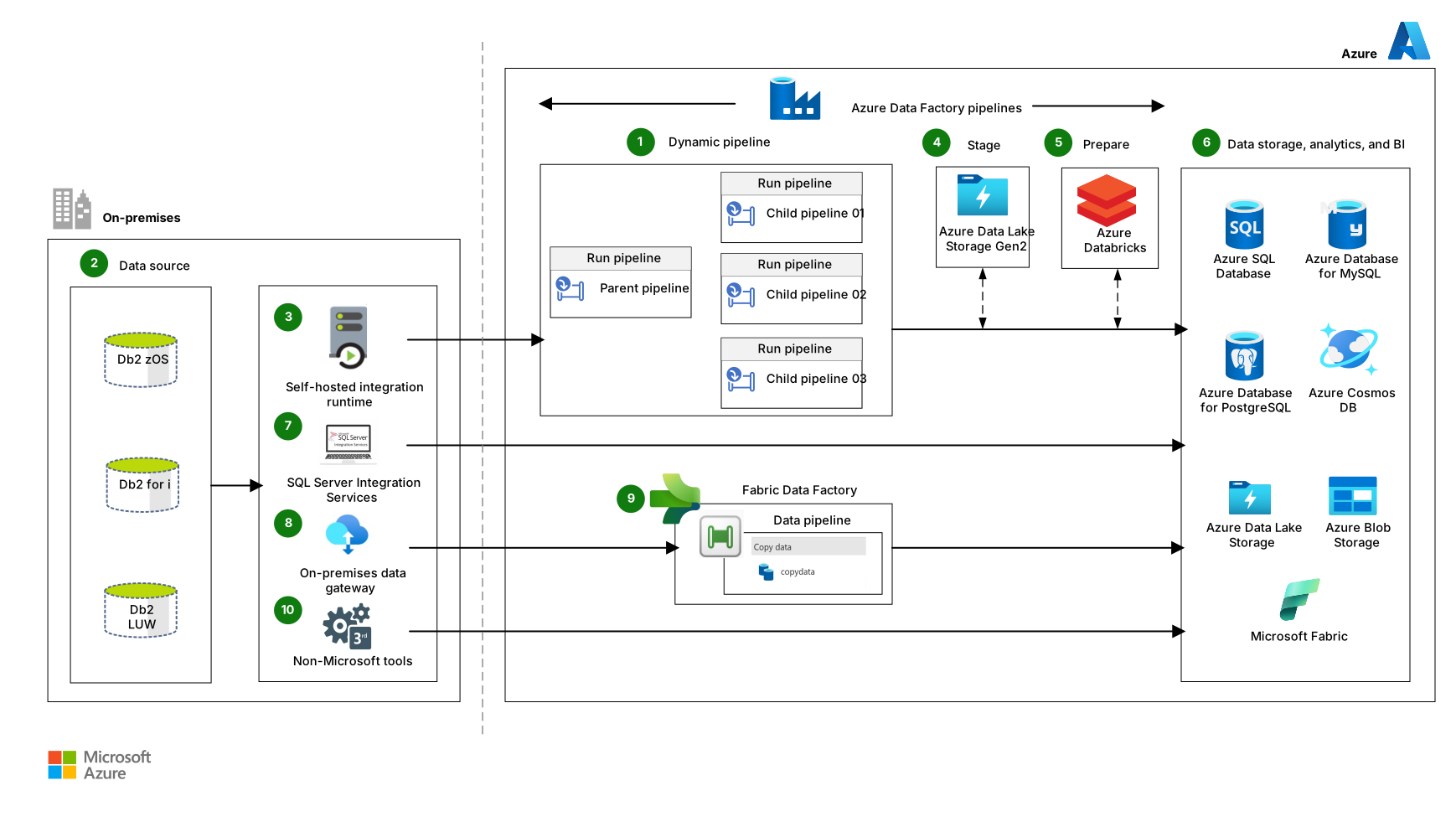
Download a Visio file of this architecture.
Workflow
The following workflow corresponds to the previous diagram:
Azure Data Factory dynamic pipelines orchestrate activities, including data extraction and data loading. You can schedule pipeline activities, start them manually, or trigger them automatically.
Pipelines group the activities that perform tasks. To extract data, Azure Data Factory dynamically creates one pipeline for each on-premises table. You can then use a massively parallel implementation when you replicate data in Azure. Configure the replication level based on your requirements.
Full replication. Replicate the entire database and modify data types and fields in the target Azure database.
Partial, delta, or incremental replication. Use watermark columns in source tables to sync the updated rows with Azure databases. These columns contain either a continuously incrementing key or a time stamp that indicates the table's last update.
Azure Data Factory also uses pipelines for the following transformation tasks:
Data-type conversion
Data manipulation
Data formatting
Column derivation
Data flattening
Data sorting
Data filtering
On-premises databases, like Db2 zOS, Db2 for i, and Db2 LUW, store the application data.
A self-hosted integration runtime (IR) provides the environment that Azure Data Factory uses to run and dispatch activities.
Azure Data Lake Storage Gen2 and Azure Blob Storage stage the data. This step might be required to transform and merge data from multiple sources.
For data preparation, Azure Data Factory uses Azure Databricks, custom activities, and pipeline dataflows to transform data quickly and effectively.
Azure Data Factory loads data into the following relational and nonrelational Azure databases:
Azure SQL
Azure Database for PostgreSQL
Azure Cosmos DB
Azure Data Lake Storage
Azure Database for MySQL
SQL Server Integration Services (SSIS) extracts, transforms, and loads data.
The on-premises data gateway is a local Windows client application that acts as a bridge between your local on-premises data sources and Azure services.
A Microsoft Fabric data pipeline is a logical grouping of activities that perform data ingestion from Db2 to Azure storage and databases.
If the solution requires near-real-time replication, you can use non-Microsoft tools.
If these tools can’t access the on-premises Db2 databases, extract the data and build a custom migration process to load the extracted files into the target databases.
Components
This section describes other tools that you can use during data modernization, data synchronization, and data integration.
Data integrators
Azure Data Factory is a hybrid data integration service. You can use this fully managed, serverless solution to create, schedule, and orchestrate extract, transform, and load (ETL) workflows and extract, load, and transform (ELT) workflows.
Fabric is an enterprise analytics platform that accelerates time to insight across data engineering, data warehousing, data integration, real‑time analytics, and business intelligence. Fabric is a software as a service (SaaS) solution that uses centralized storage in OneLake. Fabric combines the following technologies and services:
SQL technologies for enterprise data warehousing are available by using Fabric Data Warehouse, which is a managed, transactional warehouse that uses an open Delta format.
Large‑scale data engineering and machine learning are available by using Fabric Data Engineering, which includes built‑in Apache Spark capabilities.
Near-real-time analytics is available by using Fabric Real‑Time Intelligence, which includes eventhouses and eventstreams.
ETL and ELT workflows are available by using Fabric Data Factory, which includes pipelines, Dataflow Gen2, and a range of connectors with hybrid and on‑premises gateway support.
Fabric has native integrations with Power BI and with Azure services such as Azure Cosmos DB and Azure Machine Learning.
SSIS is a platform for enterprise-level data integration and transformation solutions. Use SSIS to manage, replicate, cleanse, and mine data.
Azure Databricks is a data analytics platform based on the Spark open-source distributed processing system. Azure Databricks is optimized for the Azure cloud platform. In an analytics workflow, Azure Databricks reads data from multiple sources and uses Spark to provide insights.
Data storage
Azure SQL Database is a fully managed, cloud-based platform as a service (PaaS). SQL Database provides AI-powered automated features that optimize performance and durability. Serverless compute and Hyperscale storage options automatically scale resources on demand.
Azure SQL Managed Instance is a fully managed, intelligent, and scalable cloud database service that has SQL Server engine compatibility. Use SQL Managed Instance to modernize existing apps at scale.
SQL Server on Azure Virtual Machines rehosts code-compatible SQL Server workloads in the cloud. SQL Server on Azure Virtual Machines combines the performance, security, and analytics of SQL Server with the flexibility and hybrid connectivity of Azure. To migrate existing apps or build new apps, use SQL Server on Azure Virtual Machines.
Azure Database for PostgreSQL is a fully managed relational database service based on the community edition of the open-source PostgreSQL database engine. Azure Database for PostgreSQL provides scalable application innovation features.
Azure Cosmos DB is a globally distributed, multiple-model database. Use Azure Cosmos DB to ensure that your solutions can elastically and independently scale throughput and storage across multiple geographic regions.
Data Lake Storage is a storage repository that holds large amounts of native and raw data. Data lake stores are optimized for scaling to terabytes and petabytes of data. The data typically comes from multiple heterogeneous sources and can be structured, semistructured, or unstructured. Data Lake Storage Gen2 combines Data Lake Storage Gen1 capabilities with Blob Storage. Data Lake Storage Gen2 provides file system semantics, file-level security, and scale. It also provides the tiered storage, high availability, and disaster recovery capabilities of Blob Storage.
Azure Database for MySQL is a fully managed relational database service based on the community edition of the open-source MySQL database engine.
Other tools
Microsoft Service for Distributed Relational Database Architecture (DRDA) is a component of Host Integration Server. Microsoft Service for DRDA is an application server that DRDA application requester (AR) clients use. Examples of DRDA AR clients include IBM Db2 for z/OS and Db2 for i5/OS. These clients use the application server to convert Db2 SQL statements and run them on SQL Server.
SQL Server Migration Assistant (SSMA) for Db2 automates migration from Db2 to Microsoft database services. The SSMA for Db2 tool runs on a virtual machine. It converts Db2 database objects into SQL Server database objects and creates those objects in SQL Server.
Alternatives
This architecture shows options and Azure database targets for mainframe data replication and synchronization. You can also replicate and sync to the following Azure SQL targets:
SQL Managed Instance is a fully managed cloud database service. SQL Managed Instance is compatible with SQL Server engine. Use SQL Managed Instance to modernize apps at scale.
SQL Server on Azure Virtual Machines rehosts SQL Server workloads in the cloud without code changes. SQL Server on Azure Virtual Machines combines the performance, security, and analytics of SQL Server with the flexibility and hybrid connectivity of Azure. To migrate existing apps or to build new apps, use SQL Server on Azure Virtual Machines.
Scenario details
Data availability and integrity are essential to mainframe and midrange modernization. Data-first strategies help keep data intact and available during migration to Azure. To prevent disruptions during modernization, you might need to replicate data quickly or sync on-premises data with Azure databases.
This solution covers:
Extraction. Connect to and extract data from a source database.
Transformation, including:
Staging: Temporarily store data in its original format and prepare it for transformation.
Preparation. Transform and manipulate data by using mapping rules that meet target database requirements.
Loading. Insert data into a target database.
Potential use cases
Use this solution in the following data replication and sync scenarios:
Command Query Responsibility Segregation architectures that use Azure to service all inquiry channels
Environments that test on-premises applications and parallel rehosted or reengineered applications
On-premises systems that use tightly coupled applications that require phased remediation or modernization
Recommendations
You can apply the following recommendations to most scenarios. Follow these recommendations unless you have a specific requirement that overrides them.
If you use Azure Data Factory to extract data, tune copy activity performance. When you use Fabric Data Factory to extract data, adjust parallelism, batch size, and connector settings to optimize pipeline performance. For more information, see Pipeline overview and Connector overview.
Contributors
Microsoft maintains this article. The following contributors wrote this article.
Principal author:
- Rodrigo Rodríguez | Senior Cloud Solution Architect, AI & Quantum
To see nonpublic LinkedIn profiles, sign in to LinkedIn.