Note
Access to this page requires authorization. You can try signing in or changing directories.
Access to this page requires authorization. You can try changing directories.
To manage your expenses for Azure NetApp Files, you need to understand its cost model, including effective capacity, pricing, and billing concepts.
Overview
Azure NetApp Files prices storage based on provisioned capacity and provisioned performance. You allocate capacity through capacity pools and consume it through volumes. You deliver performance either as throughput proportional to provisioned capacity (Standard, Premium, Ultra service levels) or as throughput provisioned independently of capacity (Flexible service level). The service meters all consumption hourly and invoices monthly, so it can quickly respond to dynamic resizing and dynamic service-level changes.
This article describes the billing model, the relationship between capacity and performance, the capabilities that lower effective price, and the paid add-on capabilities like Azure NetApp Files backup and cross-region replication (CRR) that introduce additional billing components. It also includes worked examples that illustrate how these capabilities compound to improve effective capacity and effective pricing.
Billing fundamentals
Capacity pools – provisioned capacity billing
Azure NetApp Files bills for a combination of provisioned storage throughput and capacity, not for the amount of data stored. You purchase capacity and throughput through capacity pools, which are the main units of billing. You allocate volumes from those pools. You incur charges based on the service level for the provisioned size of the pool, regardless of how much of that capacity you allocate to volumes.
Because billing follows provisioning, initial sizing decisions and dynamic changes over time directly determine cost. You should size volumes and capacity pools to match the capacity and performance the workload requires. Continuously consider dynamic changes to adjust for the right balance between capacity, performance, and cost.
Hourly metering, monthly billing
The service measures capacity pool allocation every hour. Each hour, the service records the pool size, the service level, and – for the Flexible service level – the provisioned throughput in effect at that hour. The monthly Azure bill accrues the hourly readings.
Hourly metering is the foundation of cost optimization in Azure NetApp Files. Any change that takes effect during a billing period – resizing a pool or volume, changing a service level, or adjusting Flexible service level throughput – is reflected in the next hourly measurement. You can continuously right size volumes, capacity pools, and workloads without forcing long-term commitments on the underlying capacity pool.
Important
Cost equals the integral of provisioned capacity – and for the Flexible service level, provisioned throughput – over time. Lowering either value at any point during the month reduces the bill from that hour forward.
Capacity pools and volumes
As mentioned earlier, capacity pools are the main units for provisioning and billing. Volumes are the units for consumption.
Sizing rules
- Capacity pools: A capacity pool has a minimum size of 1 TiB. You can resize it in 1 TiB increments up to the maximum capacity pool size of 2,048 TiB. You can also resize it in 1 TiB decrements down to the capacity allocated to the volumes in the capacity pool.
- Volumes: You can size a regular volume from 50 GiB to 100 TiB. Large volumes support up to 2 PiB, or 7.2 PiB for extra-large volumes with cool access enabled.
- A volume has both a capacity quota and a throughput quota. Auto QoS sets the throughput quota automatically as a function of the capacity quota. Manual QoS sets the throughput quota independently. The capacity quota subtracts from the parent pool's provisioned size. The sum of volume capacity quotas in a pool can't exceed the pool size. This rule is equally true for provisioned throughput towards the throughput quota.
Capacity and throughput accounting
For a volume, you measure capacity consumption against the quota by logical capacity, the sum of active filesystem data and snapshot data. The capacity pool itself is billed on its provisioned size, independent of how much volume capacity is allocated or how much data is written within the volume in the hosting capacity pool.
You account for throughput at the volume level against the capacity pool throughput quota. With auto QoS, the quota scales linearly with the volume’s capacity allocation. With manual QoS, you set the quota independently. Across a Flexible service level pool, the sum of volume throughput quotas can't exceed the throughput provisioned on the pool. The pool’s provisioned throughput drives the throughput component of the bill.
How throughput is provisioned and billed
You provision throughput in Azure NetApp Files through the capacity pool's service level. Two models are available.
Linear service levels: Standard, Premium, Ultra
The Standard, Premium, and Ultra service levels provide throughput in a fixed proportion to the provisioned capacity. Each TiB of pool capacity carries a defined throughput allocation, so total throughput scales linearly with pool size. You pay a single rate per GiB-hour that varies by service level: Standard has the lowest rate and lowest throughput per TiB, and Ultra has the highest of all.
These service levels suit workloads where required performance scales with the size of the dataset, and where the operational simplicity of a single capacity-driven dimension is preferred.
| Service level | Throughput per TiB | How throughput is provisioned | How throughput is billed |
|---|---|---|---|
| Standard | 16 MiB/s | Proportional to pool capacity | Included in capacity rate (GiB-hour) |
| Premium | 64 MiB/s | Proportional to pool capacity | Included in capacity rate (GiB-hour) |
| Ultra | 128 MiB/s | Proportional to pool capacity | Included in capacity rate (GiB-hour) |
| Flexible | 0-640 MiB/s (independently configurable) | Provisioned separately from capacity | Throughput (MiB/s-hour) add-on |
Flexible service level
The Flexible service level decouples throughput from capacity. You provision a Flexible service level capacity pool with a chosen capacity and a separately chosen throughput. The pool includes a baseline throughput allocation of 128 MiB/s, and you can add another throughput in 1 MiB/s increments without changing pool capacity (with a maximum of 640 MiB/s per TiB).
Billing for a Flexible service level pool has two components: a per-GiB-hour charge for provisioned capacity, plus a per-MiB/s-hour charge for provisioned throughput above the baseline. You can adjust capacity and throughput independently at any time, and the next hourly measurement captures the updated values.
The Flexible service level suits workloads in which the ratio of throughput to capacity doesn't align with the fixed ratios of the linear service levels – for example, a small dataset that requires high throughput, or a large dataset that requires only modest throughput.
Selecting a service level
- Standard, Premium, Ultra: Use when throughput requirements scale predictably with data volume and a single capacity dimension simplifies operations.
- Flexible: Use when capacity and throughput requirements move independently, when overprovisioning one dimension to obtain the other would be wasteful, or when capacity and performance must be tuned separately during the workload lifecycle.
Capacity consumption
Logical and physical capacity
Logical capacity is the amount of data presented in the active filesystem data, plus the delta data stored in snapshots. Physical capacity is the amount of storage occupied on the system.
Snapshots and short-term clones allow logical capacity to exceed physical capacity, because common data blocks are shared rather than duplicated.
Capacity allocation and consumption of snapshots
Snapshots consume capacity against the parent volume's quota and are therefore not allocated nor billed separately. Snapshots are block-level differential: the physical consumption of the volume equals only the blocks in one or more snapshots plus the changed blocks in the active filesystem.
Example: a 100 TiB volume has active filesystem consumption of 80 TiB and two snapshots that hold 10 TiB of differential data. The volume's logical consumption is 80 TiB of active data and two snapshots that present another full 80 TiB point-in-time view – each, totaling a 240 TiB logical view. The physical consumption allocated against the volume quota, however, is only 90 TiB - not 240 TiB.
As a planning rule of thumb, a 20 percent capacity buffer is sufficient to retain at least a week of snapshots for many workloads. Actual snapshot capacity depends on snapshot retention and the daily block-level change rate.
Capacity allocation and consumption of short-term clones
Short-term clones are similar to snapshots in that they initially share unchanged blocks with the parent volume, but they differ in two important ways: a short-term clone is writable, and it's created with its own volume quota and performance allocation. The shared blocks inherited from the source snapshot don't require a full second copy of the dataset. Instead, the clone’s quota acts as write buffer capacity for blocks that diverge after creation. In auto QoS pools, the clone’s throughput is determined by the quota assigned to the clone; in manual QoS pools, throughput is assigned independently. As a result, sizing a short-term clone isn't about duplicating the parent volume’s full logical size, but about allocating enough capacity and performance for the expected write working set during the clone’s lifetime.
Quota accounting in a capacity pool
Consider a capacity pool with 12 TiB provisioned, containing three volumes:
- Volume A: 5 TiB quota, 4.5 TiB consumed (4 TiB active, 500 GiB snapshots); 500 GiB free.
- Volume B: 3 TiB quota, 2.5 TiB consumed (2.5 TiB active); 500 GiB free.
- Volume C: 2 TiB quota, fully consumed (1.5 TiB active, 500 GiB short-term clone buffer).
The pool is billed for the provisioned 12 TiB. Of that, 10 TiB is allocated to volume quotas, 9 TiB is consumed, and 8 TiB is in active use. 1 TiB remains free within the quotas, and the remaining 2 TiB is unallocated.
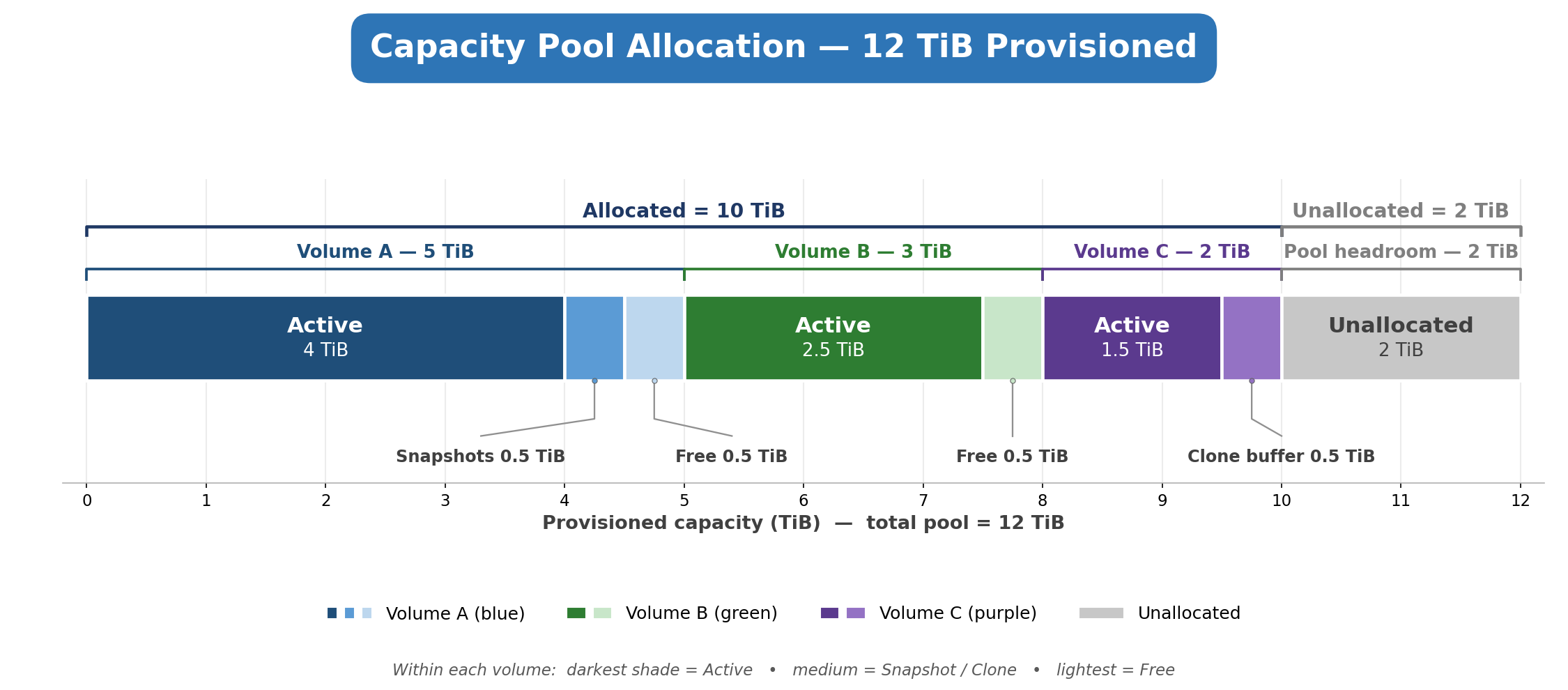
This diagram shows how a 12 TiB capacity pool is divided across three volumes plus unallocated headroom, broken out by allocated, consumed, free, and unallocated space.
The five layers of capacity
| Layer | What it is | Total |
|---|---|---|
| Allocated | Capacity assigned to volumes via quota (Vol A: 5 + Vol B: 3 + Vol C: 2). | 10 TiB |
| Consumed | Space actually used inside each quota - active data plus snapshots/clones. | 9 TiB |
| Active | The live filesystem data is currently in use. | 8 TiB |
| Free | Unused space within a volume (500 GiB in Vol A + 500 GiB in Vol B; Vol C is full). | 1 TiB |
| Unallocated | Pool capacity not assigned to any volume - available to grow or create new volumes. | 2 TiB |
Understanding the colors shading
| Color shade | What it represents |
|---|---|
| Dark | Active data in use. |
| Medium | Snapshots, reserved or used (Vol A), or short-term clone buffer (Vol C). |
| Light | Free space available within the volume. |
| Gray | Pool space isn't allocated to any volume. |
Per-volume breakdown
| Volume | Quota (Allocated) | Consumed | Active | Snapshots / Clones | Free |
|---|---|---|---|---|---|
| Volume A | 5 TiB | 4.5 TiB | 4 TiB | 500 GiB snapshots | 500 GiB |
| Volume B | 3 TiB | 2.5 TiB | 2.5 TiB | — | 500 GiB |
| Volume C | 2 TiB | 2 TiB | 1.5 TiB | 500 GiB clone buffer | 0 (full) |
| Unallocated | — | — | — | — | 2 TiB |
Bottom line: of the 12 TiB pool, 9 TiB is consumed, 1 TiB is free within quotas, and 2 TiB remains unallocated - roughly 3 TiB of total headroom before the pool fills.
Dynamic right sizing
Because Azure NetApp Files is metered hourly, it supports continuous capacity, throughput, and cost balancing through three dynamic adjustments. Each adjustment takes effect on the next hourly billing boundary.
Dynamic capacity resizing
You can resize capacity pools and volumes in place without downtime. When capacity requirements change, adjust the pool accordingly. Billing reflects the new provisioned size at the next hourly meter reading. This feature allows workloads with short peak periods to be sized for those periods instead of being provisioned at peak for the entire month.
Dynamic service-level change
You can change a volume between Standard, Premium, and Ultra service level pools to change the throughput available to it. Billing follows the service level in effect at each hour, so a workload that requires Ultra performance only during a periodic batch window can return to Standard or Premium between windows.
Dynamic throughput adjustment (Flexible service level)
Flexible service level capacity pools support independent adjustment of throughput. You can raise throughput before a high-performance phase and lower it afterward, without resizing capacity. You can raise capacity before a data growth phase and lower it afterward, without changing throughput.
Tip
Hourly metering removes the tradeoff between provisioning for peak and paying for idle. The provisioning profile of a workload over a month is an hourly step function. The bill is the integral of that function, not the maximum value it touches.
Built-in cost-optimization capabilities
Azure NetApp Files includes capabilities that lower storage cost by reducing the rate paid per GiB/h, by reducing the capacity that you must provision, or by aligning provisioned resources to actual demand. These capabilities are independent and compound when used together.
Storage with cool access (transparent data tiering)
The Azure NetApp Files storage with cool access capability moves infrequently accessed data blocks from a capacity pool to a lower-cost Azure Storage. A coolness period (between 2 and 183 days) defines how long a block must remain untouched before it's tiered off. Reads on tiered data are transparent, and affected blocks are rewarmed to the Azure NetApp Files hot tier, depending on access pattern.
Every service level supports storage with cool access. The performance profile for active blocks is unaffected. For storage with cool access, data in the cool tier is billed separately, doesn't count toward hot-tier capacity pool provisioning, and isn't covered by reserved capacity.
Reserved capacity
Reserved capacity is a commitment to a defined quantity of Azure NetApp Files capacity. The reservation applies a discount to the per-GiB rate for capacity within the reservation. You pay pay-as-you-go rates for usage beyond the reservation.
You can combine reservations across service levels, but they don't stack with higher level discounting arrangements such as MACC.
In Azure NetApp Files, storage with cool access reservations cover provisioned capacity in the capacity pool. They don't apply to data residing in the cool access tier, which is already billed at the lower cool-tier rate.
Space-efficient snapshots and short-term clones
Snapshots are read-only, and short-term clones are read-write point-in-time virtual copies of a volume. Because only changed blocks are stored, the physical capacity consumed by snapshots and short-term clones is typically a small fraction of the volume's allocated size.
Snapshots and short-term clones reduce costs in two ways. First, they remove the need to provision separate volumes to retain historical copies for short-term recovery or create full volume copies for short-cycle test and development scenarios. Second, they increase the logical capacity represented by a given amount of provisioned capacity, which in turn lowers the cost per GiB of actual stored, physical data.
Snapshots are the primary mechanism for fast data recovery in Azure NetApp Files. They don't replace backups. For long-term retention, protection against accidental volume deletion, and resilience to failures, pair snapshots with Azure NetApp Files backup.
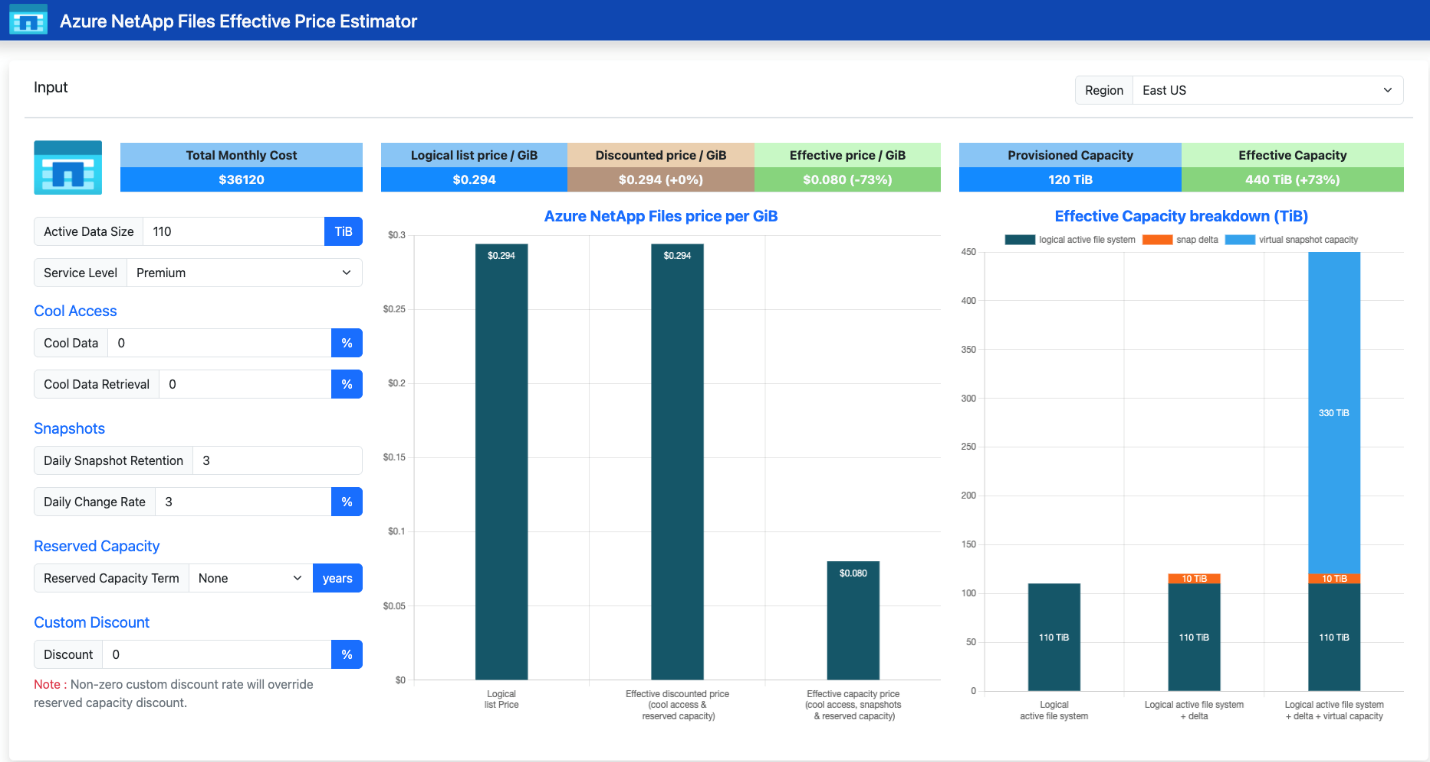
Snapshots increase effective capacity by sharing unchanged data blocks with the active volume.
A short-term clone is a writable volume created from a snapshot. The clone shares common blocks with its parent and consumes physical storage only for new or modified blocks within the clone volume, and is independent of the parent volume.
Short-term clones eliminate the need to provision full copies for development, test, analytics, or forensic workloads when the source dataset is large, but the expected write working set is small. In the estimator, you can approximate this need by using the snapshot daily change rate for the clone write buffer space.
For example, if snapshots use a 3 percent daily change rate and the estimated write buffer space is 5 percent, the estimator can use an 8 percent combined change rate. This approach provides a practical way to model clone-related capacity without sizing the clone as a full second copy.
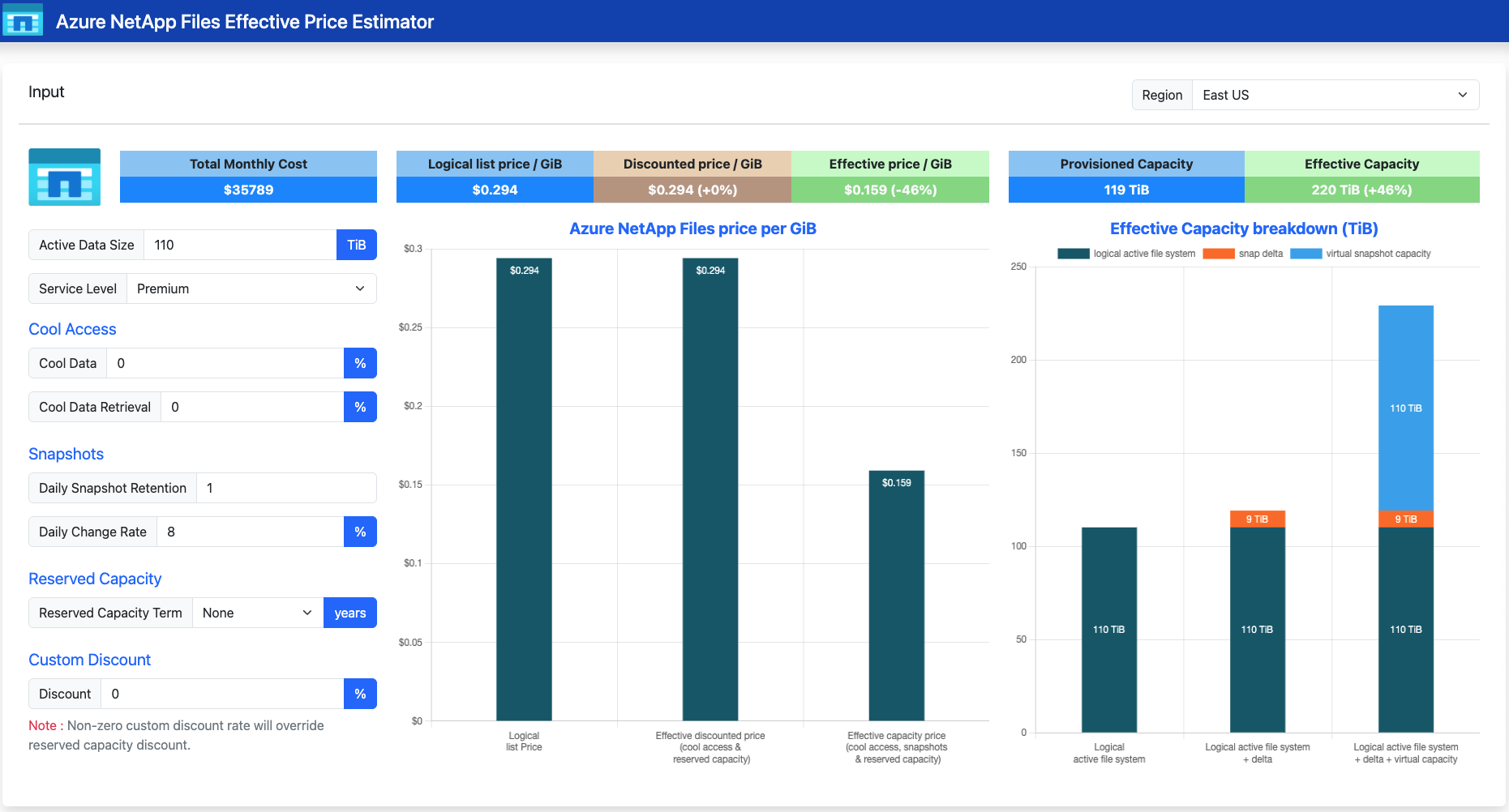
Illustrative short-term clone estimation example. Use the snapshot change rate and clone write buffer together to approximate short-term clone capacity in the estimator.
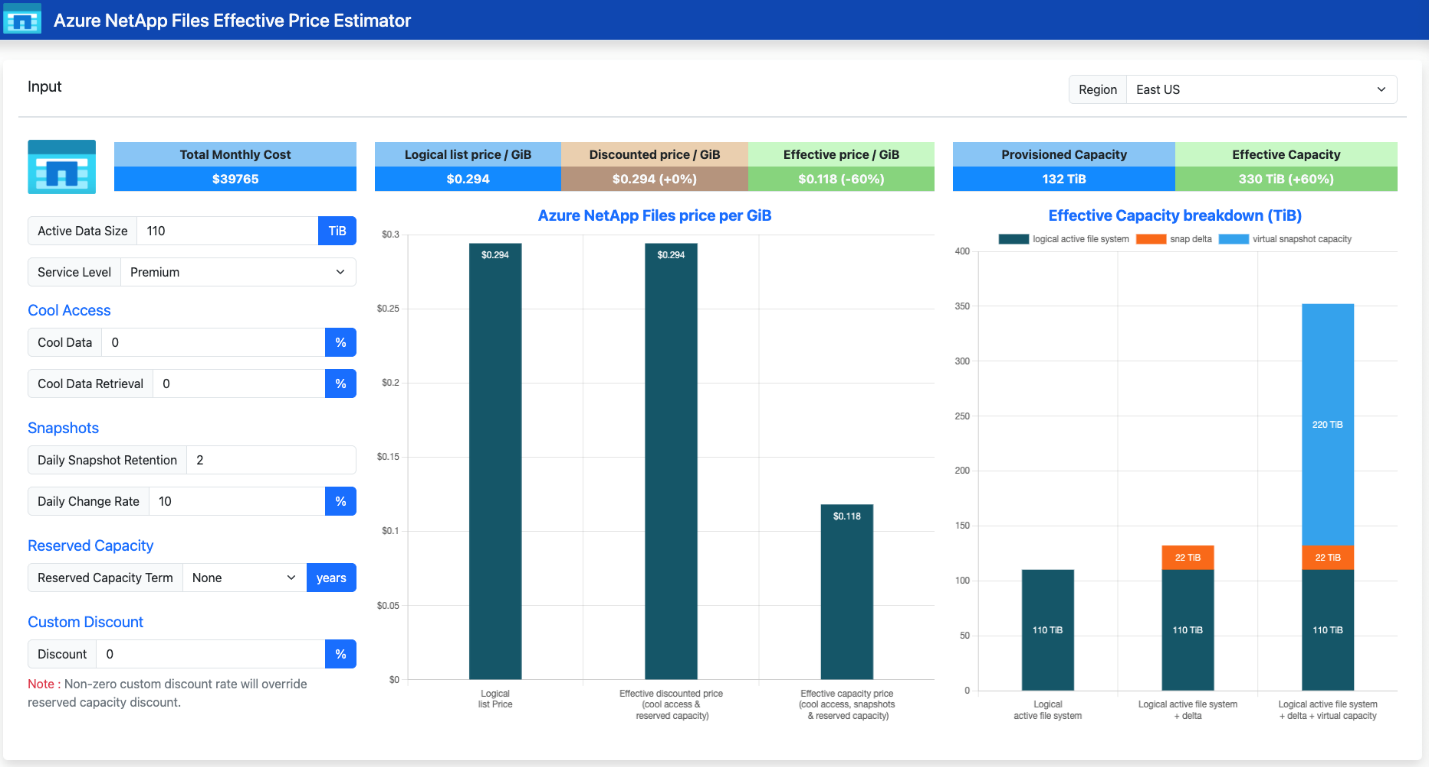
A short-term clone consumes physical storage only for blocks that diverge from its parent.
Flexible service level as a cost-efficiency lever
When throughput requirements and capacity requirements don't match the fixed ratios of the linear service levels, the flexible service level removes the overprovisioned dimension from the bill. This benefit is most pronounced for high-throughput, low-capacity workloads and for high-capacity, low-throughput workloads such as disaster-recovery copies and archives.
Consider an example workload that requires only 1 TiB of capacity with 512 MiB/s throughput and see the difference between a capacity pool provisioned with Ultra and flexible service level. This difference is a cost example of a high-throughput, low-capacity workload.
| Option | Capacity | Throughput | Monthly cost |
|---|---|---|---|
| Ultra service level | 4 TiB | 512 MiB/s | $1,609 |
| Flexible service level | 1 TiB | 512 MiB/s | $976 |
Illustrative saving: 39%
Conversely, consider an example workload that requires 550 TiB of capacity with only 128 MiB/s throughput and see the difference between a capacity pool provisioned with Standard and flexible service level. This difference is a cost example of a low-throughput, high-capacity workload.
| Option | Capacity | Throughput | Monthly cost |
|---|---|---|---|
| Standard service level | 550 TiB | 128 MiB/s | See example pricing |
| Flexible service level | 550 TiB | 128 MiB/s baseline | Lower cost than Standard |
Illustrative savings: 25%
This difference is a cost example of a low-throughput, high-capacity workload.
Flexible service level capacity pools support cool access, snapshots, short-term clones, replication, and back up. None of these capabilities are mutually exclusive to the flexible service level.
Billed add-on capabilities
Beyond the main capacity pool billing unit, Azure NetApp Files offers paid add-on features. Each feature is billed separately from capacity pool provisioning and adds its own line items to the monthly bill.
Azure NetApp Files backup
Azure NetApp Files backup stores volume snapshots in Azure storage outside the volume, providing long-term retention and protection against accidental volume deletion. Backup billing has two components: a per-GiB-month rate for backup vault storage consumed (only changed blocks are stored after the first full baseline), and a per-GiB rate for restore operations. Because only differential blocks are retained after the initial baseline, ongoing backup storage growth tracks the snapshot’s change rate rather than its full logical size at the file level.
Cross-region replication (CRR)
Cross-region replication asynchronously replicates a source volume to a destination volume in another Azure region for disaster recovery. The destination volume is provisioned in a capacity pool in the destination region and is billed at that pool’s normal rate. In addition, replicated data transfer between regions is metered and billed at a per-GiB transfer rate. Replication schedules (10 minute, hourly, daily) and change rates influence the amount of changed data transferred but don't affect the destination capacity charge, which follows the destination pool’s provisioned size. To optimize costs for idle disaster recovery data, a destination volume provisioned with Flexible service level can be configured at the 128 MiB/s baseline throughput rate, minimizing cost while the replica isn't serving production traffic.
Effective capacity and effective price concepts
Effective capacity
Effective capacity is the total logical data accessible relative to the provisioned capacity. Snapshots increase effective capacity by preserving point-in-time views, and short-term clones extend that benefit by providing writable, virtual copies that consume only differential blocks.
Example: a fully consumed 50 TiB volume with four snapshots accumulating 5 TiB of snapshot space presents 250 TiB of logical capacity (the active filesystem plus four point-in-time views) with provisioned and consumed capacity being (only) 55 TiB.
Effective price
The effective price concept is the cost per GiB of logical data after accounting for tiering, reservations, effective capacity gains, and any negotiated discount.
Tip
Effective price per GiB = (total cost ÷ effective capacity in GiB) − applicable discounts
These capabilities lower effective price in two ways: they reduce the overall cost you pay, and/or they increase the amount of usable data you get from the same provisioned capacity. Reservations and cool access help lower cost, while snapshots, short-term clones, and Flexible service level right sizing help you get more value from the capacity you provision.
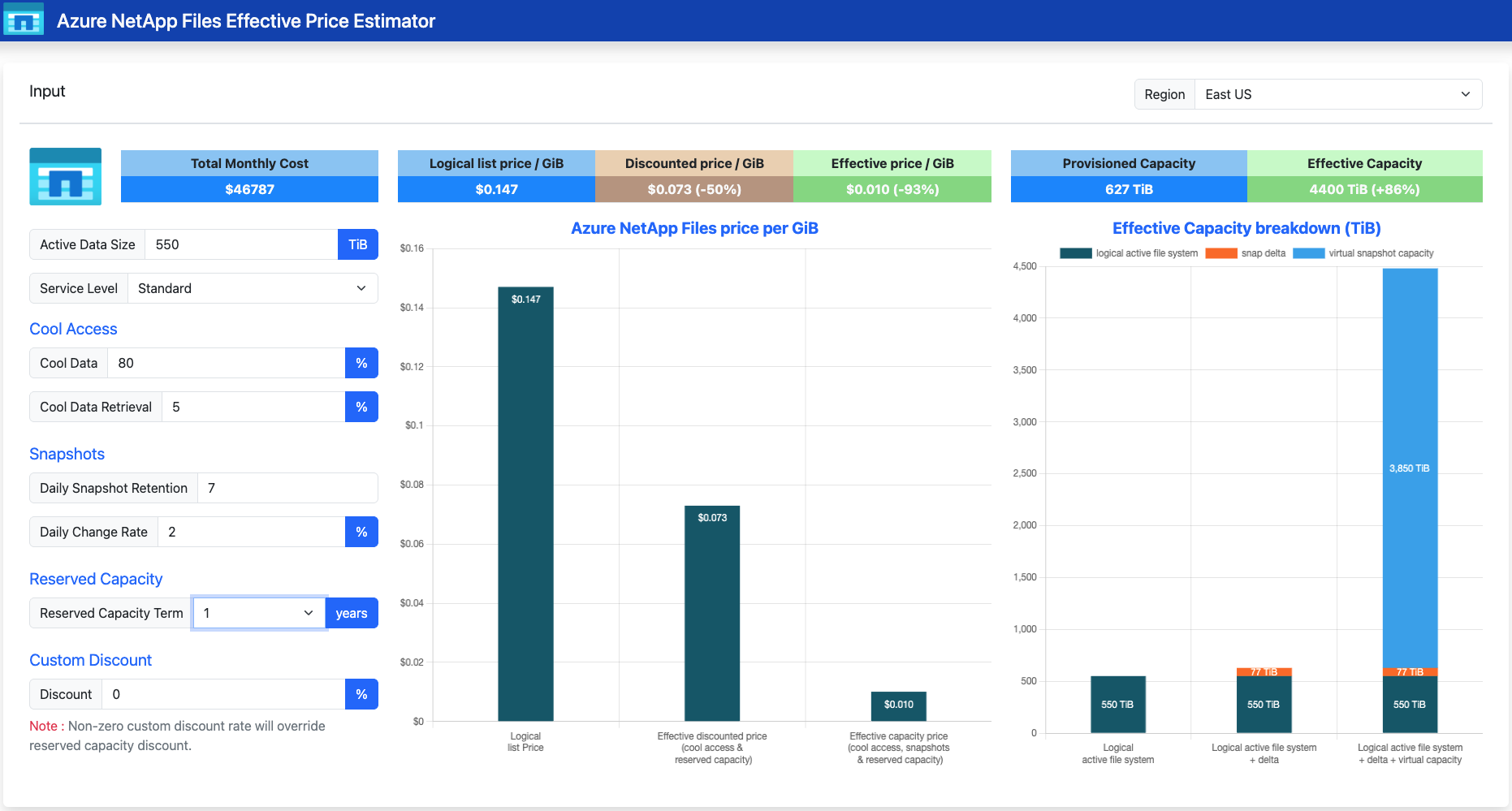
Effective price reflects discounts and capability-driven capacity gains applied to the list rate.
Cost modeling examples
Pricing in the examples uses representative rates and is region dependent. Consult the Azure NetApp Files pricing page for current rates in your region.
Example 1: Dynamic capacity resizing
A workload uses a Premium capacity pool with the following monthly profile: 24 hours at 10 TiB, 96 hours at 24 TiB, 24 hours at 5 TiB, 480 hours at 6 TiB, and the remainder at 0 TiB. You pay $0.000403 per GiB-hour for capacity.
| Scenario | Calculation | Monthly cost |
|---|---|---|
| Static provisioning at peak | 24 TiB × 720 hours × $0.000403 per GiB-hour | $7,130.97 |
| Dynamic provisioning | 10 TiB × 24h + 24 TiB × 96h + 6 TiB × 480h at $0.000403 per GiB-hour | $2,238.33 |
Saving: $4,892.64 per month (69%)
Example 2: Dynamic service-level change
Capacity is constant at 24 TiB. Performance requirements vary: 384 hours at Standard ($0.000202 per GiB-hour), 120 hours at Premium ($0.000403), 168 hours at Ultra ($0.000538), and 48 hours back at Standard.
| Scenario | Calculation | Monthly cost |
|---|---|---|
| Static provisioning for peak | 24 TiB × 720 hours × $0.000538 per GiB-hour | $9,519.76 |
| Dynamic service-level change | Standard 432h + Premium 120h + Ultra 168h at the stated hourly rates | $5,549.38 |
Saving: $3,970.38 per month (42%)
Example 3: Storage with cool access and reservations
An organization has 550 TiB of file-share data on a Standard capacity pool. List price is $0.147 per GiB-month. An estimated 80 percent of data (440 TiB) is tiered to the cool tier at $0.059 per GiB-month. 110 TiB remains in the hot tier. A 100 TiB, 1-year Standard service level reservation (18% discount) covers a portion of the hot tier.
| Scenario | Calculation | Monthly cost |
|---|---|---|
| Base | 550 TiB × $0.147 per GiB-month | $83,049 |
| With storage with cool access | 110 TiB hot × $0.147 + 440 TiB cool × $0.059 | $44,031 |
| With cool access + reserved capacity | Hot tier after 18% discount on 100 TiB equivalent + cool tier unchanged | $41,041 |
Effective price drops from $0.147 to $0.073 per GiB-month (about 50% lower than base).
Example 4: Snapshots
A 110 TiB Premium volume retains three daily snapshots. The daily change rate is 3%. Premium list price is $0.294 per GiB-month.
| Scenario | Capacity | Monthly cost |
|---|---|---|
| Base case | 110 TiB Premium volume | $33,138 |
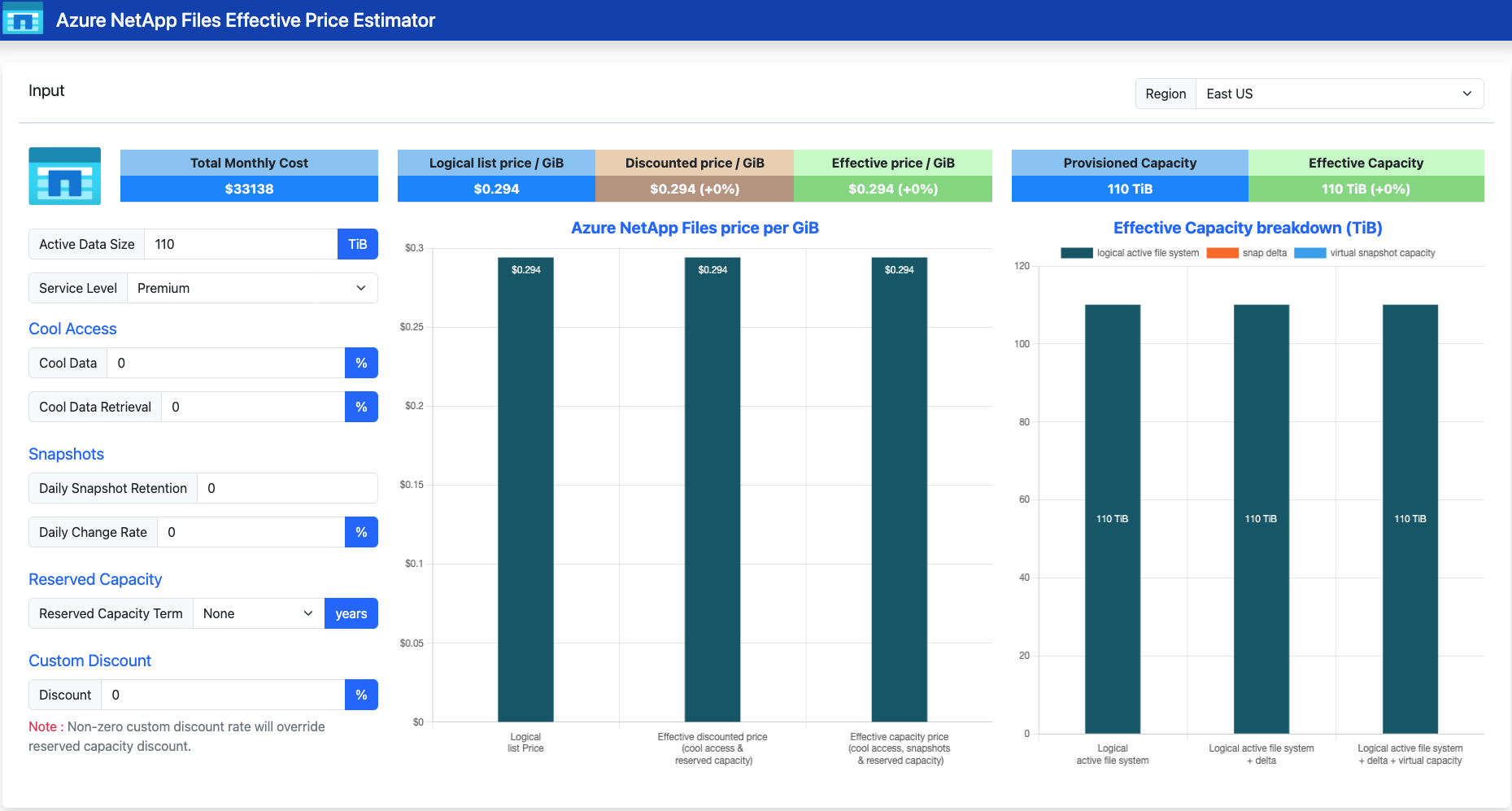
Base case: 110 TiB Premium volume without snapshots.
With daily snapshots:
- Three daily snapshots at a 3% change rate add approximately 10 TiB of differential data
- Total consumed capacity is about 120 TiB
- Logical footprint is 440 TiB (the active dataset plus three recoverable point-in-time views)
- Effective price falls to approximately $0.080 per GiB of accessible data, or about 73% of the list price for the same recoverable footprint
| Metric | With daily snapshots |
|---|---|
| Differential capacity added | About 10 TiB |
| Total consumed capacity | About 120 TiB |
| Logical footprint | 440 TiB |
| Effective price | About $0.080/GiB accessible data |
With daily snapshots: quadrupled effective capacity at a small incremental physical cost.
Example 5: Short-term clones
A 50 TiB Premium service level source volume is used to create a short-term clone for test and analytics. The expected write working set in the clone is 5 TiB. Premium list price is $0.294 per GiB-month.
| Scenario | Provisioned capacity | Monthly cost |
|---|---|---|
| Conventional writable copy | 50 TiB Premium | $15,063 |
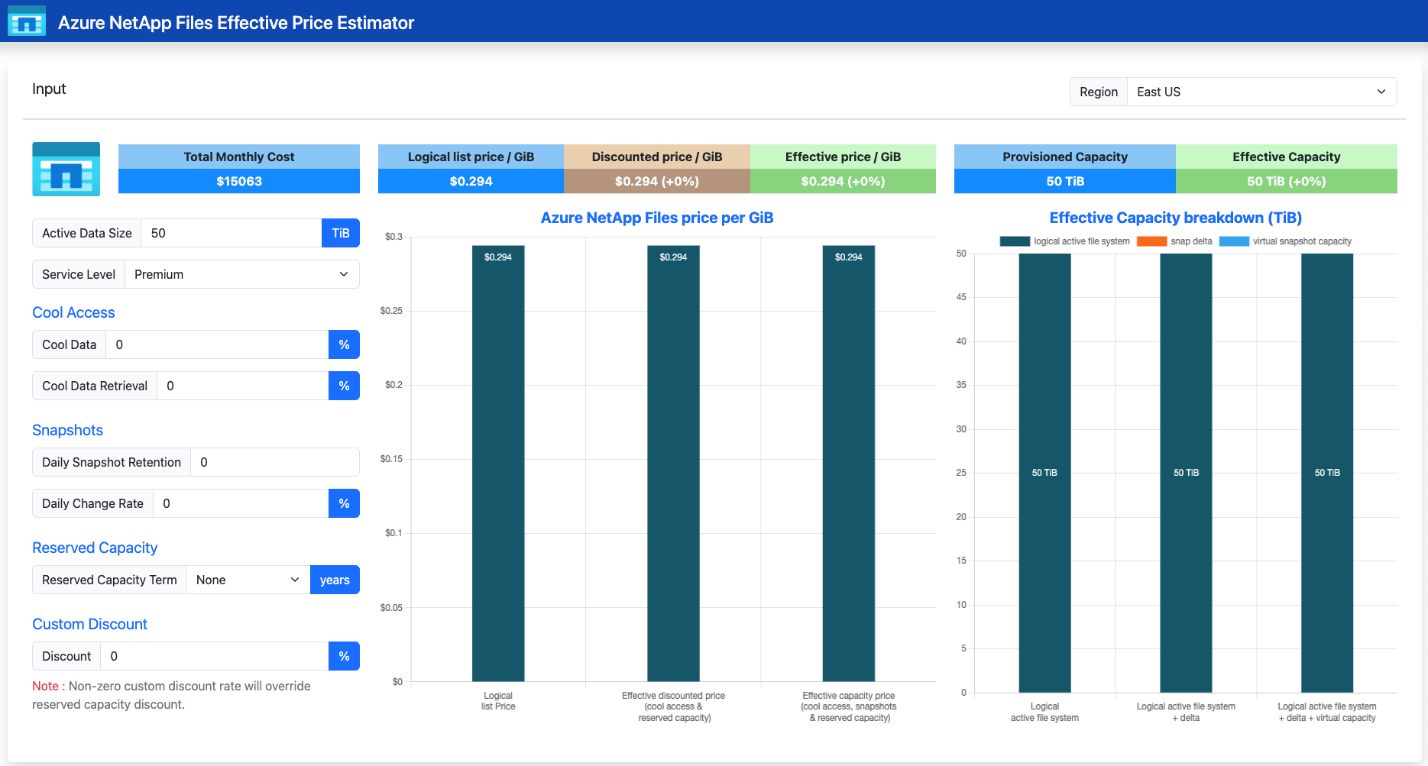
With a short-term clone:
- Provisioned capacity is 5 TiB instead of 50 TiB, sized only for the expected 5 TiB write working set
- 5 TiB × 1024 GiB/TiB × $0.294 = $1,506 per month, a reduction of approximately 90%
| Scenario | Provisioned capacity | Monthly cost |
|---|---|---|
| Short-term clone | 5 TiB Premium | $1,506 |
Approximate reduction: 90%

With a short-term clone, the source dataset remains shared while capacity is provisioned only for the expected write working set.
Example 6: Flexible service level aligned to workload
Four workloads, each compared between a linear service level provisioned to meet peak throughput and a Flexible service level configuration sized to actual throughput and capacity requirements.
| Workload | Linear provisioning | Cost / month | Flexible configuration | Cost / month | Saving |
|---|---|---|---|---|---|
| Analytics (small data, high I/O) | 4 TiB Ultra (for 512 MiB/s) | $1,609 | 1 TiB Flexible with 512 MiB/s | $976 | 39% |
| EDA simulation (very high I/O) | 36 TiB Ultra (for ~4,500 MiB/s) | $14,478 | 7 TiB Flexible with 4,480 MiB/s | $10,582 | 27% |
| DB (large, moderately high I/O) | 100 TiB Premium (for 6,400 MiB/s) | $30,125 | 75 TiB Flexible with 6,400 MiB/s | $22,577 | 25% |
| Disaster recovery (large, low I/O) | 175 TiB Standard (unused performance) | $26,425 | 175 TiB Flexible at 128 MiB/s baseline | $19,753 | 25% |
In each case, the Flexible service level removes the overprovisioned dimension from the bill. Where the workload requires high throughput on a small dataset, capacity is reduced. Where the workload requires large capacity at low throughput, throughput is reduced to baseline.
Compounding effective capacity and effective price concepts
A 110 TiB dataset uses three daily snapshots with a 3% daily change rate and a short-term clone sized with a 5% write buffer for test and analytics. Of the primary dataset, 80% is eligible for storage with cool access. The hot tier remains on Premium service level, with a 100 TiB reservation covering most of that provisioned capacity. The disaster-recovery copy is hosted on Flexible service level at the 128 MiB/s baseline to keep idle replication costs low.
Base:
- Primary workload: 110 TiB of Premium storage.
- Temporary writable copy: provisioned as a second 110 TiB Premium volume.
- Disaster recovery destination: provisioned as a 110 TiB Premium volume in the destination region.
- Total provisioned Premium capacity: 330 TiB before snapshots and replication transfer charges.
- Monthly storage cost: approximately $99,414 at $0.294 per GiB-month.
- Effective price: remains at list price because each extra copy is provisioned as a near-full duplicate.
| Component | Provisioned capacity | Monthly cost |
|---|---|---|
| Primary workload | 110 TiB Premium | Included below |
| Temporary writable copy | 110 TiB Premium | Included below |
| Disaster recovery destination | 110 TiB Premium | Included below |
Total provisioned Premium capacity: 330 TiB | Monthly storage cost: about $99,414
With compound optimization:
- Hot tier: 22 TiB Premium after tiering; monthly cost about $8,870.
- Cool tier: 88 TiB in cool access; monthly cost about $5,304.
- Reserved capacity: 100 TiB reservation covers most of the hot-tier Premium capacity
- Snapshots: Three daily snapshots at a 3 percent change rate add about 10 TiB of differential capacity.
- Logical footprint: expands from 110 TiB to about 440 TiB.
- Consumed capacity: rises to only about 120 TiB.
- Short-term clone: 5 percent write buffer instead of a second full 110 TiB volume; monthly cost about $1,506.
- Disaster recovery copy: Flexible service level at the 128 MiB/s baseline keeps idle cost low.
| Optimization component | Result | Monthly cost / impact |
|---|---|---|
| Hot tier | 22 TiB Premium after tiering | About $8,870 |
| Cool tier | 88 TiB in cool access | About $5,304 |
| Reserved capacity | 100 TiB reservation covers most hot-tier Premium capacity | Reduces hot-tier rate |
| Snapshots | Three daily snapshots add about 10 TiB differential capacity | Raises logical footprint to about 440 TiB |
| Consumed capacity | About 120 TiB | Much lower than full-copy alternatives |
| Short-term clone | 5% write buffer instead of a second full 110 TiB volume | About $1,506 |
| Disaster recovery copy | Flexible service level at 128 MiB/s baseline | Keeps idle DR cost low |
Bottom line: effective price is lower because cost goes down while usable capacity goes up.
This example shows how the cost levers compound rather than compete: storage with cool access and reservation coverage reduces the rate paid for the primary copy, snapshots and short-term clones increase the amount of logical data represented by a given amount of provisioned capacity, and Flexible service level prevents overprovisioned disaster-recovery throughput from inflating the monthly bill. The result is a materially lower effective price for the same protected and testable data estate.
Summary
The Azure NetApp Files cost model is based on three key properties:
- Provisioning drives billing. Cost reflects the provisioned capacity (and, for the Flexible service level, the provisioned throughput) - not the data stored.
- Metering is hourly. Dynamic resizing, dynamic service-level changes, and dynamic Flexible throughput adjustments take effect within an hour and flow into the monthly invoice.
- Capabilities compound. Cool access, reserved capacity, snapshots, short-term clones, and the Flexible service level address different parts of the cost equation and can be combined.
Sizing pools and volumes to actual demand, choosing the service level that matches the capacity-to-throughput ratio of the workload, and layering the built-in optimization capabilities together produces the lowest effective price for a given functional requirement.
Effective capacity and effective price provide the lens for understanding the full economic value of Azure NetApp Files. Effective capacity describes how much logical data can be represented or protected by a given amount of provisioned capacity when capabilities such as snapshots and short-term clones reuse unchanged blocks instead of creating full copies. Effective price expresses the resulting cost per GiB of useful data after combining those efficiency gains with lower-cost tiering, reservations, and workload-aligned provisioning such as the Flexible service level.
Together, these concepts show that the Azure NetApp Files cost model isn't just about the list price of provisioned capacity. It's about how efficiently the service converts provisioned capacity and throughput into usable, protected, and recoverable data at the lowest possible cost.
Next steps
- Azure NetApp Files pricing page
- Service levels for Azure NetApp Files
- Resource limits for Azure NetApp Files
- Cost model for cross-region replication
- Reservations for Azure NetApp Files
- Cool access in Azure NetApp Files
- How Azure NetApp Files snapshots work
- Short-term clones in Azure NetApp Files
- Azure NetApp Files backup
- Understand volume quota
- Monitor the capacity of a volume
- Resize the capacity pool or a volume
- Manage billing by using tags
- Capacity management FAQs
- Azure pricing calculator for Azure NetApp Files
- Azure NetApp Files tools