Note
Access to this page requires authorization. You can try signing in or changing directories.
Access to this page requires authorization. You can try changing directories.
This article provides step-by-step instructions to revert all parameters to their default values for an Azure Database for PostgreSQL flexible server.
Steps to revert all parameters to their default values
Using the Azure portal:
Select your Azure Database for PostgreSQL flexible server.
In the resource menu, under the Settings section, select Parameters.

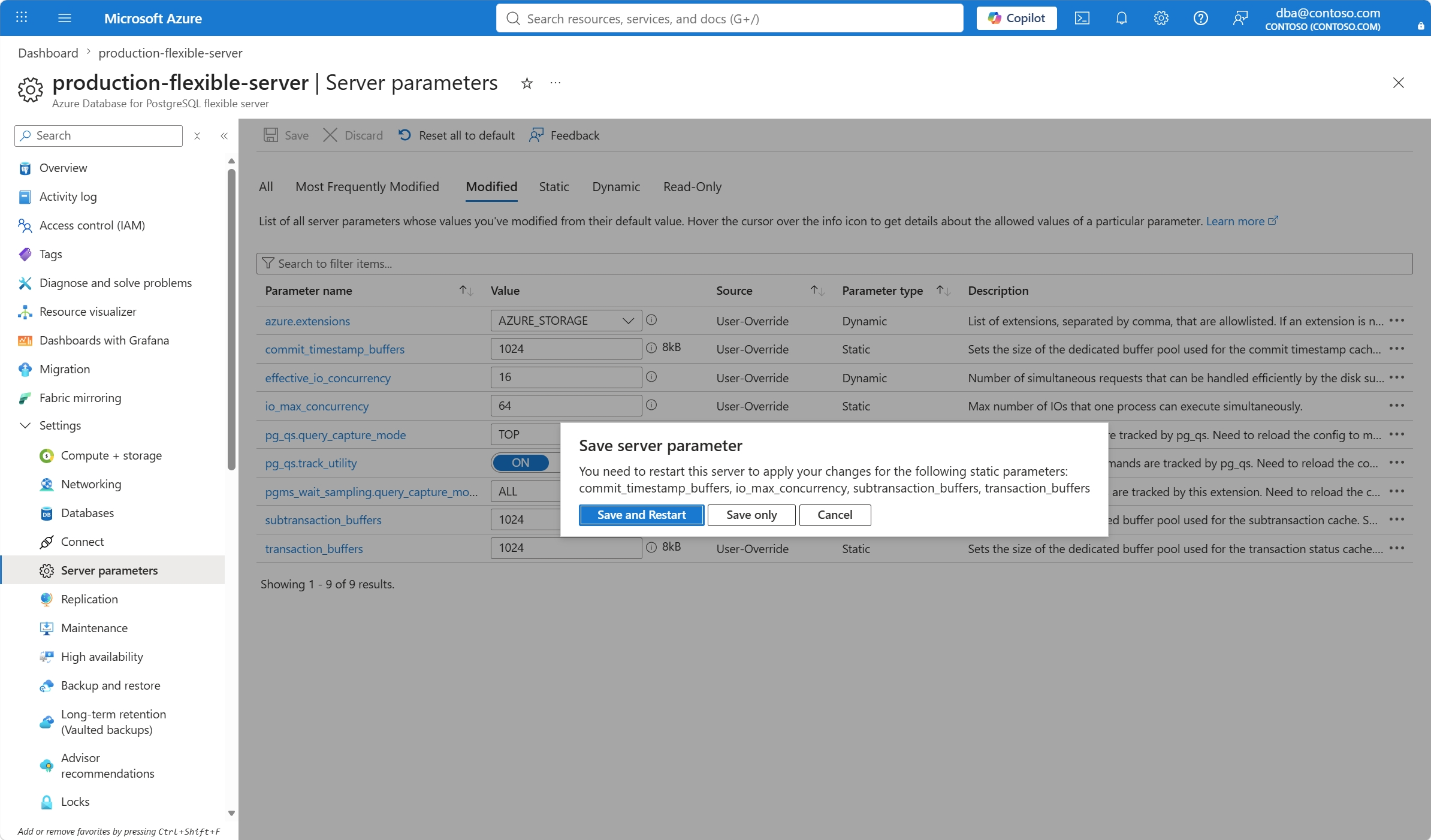
Select the Modified tab.

Select Reset all to default.

If you want to proceed with resetting all modified parameters to their default values, confirm the operation in the Reset all to default values dialog.

If, for any of the parameters whose current value doesn't match their default, the column Parameter type is equal to Static, the server requires a restart for the change to take effect. In that case, a dialog pops up so that you can select if you want to:
- Save and Restart: Persist all changes you made to all parameters whose values you modified, and immediately after restart the server for any changes to static parameters to take effect.
- Save only: Persist all changes you made to all parameters whose set values changed, but defer the server restart to a later time. Until you complete the server restart action, changes to static parameters don't take effect.
- Cancel: Don't implement any changes yet.