Note
Access to this page requires authorization. You can try signing in or changing directories.
Access to this page requires authorization. You can try changing directories.
Note
Community interest groups have now moved from Yammer to Microsoft Viva Engage. To join a Viva Engage community and take part in the latest discussions, fill out the Request access to Finance and Operations Viva Engage Community form and choose the community you want to join.
This article provides information about replenishment methods. It also explains how the multiple order quantity for a product affects the result.
Replenishment methods are also known as coverage methods and lot-sizing methods.
Coverage codes
You can configure master planning to use different replenishment methods. Replenishment methods are the techniques that the system uses to calculate requirements for a product. Replenishment methods are defined by coverage codes that you can set up on either the coverage group or the product.
Use the following coverage codes:
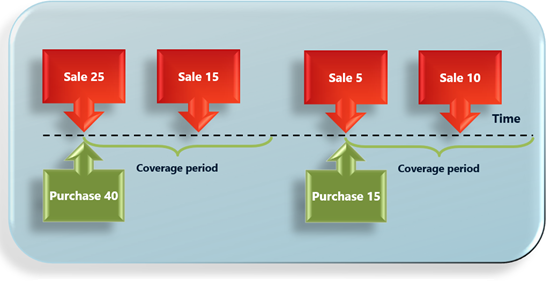
Period – The replenishment method combines all the demand for a period into one order for the product. The order is planned for the first day of the period, and its quantity fulfills the net requirements during the established period. The period starts with the first demand of the product and covers the defined length of time. The next period starts with the next requirements of the product. Use the Period coverage code for non-predictable inventory draw, season-influenced products, or high-cost products. The following illustration shows an example.
Requirement – In the replenishment method, the system creates a planned purchase, transfer, or production order per requirement for the product. Use this method for expensive products that have intermittent demand. The Requirement coverage code is often used for configurable products or make-to-order scenarios. The following illustration shows an example.

Min./Max. – The replenishment method is based on the inventory level. It defines the replenishment of inventory up to a specific level when the predicted on-hand level is below a specific threshold. The replenishment quantity is the difference between the maximum level and the predicted on-hand level. Use the Min./Max. coverage code for predictable inventory draw, high runners, or less expensive products. The following illustration shows an example.

Manual – In the replenishment method, the system doesn't suggest purchase, transfer, or production orders for the product. Instead, the planner for the product is responsible for creating the required orders for the replenishment of the product. Use the Manual coverage code for products for which you don't want the system to generate planned orders.
Impact of the order quantity from default order settings
On the Default order setting page for a released product, you can specify each of the following quantity settings on the Purchase order, Inventory, and Sales order FastTabs. (The Inventory FastTab is used for both transfer orders and production orders.)
Multiple – Planned orders are a multiple of this quantity.
For example, if the Multiple field is set to 5, an order can be for a quantity of 5, 10, 15, 20, and so on.
Min. order quantity – Planned orders aren't less than the specified value.
For example, if the Min. order quantity field is set to 10, a planned order for a quantity of 10 is created, even if only four are required to fulfill the demand.
Max. order quantity – Planned orders don't exceed the specified value. If the demand is more than the Max. order quantity value, multiple planned orders are created to cover it.
For example, if the Max. order quantity field is set to 100, and the demand is 450, four planned orders for a quantity of 100 and one planned order for a quantity of 50 are created.
Examples of replenishment that use the Min./Max. coverage code
If you don't specify a value in the Multiple field for a product on the Default order setting page, and if you're using the Min./Max. replenishment method, master planning replenishes the inventory up to a specific level when the predicted on-hand level is below a specific threshold.
If you define a multiple quantity for a product, the Min./Max. replenishment method changes its behavior and considers the Multiple value.
In other words, master planning still replenishes the inventory up to the defined maximum level when the predicted on-hand level is less than the defined minimum level. However, the replenishment quantity must be a multiple of the Multiple value.
If the replenishment quantity (the difference between the maximum level and the predicted on-hand level) isn't a multiple of the defined multiple quantity, master planning uses the first possible value that, together with predicted on-hand level, is below the maximum level. If the sum is less than the minimum level, master planning uses the first value that, together with predicted on-hand, is above the maximum level.
The following subsections provide some examples that show how the multiple order quantity for a product affects the result of the Min./Max. replenishment method.
Example 1
A product has the following configuration:
- Coverage code: Min./Max.
- Minimum: 15
- Maximum: 22
- Multiple: 0
The product has 10 pieces of on-hand inventory, and there's no other demand or supply.
When master planning runs, it creates a planned order for 12 pieces to replenish inventory to the maximum quantity.
Example 2
A product has the following configuration:
- Coverage code: Min./Max.
- Minimum: 15
- Maximum: 22
- Multiple: 5
The product has 10 pieces of on-hand inventory, and there's no other demand or supply.
When master planning runs, it creates a planned order for 10 pieces (because 15 pieces of replenishment plus 10 pieces of on-hand inventory exceed the maximum quantity).
Example 3
A product has the following configuration:
- Coverage code: Min./Max.
- Minimum: 21
- Maximum: 24
- Multiple: 5
The product has 10 pieces of on-hand inventory, and there's no other demand or supply.
When master planning runs, it creates the planned order for 15 pieces (because 10 pieces of replenishment plus 10 pieces of on-hand inventory are less than the minimum quantity).