Note
Access to this page requires authorization. You can try signing in or changing directories.
Access to this page requires authorization. You can try changing directories.
Data Factory in Microsoft Fabric (Fabric Data Factory) is the next generation of Azure Data Factory. By using OneLake as the unified storage layer, Fabric Data Factory reduces infrastructure complexity and data movement. Pipelines can work directly with live data through OneLake shortcuts and cross-tenant sharing.
This article compares the core features, activities, connectors, and infrastructure components of both services. To plan a migration, see the migration planning guide.
Compare features side by side
Here's how the core features stack up between Azure Data Factory and Fabric Data Factory. The table highlights what's changed, what's new, and what stays the same.
| Azure Data Factory | Data Factory in Fabric | What's different |
|---|---|---|
| Pipeline | Pipeline | Better integration: Pipelines in Fabric work seamlessly with Lakehouse, Data Warehouse, and other Fabric services right out of the box. Fabric pipelines include more SaaS-based activities and differ in JSON definitions. See our pipeline feature comparison for more details. |
| Mapping data flow | Dataflow Gen2 | Easier to use: Dataflow Gen2 gives you a simpler experience for building transformations. We're adding more mapping dataflow features to Gen2 all the time. |
| Activities | Activities | More activities coming: We're working to bring all your favorite ADF activities to Fabric. Plus, you get new ones like the Office 365 Outlook activity that aren't available in ADF. See our activity comparison for details. |
| Dataset | Connections only | Simpler approach: No more complex dataset configurations. For Data Factory in Fabric you use connections to link to your data sources and start working. Fabric eliminates datasets, defining data properties inline within activities. |
| Linked Service | Connections | More intuitive: Connections work like linked services but are easier to set up and manage. |
| Triggers | Schedule and file event triggers | Built-in scheduling: Use Fabric's scheduler and Reflex events to automatically run your pipelines. File event triggers work natively in Fabric without extra setup. Fabric integrates triggers into its Activator framework, unlike ADF’s standalone triggers. |
| Publish | Save and Run | No publishing step: In Fabric, skip the publish step entirely. Just select Save to store your work, or select Run to save and execute your pipeline immediately. |
| Autoresolve and Azure Integration runtime | Not needed | Simplified architecture: No need to manage integration runtimes. Fabric handles the compute for you. |
| Self-hosted integration runtimes | On-premises Data Gateway | Same on-premises access: Connect to your on-premises data using the familiar On-premises Data Gateway. Learn more in our on-premises data access guide. |
| Azure-SSIS integration runtimes | To be determined | Future capability in Fabric: We're still working on the design for SSIS integration in Fabric. |
| Managed virtual networks and private endpoints | To be determined. | Future capability in Fabric: We're still working on integration for managed virtual networks and private endpoints in Fabric. |
| Expression language | Expression language | Same expressions: Your existing expression knowledge transfers directly. The syntax is nearly identical. |
| Authentication types | Authentication kinds | More options: All your popular ADF authentication methods work in Fabric, plus we've added new authentication types. |
| CI/CD | CI/CD | Enhanced capabilities beyond ADF include easy cherry-picking, individual item promotion, Git repo enablement, and built-in SaaS CI/CD options. |
| ARM template export/import | Save as | Quick duplication: In Fabric, use "Save as" to quickly duplicate pipelines for development or testing. |
| Monitoring | Monitoring hub + Run history | Advanced monitoring: The monitoring hub offers a modern experience with cross-workspace insights and better drill-down capabilities. |
| Debugging | Interactive mode | Simplified debugging: Fabric eliminates ADF’s debug mode. You’re always in interactive mode. |
| Change Data Capture (CDC) | Copy jobs | Incremental data movement: Fabric manages incremental data movement through Copy jobs instead of CDC artifacts. |
| Azure Synapse Link | Mirroring | Data replication: Fabric replaces Azure Synapse Link with mirroring features for data replication. |
| Execute pipeline activity | Invoke pipeline activity | Cross-platform invocation: Fabric enhances ADF’s Execute pipeline activity with cross-platform invocation. |
Pipeline feature comparison
| Category | ADF Pipelines | Fabric Pipelines |
|---|---|---|
| Type of service | Data Integration PaaS Service | Data Integration SaaS Service |
| Authoring Environment | Azure portal (ADF Studio) | Fabric / PBI workspace (unified UX with Lakehouses, Warehouses, etc.) |
| Pipeline Orchestration | Full-featured pipelines with activities, triggers, parameters | Same orchestration model, re-imagined for Fabric UX |
| Data Movement | Copy activity, mapping data flows, on-premises IR support, Managed virtual network | Copy activity, Dataflows Gen2, built-in connectivity to OneLake and Fabric items, OneLake shortcuts for live data access without copy, On-premises Data Gateway, virtual network gateway |
| Compute / IR | Self-hosted, SSIS and Azure IR (for movement + transformation) | Cloud connections, On-premises, and virtual network gateway |
| Data Flows | Azure Blob, Data Lake Storage, SQL, 100+ connectors | Same connectors + native OneLake integration, tighter Fabric workspace alignment |
| Monitoring | Pipelines and Data Flows in ADF Studio with runs, triggers, alerts | Monitoring Hub and Workspace Monitoring with unified views across Pipelines, Dataflows, Notebooks, Databases, etc. |
| Triggers | Schedules, tumbling window, event-based triggers | Schedules, event triggers, tumbling window triggers as interval schedules. Pipelines that use live data through OneLake shortcuts and cross-tenant sharing work seamlessly with all Fabric trigger types. |
| CI/CD | ARM templates + Azure DevOps or GitHub repo integration | Built-in deployment pipelines in Fabric; workspace-level promotion (Dev → Test → Production) and external repo integration |
| Security | Managed identities, Key Vault integration, private endpoints | Same security model plus Fabric workspace RBAC; OneLake security integration |
| Data sharing and governance | N/A | Cross-tenant data sharing via OneLake shortcuts enables governed, live data access across organizational boundaries without duplication |
| Pricing | Azure utilization-based Pay-as-you-go (per activity run, data movement, and compute) | Capacity-based (Fabric F SKU) with no charges for external or pipeline activities, only activity runs and pipeline data movement |
Activity comparison
With Data Factory in Microsoft Fabric, we continue to maintain a high degree of continuity with Azure Data Factory. Approximately 90% of activities accessible in ADF are already available under Data Factory in Fabric. Here's a breakdown of the activities and their availability in both ADF and Data Factory in Fabric:
| Activity | ADF | Data Factory in Fabric |
|---|---|---|
| ADX/KQL | Y | Y |
| Append Variable | Y | Y |
| Custom (Azure Batch in Fabric) | Y | Y |
| Azure Databricks | Notebook activity • Jar activity • Python activity • Job activity | Azure Databricks activity |
| Azure Machine Learning | Y | Y |
| Azure Machine Learning Batch Execution | Deprecated | N/A |
| Azure Machine Learning Update Resource | Deprecated | N/A |
| Copy | Copy data | Copy activity |
| Dataflow Gen2 | N/A | Y |
| Delete | Y | Y |
| Execute/Invoke Pipeline | Execute pipeline | Invoke pipeline |
| Fabric Notebooks | N/A | Y |
| Fail | Y | Y |
| Filter | Y | Y |
| For Each | Y | Y |
| Functions | Azure function | Function activity |
| Get Metadata | Y | Y |
| HDInsight | Hive activity • Pig activity • MapReduce activity • Spark activity • Streaming activity | HDInsight activity |
| If condition | Y | Y |
| Lookup | Y | Y |
| Mapping Data Flow | Y | Dataflow Gen2 |
| Office 365 Outlook | N/A | Y |
| Power Query (ADF only - Wrangling Dataflow) | Deprecated | N/A |
| Script | Y | Y |
| Semantic model refresh | N/A | Y |
| Set Variable | Y | Y |
| Sproc | Y | Y |
| SSIS | Y | N/A |
| Stored procedure | Y | Y |
| Switch | Y | Y |
| Synapse Notebook and SJD activities | Y | N/A |
| Teams | N/A | Y |
| Until | Y | Y |
| Validation | Y | Get metadata & If Condition |
| Wait | Y | Y |
| Web | Y | Y |
| Webhook | Y | Y |
| Wrangling Data Flow | Y | Dataflow Gen2 |
New activities in Fabric Data Factory
In addition to maintaining activity continuity, Data Factory in Fabric introduces some new activities to meet your richer orchestration needs. These new activities are:
- Outlook: Available in Fabric Data Factory to facilitate integration with Outlook services.
- Teams: Available in Fabric Data Factory to enable orchestration of Microsoft Teams activities.
- Semantic model refresh: Available in Fabric Data Factory to enhance Power BI semantic model refresh capabilities.
- Dataflow Gen2: Available in Fabric Data Factory to empower data orchestration with advanced dataflow capabilities.
For a list of all available Fabric Data Factory activities, see the Activity overview.
Connector comparison
For a comparison of all connectors and their availability in Azure Data Factory and Fabric Data Factory, see the Connector comparison article.
Self-hosted Integration Runtime (SHIR) vs. On-premises Data Gateway (OPDG)
Note
The services supported by the SHIR and ODPG are different:
- Self-hosted Integration Runtime (SHIR): Supports Azure Data Factory, Azure Synapse Analytics, Azure Machine Learning studio, and Azure Purview.
- On-premises Data Gateway (OPDG): Supports Power BI, Power Apps, Power Automate, Azure Analysis Services, Logic Apps, Fabric Dataflow Gen2, Fabric Pipeline, Fabric Copy Job, and Fabric Mirroring.
| Category | Self-hosted Integration Runtime (SHIR) | On-premises Data Gateway (OPDG) |
|---|---|---|
| Supported Services | - Azure Data Factory - Azure Machine Learning studio - Azure Synapse Analytics - Azure Purview |
- Power BI - Power Apps - Power Automate - Azure Analysis Services - Logic Apps - Fabric Dataflow Gen2 - Fabric Pipeline - Fabric Copy Job - Fabric Mirroring |
| Installation & Registration | - Registered by key - Runs in service mode |
- Registered with Microsoft Entra ID account - Supports user mode |
| Platform | - Windows - Container image supported |
- Windows only - No container support |
| Proxy Support | - Support both system and custom proxy | - Support custom proxy |
| Region Binding | - Fixed to Data Factory region - Can't change default region |
- Region can be changed |
| Custom Relay | - Not supported | - Supported; customers can bring their own relay |
| Sharing Across Services | - Shared with up to 120 Data Factories - Can't be shared across ADF, Synapse, Purview, or Synapse workspaces |
- Available to all supported services within a tenant |
| High Availability (HA) | - Up to 8 nodes (4 default) | - Up to 10 nodes |
| Recovery | - Requires reinstallation | - Recovery key supported |
| Load Balancing | - Task-level load balancing based on available worker count (CPU + memory) | - Query-level load balancing - Round robin or Random distribution options |
| Credential Store | - Stored locally on SHIR nodes - Azure Key Vault supported |
- Stored centrally in Gateway cloud service - No Key Vault integration |
| Auto-update | - Supported | - Not supported |
| Connector Extensibility | - Not supported | - Supported |
| Interactive Authoring | - Supported | - Supported |
| Private Link for Control Flow | - Supported | - Not supported |
| Versioning | - Two releases per month; one pushed as autoupdate - Supports last 12 months of releases |
- One release per month - Supports last 6 releases |
| CPU & Memory Throttling | - Not supported | - Supported |
| Throughput Limits | - No hard limit; dependent on network bandwidth | Service-specific limits: Power Apps / Power Automate / Logic Apps: - Write: 2-MB payload limit - Read: 2-MB request limit, 8 MB compressed response limit - GET request URL limit: 2,048 characters Power BI Direct Query: 16-MB uncompressed response limit |
ADF Managed Virtual Network vs. Fabric Virtual Network Data Gateway
Azure Data Factory (ADF) Managed Virtual Network and Microsoft Fabric Virtual Network (virtual network) Data Gateway both help you connect to data sources securely, without exposing them to the public internet. While both options support private connectivity for cloud workloads, they differ in how they're set up, who manages them, and which services they support.
ADF Managed VNET
Microsoft owns and manages the network environment. You get a simple setup, but you can't control the network settings or firewall rules.Fabric VNET Data Gateway
You deploy the gateway inside your own Azure virtual network. This gives you full control over networking, firewall, and scaling. You decide how the gateway connects to your resources and manage all network settings.
Use the table below to compare the main differences and choose the option that fits your workload and governance needs.
| Category | ADF Managed Virtual Network | Fabric Virtual Network Data Gateway |
|---|---|---|
| Supported Services | Azure Data Factory & Synapse pipelines. | Microsoft Fabric Dataflow Gen2, Fabric data pipelines, Fabric Copy Job, Fabric Mirroring, Power BI semantic models, and Power BI paginated reports |
| VNET Ownership | Microsoft-managed virtual network (customer doesn’t control the network). | Customer-managed virtual network (customer has full control). |
| Private Endpoints | Autocreated and managed by ADF for supported services (Azure Storage, SQL DB, etc.). | Customers configure virtual network Gateway to connect Fabric workloads to resources inside their virtual network. |
| Networking Control | Limited - customers can only allowlist virtual network integration runtime to private endpoints. | Full control - customer configures firewall, NSG rules, routing in their own virtual network. |
| Installation / Deployment | No installation needed; fully managed by Microsoft inside a hidden virtual network. | Requires deployment of virtual network Data Gateway into the customer’s virtual network. |
| High Availability | Microsoft-managed, autoscaled inside ADF’s virtual network. Switch to reserve mode when enabling TTL. | Supports scaling and HA (node-based clusters), but runs inside customer-managed virtual network. Support up to 7 nodes. |
Fabric Data Factory capabilities
Fabric Data Factory includes Copilot for Data Factory, which uses natural language to help you create and manage pipelines, dataflows, and other Data Factory items.
Native Lakehouse and Data Warehouse integration
One of the biggest advantages of Fabric Data Factory is how it connects with your data platforms. Lakehouse and Data Warehouse work as both sources and destinations in your pipelines, making it easy to build integrated data projects. Pipelines can also operate on lakehouse tables backed by OneLake shortcuts, allowing you to transform and orchestrate data from external sources (including cross-tenant shares) without first copying it into your workspace.


Email notifications with Office 365
The Office 365 Outlook activity sends customized email notifications about pipeline runs, activity status, and results.

Streamlined data connection experience
Fabric's Get data experience provides a guided setup for copy pipelines and new connections.


CI/CD experience
Fabric decouples CI/CD from ARM templates, so you can cherry-pick individual workspace items for check-in, check-out, validation, and collaboration. In addition to external Git repo integration, Fabric offers built-in deployment pipelines that don't require an external repo.
Monitoring hub and activity insights
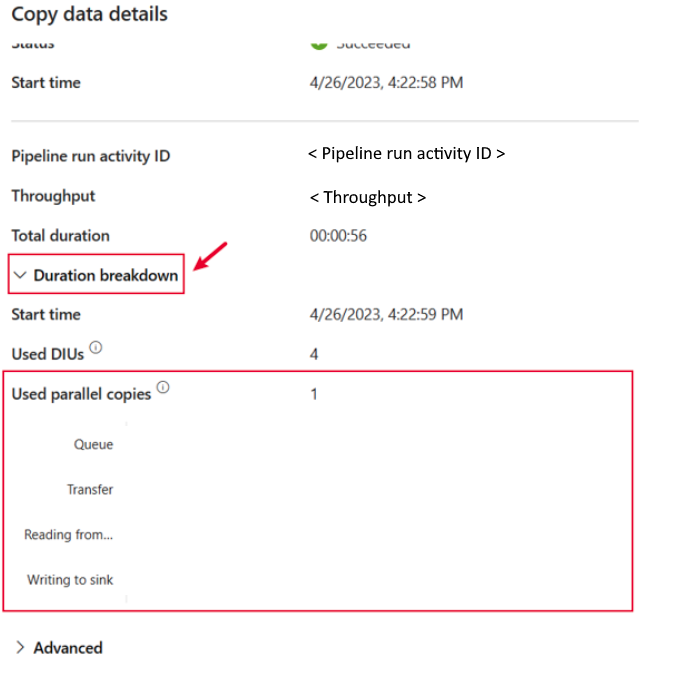
The Fabric Data Factory monitoring hub provides cross-workspace visibility into all workloads, with drill-down into individual activity runs.

For copy activities, select the run details button (the glasses icon) to view a duration breakdown that shows how long each stage took.

Quick pipeline duplication
Use the Save as feature to duplicate any existing pipeline. Use it to create development copies, test variations, or set up similar workflows.

Related content
Note
New features developed for Data Factory in Fabric aren't backported to Azure Data Factory or Azure Synapse pipelines. The two platforms maintain separate roadmaps. The product teams evaluate backport requests based on community feedback.
For more information, see the following resources: