Note
Access to this page requires authorization. You can try signing in or changing directories.
Access to this page requires authorization. You can try changing directories.
Consistent formatting makes Transact-SQL (T-SQL) easier to read, review, and maintain, especially when multiple people contribute to the same codebase. The MSSQL extension for Visual Studio Code includes a built-in SQL formatter (Preview) that you can run on demand, configure for automatic formatting on save, and customize through Visual Studio Code settings.
The T-SQL formatting functionality in the MSSQL extension is built on ScriptDOM, an open-source .NET library that parses T-SQL and generates scripts based on abstract syntax trees.
Format on demand
You can format T-SQL in any editor window. The formatter works on the whole document or only on the text that you select.
To format T-SQL on demand, use one of the following methods:
Context menu: Right-click in a T-SQL editor window and select Format Document or Format Selection.
Command Palette: Run Format Document or Format Selection.
Keyboard shortcut: For Format Document, press Shift+Alt+F on Windows and Linux, or Shift+Option+F on macOS. For Format Selection, press Ctrl+K, Ctrl+F on Windows and Linux, or Cmd+K, Cmd+F on macOS.
Format on save
In Visual Studio Code, the standard editor setting controls format on save, rather than a dedicated MSSQL formatter setting.
Use the following settings in your Visual Studio Code settings.json file to format T-SQL automatically whenever you save a file:
{
  "[sql]": {
    "editor.formatOnSave": true
  }
}
Configure formatting options
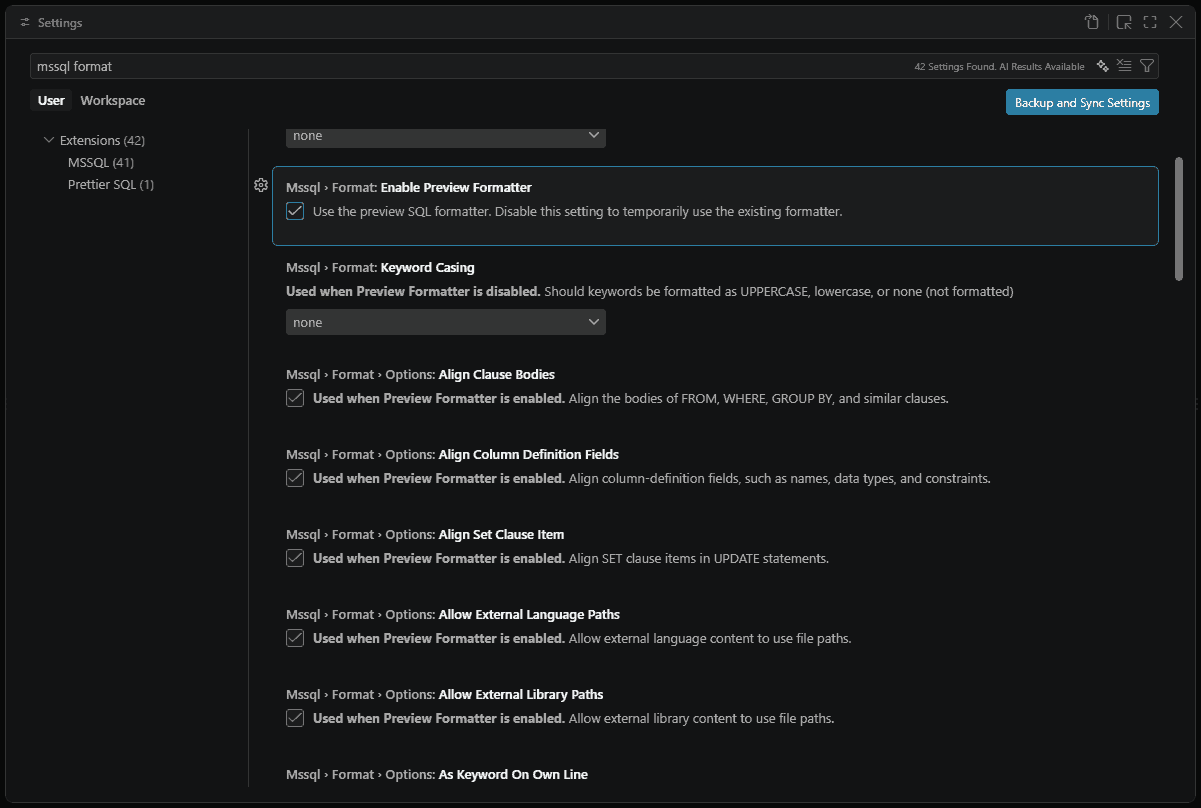
Configure formatting in the Visual Studio Code Settings UI or in user or workspace settings.json.
In the Settings editor, search for Mssql > Format to view the available options. In settings.json, use the corresponding mssql.format.* settings.
The preview formatter is enabled by default. Its options use the
mssql.format.options.*namespace.The five existing formatter settings remain available when the preview formatter is enabled. The preview formatter adds the
mssql.format.options.*settings.
Supported settings
The tables list existing formatter settings followed by preview formatter settings.
Existing formatter settings
| Setting | Type | Default | Description |
|---|---|---|---|
mssql.format.alignColumnDefinitionsInColumns |
bool | false |
Align column definitions in columns. |
mssql.format.datatypeCasing |
enum | none |
Format data types as uppercase, lowercase, or none (not formatted). |
mssql.format.keywordCasing |
enum | none |
Format keywords as uppercase, lowercase, or none (not formatted). |
mssql.format.placeCommasBeforeNextStatement |
bool | false |
Place commas at the beginning of each item in a list, for example , mycolumn2, instead of at the end, for example mycolumn1,. |
mssql.format.placeSelectStatementReferencesOnNewLine |
bool | false |
Place references in a SELECT statement on separate lines. For SELECT C1, C2 FROM T1, both C1 and C2 are on separate lines. |
Preview formatter settings
These mssql.format.options.* settings add on top of the existing formatter settings when you enable the preview formatter.
General
| Setting | Type | Default | Description |
|---|---|---|---|
mssql.format.enablePreviewFormatter |
bool | true |
Use the SQL formatter (Preview). |
mssql.format.showParseErrorNotification |
bool | true |
Show a notification when the formatter can't fully parse the T-SQL. |
mssql.format.options.sqlVersion |
enum | sql170 |
T-SQL version used to parse and generate formatted scripts. |
mssql.format.options.sqlEngineType |
enum | all |
Database Engine type used to parse and generate formatted scripts. Valid values are all, standalone, and sqlAzure. |
Alignment
| Setting | Type | Default | Description |
|---|---|---|---|
mssql.format.options.alignClauseBodies |
bool | true |
Align bodies of FROM, WHERE, GROUP BY, and similar clauses. |
mssql.format.options.alignColumnDefinitionFields |
bool | true |
Align column-definition fields, such as name, type, and constraints. |
mssql.format.options.alignSetClauseItem |
bool | true |
Align SET clause items in UPDATE statements. |
Paths
| Setting | Type | Default | Description |
|---|---|---|---|
mssql.format.options.allowExternalLanguagePaths |
bool | true |
Allow external language content to use file paths. |
mssql.format.options.allowExternalLibraryPaths |
bool | true |
Allow external library content to use file paths. |
Formatting
| Setting | Type | Default | Description |
|---|---|---|---|
mssql.format.options.asKeywordOnOwnLine |
bool | true |
Place AS on its own line. |
mssql.format.options.keywordCasing |
enum | uppercase |
Keyword casing style. Valid values are uppercase, lowercase, and pascalCase. |
mssql.format.options.preserveComments |
bool | true |
Preserve comments during formatting. |
mssql.format.options.numNewlinesAfterStatement |
int | 1 |
Number of line breaks after each statement, from 0 through 5. |
Indentation
| Setting | Type | Default | Description |
|---|---|---|---|
mssql.format.options.indentSetClause |
bool | false |
Indent SET clause in UPDATE statements. |
mssql.format.options.indentViewBody |
bool | false |
Indent VIEW body. |
Multiline
| Setting | Type | Default | Description |
|---|---|---|---|
mssql.format.options.multilineInsertSourcesList |
bool | true |
INSERT sources as multiline. |
mssql.format.options.multilineInsertTargetsList |
bool | true |
INSERT columns as multiline. |
mssql.format.options.multilineSelectElementsList |
bool | true |
SELECT columns as multiline. |
mssql.format.options.multilineSetClauseItems |
bool | true |
SET items as multiline. |
mssql.format.options.multilineViewColumnsList |
bool | true |
VIEW columns as multiline. |
mssql.format.options.multilineWherePredicatesList |
bool | true |
WHERE predicates as multiline. |
New line
| Setting | Type | Default | Description |
|---|---|---|---|
mssql.format.options.newLineBeforeCloseParenthesisInMultilineList |
bool | true |
New line before close parenthesis in multiline list. |
mssql.format.options.newLineBeforeFromClause |
bool | true |
New line before FROM clause. |
mssql.format.options.newLineBeforeGroupByClause |
bool | true |
New line before GROUP BY clause. |
mssql.format.options.newLineBeforeHavingClause |
bool | true |
New line before HAVING clause. |
mssql.format.options.newLineBeforeJoinClause |
bool | true |
New line before JOIN clause. |
mssql.format.options.newLineBeforeOffsetClause |
bool | true |
New line before OFFSET clause. |
mssql.format.options.newLineBeforeOpenParenthesisInMultilineList |
bool | false |
New line before open parenthesis in multiline list. |
mssql.format.options.newLineBeforeOrderByClause |
bool | true |
New line before ORDER BY clause. |
mssql.format.options.newLineBeforeOutputClause |
bool | true |
New line before OUTPUT clause. |
mssql.format.options.newLineBeforeWhereClause |
bool | true |
New line before WHERE clause. |
mssql.format.options.newLineBeforeWindowClause |
bool | true |
New line before WINDOW clause. |
mssql.format.options.newlineFormattedCheckConstraint |
bool | false |
Newline formatted CHECK constraint. |
mssql.format.options.newLineFormattedIndexDefinition |
bool | false |
Newline formatted index definition. |
Spacing
| Setting | Type | Default | Description |
|---|---|---|---|
mssql.format.options.spaceBetweenDataTypeAndParameters |
bool | true |
Space between data type and parentheses, for example VARCHAR (255). |
mssql.format.options.spaceBetweenParametersInDataType |
bool | true |
Space between parameters in data types. |
Example settings file
{
  "mssql.format.options.keywordCasing": "lowercase",
  "mssql.format.options.alignClauseBodies": false,
  "mssql.format.options.numNewlinesAfterStatement": 2,
  "[sql]": {
    "editor.formatOnSave": true
  }
}
Set the default formatter
To set the MSSQL extension as the default, select Configure Default Formatter... > SQL Server (mssql), or add the following configuration to settings.json:
{
  "[sql]": {
    "editor.defaultFormatter": "ms-mssql.mssql"
  }
}