Bilješka
Pristup ovoj stranici zahtijeva provjeru vjerodostojnosti. Možete pokušati da se prijavite ili promijenite direktorije.
Pristup ovoj stranici zahtijeva provjeru vjerodostojnosti. Možete pokušati promijeniti direktorije.
Azure Cosmos DB is designed with fine-grained multitenancy and resource governance. This design allows Azure Cosmos DB to operate at a significantly lower cost and helps you save money. Currently, Azure Cosmos DB supports more than 280 customer workloads on a single machine with the density continuously increasing, and thousands of customer workloads within a cluster. It load balances replicas of customers' workloads across different machines in a cluster and across multiple clusters within a data center. To learn more, see Azure Cosmos DB: Pushing the frontier of globally distributed databases. Because of resource governance, multitenancy, and native integration with the rest of the Azure infrastructure, Azure Cosmos DB is on average 4 to 6 times cheaper than MongoDB, Cassandra, or other OSS NoSQL running on IaaS and up to 10 times cheaper than the database engines running on-premises. See the paper on The total cost of (non) ownership of a NoSQL database cloud service.
The OSS NoSQL database solutions, such as Apache Cassandra, MongoDB, and HBase, were designed for on-premises. When offered as a managed service, they're equivalent to a Resource Manager template with a tenant database for managing the provisioned clusters and monitoring support. OSS NoSQL architectures require significant operational overhead, and the expertise can be difficult and expensive to find. On the other hand, Azure Cosmos DB is a fully managed cloud service, which allows developers to focus on business innovation rather than on managing and maintaining database infrastructure.
Unlike a cloud-native database service Azure Cosmos DB, OSS NoSQL database engines weren't designed and built with resource governance or fine-grained multitenancy as the fundamental architectural principles. OSS NoSQL database engines like Cassandra and MongoDB make a fundamental assumption that all the resources of the virtual machine on which they run are available for their use. Many of these database engines can't function if the amount of resources drops below a certain threshold, for example, for small VM instances. And they're available with vendor-recommended configurations suggesting typically large-scale VMs with higher cost. So you can't host an OSS NoSQL or any other on-premises database engine and make it available by using a consumption-based charging model like requests per second or consumed storage.
Total cost of ownership of Azure Cosmos DB
The serverless provisioning model of Azure Cosmos DB eliminates the need to over-provision the database infrastructure. Azure Cosmos DB resources are provided without any need for specialized configurations or licensing. As a result, Azure Cosmos DB-backed applications can run with as much as a 70 percent total cost of ownership savings when compared to OSS NoSQL databases. For some real-time examples, see customer use-cases. Other benefits of the Azure Cosmos DB pricing model include:
Great value for the price: Market analysts, customers, and partners confirm greater value for all the features that Azure Cosmos DB offers for a much lower price compared to what customers can get when implementing these solutions on their own or through other vendors. The database features such as global distribution, multi-region writes, well-defined and intuitive consistency models, and automatic indexing are greatly simplified with Azure Cosmos DB without any complexity, overhead, or downtime.
No NoSQL DevOps administration is required: With Azure Cosmos DB you don't need to employ DevOps to manage deployments, perform maintenance, scale, or patch. You can execute all the workloads that you would do with OSS NoSQL cluster hosted on-premises or on cloud infrastructure.
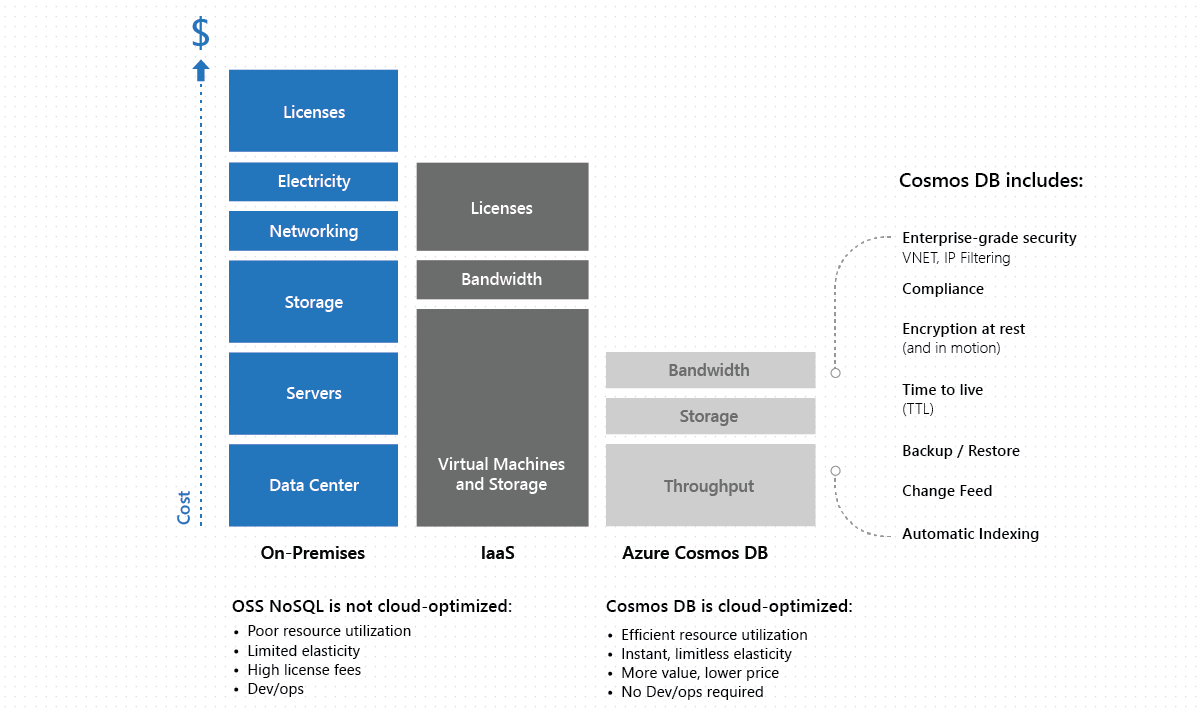
Ability to elastically scale: You can scale Azure Cosmos DB throughput up and down, which helps reduce the cost of ownership during non-peak times. OSS NoSQL clusters deployed on cloud infrastructure offer limited elasticity, and on-premises deployments aren't elastic by definition. In Azure Cosmos DB, if you provision more throughput, your throughput is guaranteed to scale linearly. This guarantee is backed by financial SLAs and at the 99th percentile at any scale.
Economies of scale: A managed service like Azure Cosmos DB operates with a large number of nodes, integrated natively with networking, storage, and computes. Because of the large scale and standardization of Azure Cosmos DB, you can save money.
Optimized for the cloud: Azure Cosmos DB is designed from the ground up with fine-grained multitenancy and performance isolation. This design allows for optimally placing, executing, and balancing thousands of tenants and their workloads across clusters and data centers. In contrast, the current generation of OSS NoSQL databases operate on-premises with the entire virtual machine assumed to run a single tenant’s workload. These databases are also not designed to leverage a cloud provider’s infrastructure and hardware to the full extent. For example, an OSS NoSQL database engine isn't aware of the differences between a virtual machine being down versus a routine image upgrade, or the fact that premium disk is already three-way replicated. It can't take advantage of these benefits and pass on the benefits and savings to customers.
You pay by the hour: For large-scale workloads that need to scale at any point in time, you're only charged by the hour. The workloads on an application typically vary across times of the year, and by the data that is queried. With Azure Cosmos DB, you can scale up or down as you need and pay only for what you need. With on-premises or IaaS-hosted systems, you can't match this model, because there isn't a way to decommission the hardware every hour. In such cases, you can potentially save between 10 to 14 times on an average with Azure Cosmos DB.
You get numerous features for free: In Azure Cosmos DB, write workloads are substantially cheaper compared to alternative database services. In addition, Azure Cosmos DB offers features such as automatic indexing, Time to Live (TTL), Change Feed, and others without any additional charges, something that other database services typically charge for.
Uses unified currency for diverse workloads: Unlike alternative offerings, in Azure Cosmos DB, you don't need to segment workloads, for example, into reads and writes. Or provision throughput on a per workload type that is read throughput versus write throughput. In Azure Cosmos DB, provisioned throughput is reserved using a unified and normalized currency in terms of Request Units or RU/sec. Azure Cosmos DB doesn't force you to assign priority to your workloads, perform capacity planning, or pay for each type of capacity separately. This approach enables you to easily interchange the same RU/s between various operations and workload types.
Doesn't require provisioning VMs to scale: Most operational databases require you to go with large virtual machines to avoid noisy neighbors and for loose resource governance, if you want scale. This requirement puts the burden and the upfront commitment of cost on the customers. With Azure Cosmos DB, you can start small and grow into the large scale workload sizes seamlessly, and without any downtime or impact on data availability.
You can utilize provisioned throughput to a maximum limit: By the virtue of sub-core multiplexing in Azure Cosmos DB, you can saturate the provisioned throughput to a greater extent than IaaS hosted options or third party offers. This method saves a lot more than the alternative solutions.
Deep integration of Azure Cosmos DB with other Azure services. Azure Cosmos DB has a native integration with Networking, Compute, Azure Functions (serverless), Azure IoT, and others Azure services. With this integration, you get the best performance, speed of data replication across the world with robust guarantees. The third party solutions won't be able to match or would typically charge a premium to offer such features.
You automatically get high availability, with at least 10-20 fault domains by default: Azure Cosmos DB supports the distribution of workloads across fault domains, a feature that is critical for high availability. It offers 99.999 high availability for reads and writes at the 99th percentile across anywhere in the world. The cost of implementing something like this on your own or through a third-party solution, would be high.
You automatically get all enterprise capabilities, at no additional cost. Azure Cosmos DB offers the most comprehensive set of compliance certifications, security, and encryption at rest and in motion at no additional cost (compared to our competition). You automatically get regional availability anywhere in the world. You can span your database across any number of Azure regions and add or remove regions at any point.
You can save up to 65% of costs with reserved capacity: Azure Cosmos DB reserved capacity helps you save money by pre-paying for Azure Cosmos DB resources for either one year or three years. You can significantly reduce your costs with one-year or three-year upfront commitments and save between 20-65% discounts when compared to the regular pricing. On your mission-critical workloads you can get better SLAs in terms of provisioning capacity.
Capacity planning
When you estimate TCO, it might help to start with capacity planning. If you're planning a migration to Azure Cosmos DB from an existing database cluster, you can use information about your existing database cluster for capacity planning.
- If all you know is the number of vcores and servers in your existing database cluster, read about estimating request units using vCores or vCPUs.
- If you know typical request rates for your current database workload, see estimating request units using Azure Cosmos DB capacity planner.
Next steps
- Trying to do capacity planning for a migration to Azure Cosmos DB? You can use information about your existing database cluster for capacity planning.
- If all you know is the number of vcores and servers in your existing database cluster, read about estimating request units using vCores or vCPUs.
- If you know typical request rates for your current database workload, see estimating request units using Azure Cosmos DB capacity planner.
- How Azure Cosmos DB pricing model is cost-effective for customers
- Optimizing for development and testing
- Optimizing throughput cost
- Optimizing storage cost
- Optimizing the cost of reads and writes
- Optimizing the cost of queries
- Optimizing the cost of multi-region Azure Cosmos DB accounts
- The Total Cost of (Non) Ownership of a NoSQL Database Cloud Service