Bilješka
Pristup ovoj stranici zahtijeva provjeru vjerodostojnosti. Možete pokušati da se prijavite ili promijenite direktorije.
Pristup ovoj stranici zahtijeva provjeru vjerodostojnosti. Možete pokušati promijeniti direktorije.
Azure Key Vault can emit events to a system topic when a certificate, key, or secret is about to expire (30 days in advance), and other events when they do expire. By routing these events to Azure Monitor alerts, you can detect and fix expiration issues before they affect your services.
This article shows you how to create an event subscription that sends Key Vault events to Azure Monitor alerts, and how to view and manage the resulting alerts. For more information about the available events, see Azure Key Vault event schema.
Prerequisites
- Create a Key Vault resource. For instructions, see Create a key vault using the Azure portal.
- To learn about Azure Monitor alerts, see How to send events to Azure Monitor alerts.
Create and configure the event subscription
When creating an event subscription, follow these steps:
- Enter a name for the event subscription.
- For Event Schema, select Cloud Events Schema v1.0. It's the only schema type that the Azure Monitor alerts destination supports.
- Set the Topic Type to Key Vault.
- For Source Resource, select the Key Vault resource.
- Enter a name for the Event Grid system topic.
- For Filter to Event Types, select the event types that you're interested in.
- For Endpoint Type, select Azure Monitor Alert as a destination.
- Select the Configure an endpoint link.
- On the Select Monitor Alert Configuration page, follow these steps.
Select the alert severity.
Select the action group (optional), see Create an action group in the Azure portal.
Enter a description for the alert.
Select Confirm Selection.
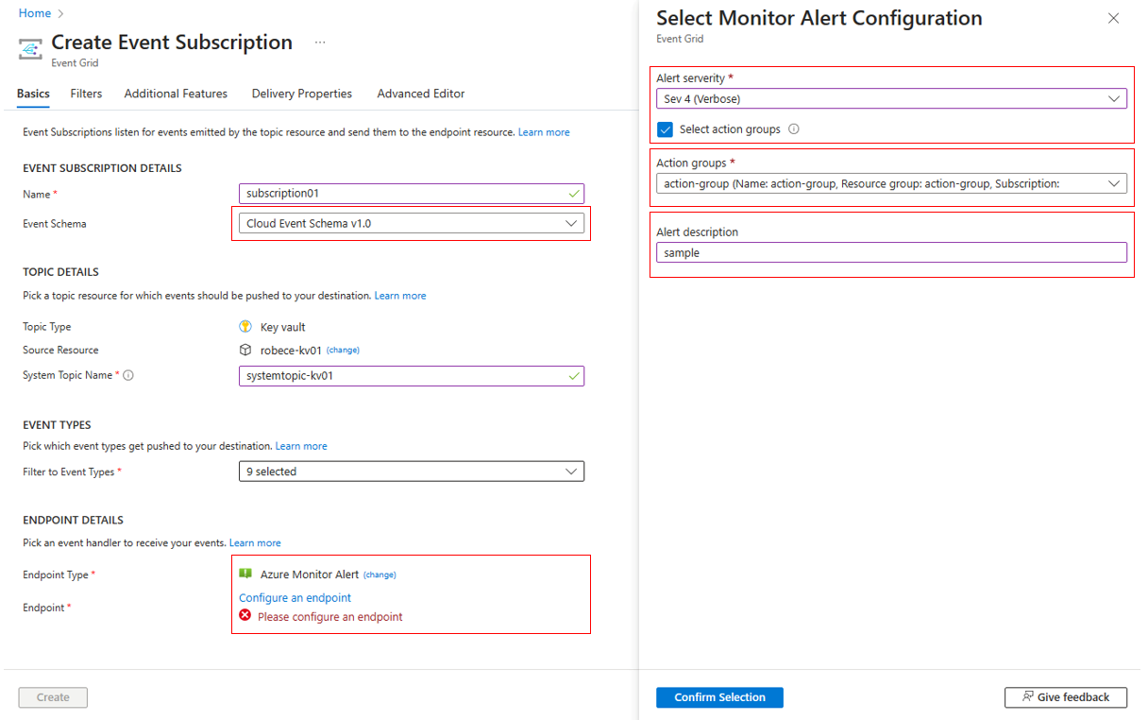
- On the Create Event Subscription page, select Create to create the event subscription. For detailed steps, see subscribe to events through portal.
Manage fired alerts
Manage the subscription directly in the source (for example, the Key Vault resource) by selecting the Events page or by accessing the Event Grid system topic resource. For more information, see the following references: blob event quickstart and manage the system topic.
View alert instances
Key Vault events appear as alerts, and you can view them on the alerts page. To learn how to view and manage these alerts, see manage alert instances.
Next steps
See the following articles: