Bilješka
Pristup ovoj stranici zahtijeva provjeru vjerodostojnosti. Možete pokušati da se prijavite ili promijenite direktorije.
Pristup ovoj stranici zahtijeva provjeru vjerodostojnosti. Možete pokušati promijeniti direktorije.
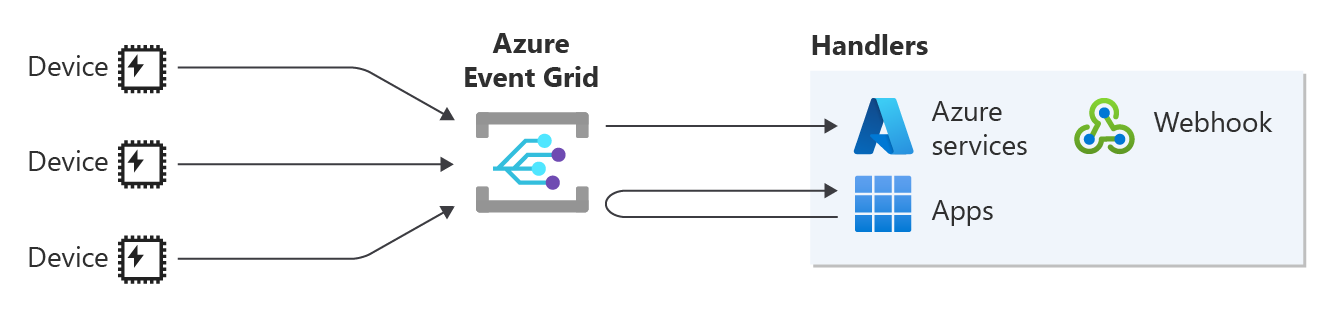
Event Grid lets you route your MQTT messages to Azure services or webhooks for further processing. By routing this data, you can build end-to-end solutions that use your IoT data for analysis, storage, and visualization.
This article explains when to use routing and shows you how to configure routing to either an Event Grid namespace topic or a custom topic.
When to use routing
Routing the messages from your clients to an Azure service or your custom endpoint helps you maximize the benefits of this data. The following list describes some of the many use cases for this feature:
- Data analysis: Extract and analyze the routed messages from your clients to optimize your solution. For example, analyze your machines' telemetry to predict when to schedule maintenance before failures happen, to avoid delays and further damage.
- Serverless applications: Trigger a serverless function based on the routed messages from your clients. For example, when a motion sensor detects motion, send a notification to security personnel to address it.
- Data visualizations: Build visualizations of the routed data from your clients to represent and understand the data, and to highlight trends and outliers.
Configure routing
The routing configuration lets you send all your MQTT messages from your clients to either an Event Grid namespace topic or an Event Grid custom topic. After the messages are in the topic, you can configure an event subscription to consume the messages from the topic. Use the following high-level steps to achieve this configuration:
- Namespace topic as a routing destination:
- Create an Event Grid namespace topic where Event Grid routes all MQTT messages.
- Create a push-type event subscription to route these messages to one of the supported Azure services or a custom webhook, or create a queue-type event subscription to pull the messages directly from the namespace topic through your application.
- Set the routing configuration that refers to the topic that you created in the first step.
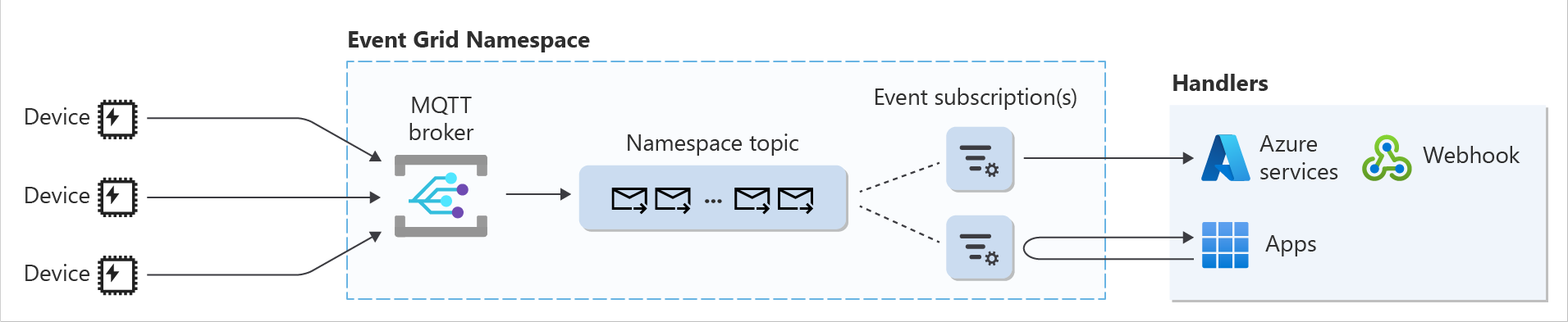
- Custom topic as a routing destination:
- Create an Event Grid custom topic where Event Grid routes all MQTT messages. This topic needs to fulfill the Event Grid custom topic requirements for routing.
- Create an Event Grid event subscription to route these messages to one of the supported Azure services or a custom endpoint.
- Set the routing configuration that refers to the topic that you created in the first step.

Note
Disabling public network access on the namespace causes the MQTT routing to fail.
Difference between namespace topics and custom topics as a routing destination
The following table shows the difference between namespace topics and custom topics as a routing destination. For a detailed breakdown of which quotas and limits each Event Grid resource includes, see Quotas and limits.
| Point of comparison | Namespace topic | Custom topic |
|---|---|---|
| Throughput | High, up to 40 MB/s (ingress) and 80 MB/s (egress) | Low, up to 5 MB/s (ingress and egress) |
| Pull delivery | Yes | No |
| Push delivery to Event Hubs | Yes | Yes |
| Push delivery to Azure services (Functions, Webhooks, Service Bus queues and topics, relay hybrid connections, and storage queues) | No | Yes |
| Message retention | 7 days | 1 day |
| Role assignment requirement | Not needed because the MQTT broker and the namespace topic are under the same namespace | Required because the namespace hosting the MQTT broker functionality and the custom topic are different resources |
Event Grid custom topic requirements for routing
The Event Grid custom topic that you use for routing needs to fulfill the following requirements:
- It needs to use the CloudEvents schema v1.0.
- It needs to be in the same region as the namespace.
- You need to assign the Event Grid Data Sender role to yourself or to the selected managed identity on the Event Grid custom topic before you apply the routing configuration. To assign the role:
- In the portal, go to the Event Grid topic resource that you created.
- On the Access control (IAM) menu, select Add role assignment.
- On the Role tab, select Event Grid Data Sender, then select Next.
- On the Members tab, select Select members, then enter your Microsoft Entra user name in the Select box that appears (for example,
user@contoso.com). - Select your Microsoft Entra user name, then select Review + assign.
Azure portal configuration
To configure routing:
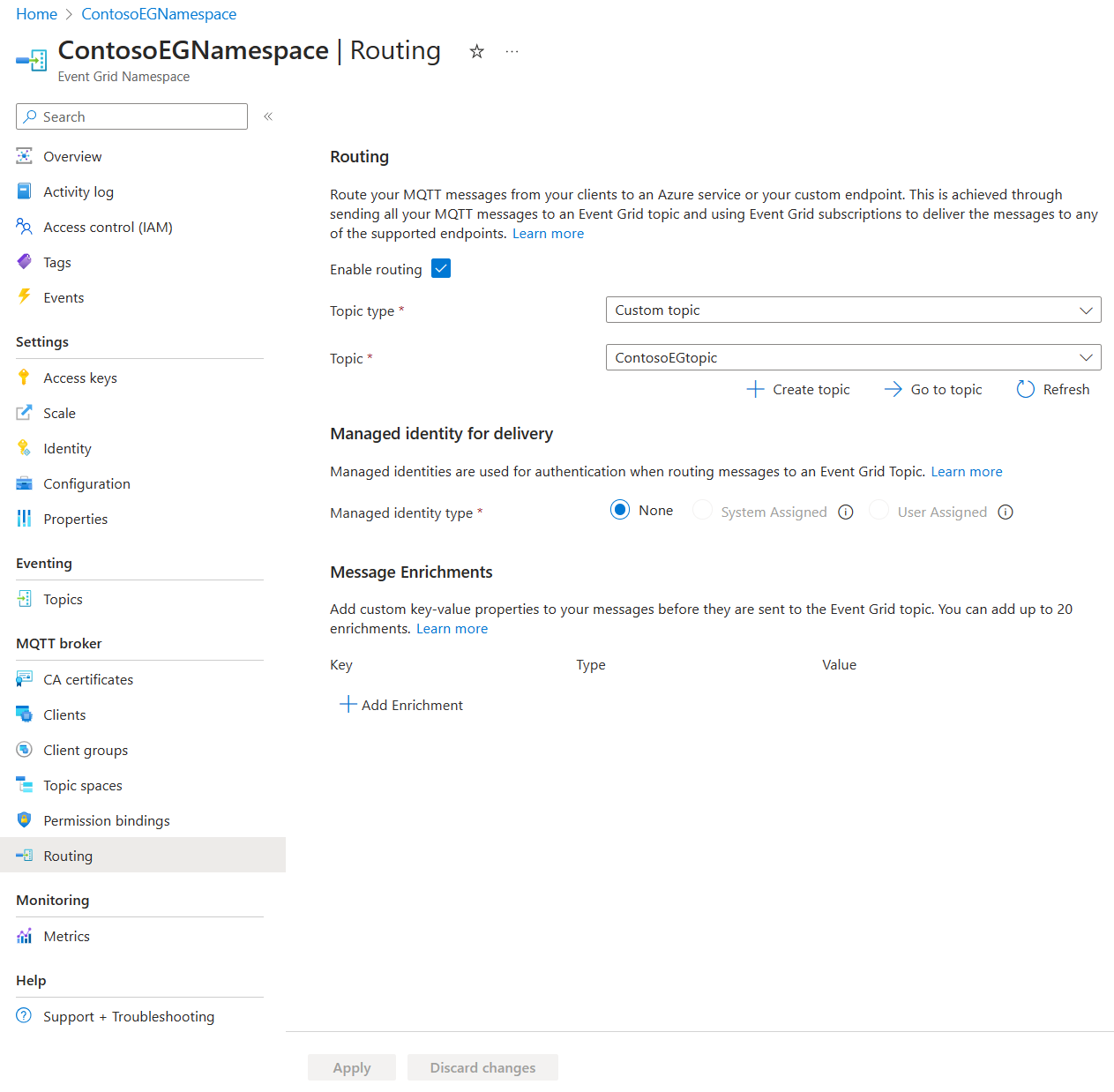
- Go to your namespace in the Azure portal.
- Under Routing, select Enable routing.
- For Topic type, select either Namespace topic or Custom topic.
- For Topic, select the topic that you created where all MQTT messages are routed.
- For custom topics, the list shows only the topics that fulfill the Event Grid custom topic requirements for routing.
- If you select a custom topic, the Managed Identity for Delivery section appears. Select one of the following options for the identity that authenticates the MQTT broker while it delivers the MQTT messages to the custom topic:
- None: Assign the Event Grid Data Sender role to yourself on the custom topic.
- System-assigned identity: Enable system-assigned identity on the namespace as a prerequisite, and assign the Event Grid Data Sender role to the system-assigned identity on the custom topic.
- User-assigned identity: Enable user-assigned identity on the namespace as a prerequisite, and assign the Event Grid Data Sender role to the selected identity on the custom topic. If you select User-assigned identity, a dropdown appears so that you can select the identity.
- Select Apply.
For enrichments configuration instructions, go to Enrichment portal configuration.
Azure CLI configuration
az resource create --resource-type Microsoft.EventGrid/namespaces --id /subscriptions/<Subscription ID>/resourceGroups/<Resource Group>/providers/Microsoft.EventGrid/namespaces/<Namespace Name> --is-full-object --api-version 2023-06-01-preview --properties @./resources/NS.json
NS.json
{
    "properties": {
        "inputSchema": "CloudEventSchemaV1_0",
        "topicSpacesConfiguration": {
            "state": "Enabled",
            "routeTopicResourceId": "/subscriptions/<Subscription ID>/resourceGroups/<Resource Group>/providers/Microsoft.EventGrid/topics/<Event Grid topic name>",
            "routingIdentityInfo": {
                "type": "UserAssigned",
                "userAssignedIdentity": "/subscriptions/<Subscription ID>/resourceGroups/<Resource Group>/providers/Microsoft.ManagedIdentity/userAssignedIdentities/<User-assigned identity>"
            }
        }
    }
}
In routingIdentityInfo, type accepts None, SystemAssigned, or UserAssigned. Set userAssignedIdentity only when type is UserAssigned.
For enrichments configuration instructions, go to Enrichment CLI configuration.
MQTT message routing behavior
While routing MQTT messages to custom topics, Event Grid provides durable delivery as it tries to deliver each message at least once immediately. If there's a failure, Event Grid either retries delivery or drops the message meant for routing. Event Grid doesn't guarantee order for event delivery, so subscribers might receive them out of order.
The following table describes the behavior of MQTT message routing based on different errors.
| Error | Error description | Behavior |
|---|---|---|
| TopicNotFoundError | The custom topic configured to receive all the MQTT routed messages was deleted. | Event Grid drops the MQTT message meant for routing. |
| AuthenticationError | The Event Grid Data Sender role for the custom topic configured as the destination for MQTT routed messages was deleted. | Event Grid drops the MQTT message meant for routing. |
| TooManyRequests | The number of MQTT routed messages per second exceeds the publish limit for the custom topic. | Event Grid retries to route the MQTT message. |
| ServiceError | An unexpected server error for a server's operational reason. | Event Grid retries to route the MQTT message. |
During retries, Event Grid uses an exponential backoff retry policy for MQTT message routing. Event Grid retries delivery on the following schedule on a best effort basis:
- 10 seconds
- 30 seconds
- 1 minute
- 5 minutes
- 10 minutes
- 30 minutes
- 1 hour
- 3 hours
- 6 hours
- Every 12 hours
If a routed MQTT message queued for redelivery succeeds, Event Grid tries to remove the message from the retry queue on a best effort basis, but you might still receive duplicates.