Bilješka
Pristup ovoj stranici zahtijeva provjeru vjerodostojnosti. Možete pokušati da se prijavite ili promijenite direktorije.
Pristup ovoj stranici zahtijeva provjeru vjerodostojnosti. Možete pokušati promijeniti direktorije.
On-demand billing for Spark is a pay-as-you-go billing model for Apache Spark workloads in Microsoft Fabric. When you enable it, Spark jobs no longer consume compute from your Fabric capacity. Instead, jobs use dedicated serverless resources that you bill independently.
This model complements the standard capacity model so you can choose the best option per workload.
Choose between on-demand billing and capacity model
| Feature | Capacity model | On-demand billing for Spark |
|---|---|---|
| Billing | Fixed cost per capacity tier | Pay-as-you-go for Spark jobs |
| Scaling | Capacity shared across workloads | Spark scales independently |
| Resource contention | Possible between workloads | Dedicated compute limits for Spark |
| Best use case | Predictable workloads | Dynamic or bursty Spark jobs |
You can combine both models to balance cost and performance. For example, run stable recurring workloads on capacity and move bursty or ad hoc Spark workloads to on-demand billing.
Key benefits
- Cost efficiency: Pay only for Spark job runtime.
- Independent scaling: Spark workloads run without affecting other capacity-based operations.
- Enterprise-ready: Integrates with Azure Quota Management for scaling flexibility.
How on-demand billing works
When you enable on-demand billing:
- Spark jobs are offloaded from Fabric capacity and don't consume CU from that capacity.
- You set a maximum CU limit for Spark workloads (a quota-like limit).
- Billing remains based on Spark usage rate (
0.5 CU hour) and applies only to active job compute. - When the CU limit is reached, interactive jobs are throttled and batch jobs are queued.
- Spark usage and cost are shown separately in the Microsoft Fabric Capacity Metrics app and Azure Cost Analysis.
Important
On-demand billing is opt-in per capacity and does not burst from or fall back to Fabric capacity. It's a separate serverless pay-as-you-go model.
Job concurrency and queuing behavior
When you enable on-demand billing, the maximum Capacity Unit (CU) limit that the Fabric capacity admin configures governs Spark concurrency. Unlike standard capacity, on-demand billing doesn't use bursting or smoothing.
- Interactive Spark jobs (for example Lakehouse operations, table preview, Load to Table, or interactive notebook queries) are throttled when available CUs are fully used.
- Background Spark jobs (triggered by pipelines, scheduler, API executions, Spark job definitions, or table maintenance) are queued.
The queue size is tied to the CU limit.
Note
If the max CU limit is 2048, the Spark queue can hold up to 2048 jobs.
This behavior keeps allocation predictable and controllable while supporting high-volume Spark workloads.
Request additional quotas
If your Data Engineering or Data Science workloads require a higher quota than your current maximum CU limit, request an increase in Azure Quotas:
- Navigate to the Azure portal and sign in.
- In the search bar, type and select Azure Quotas.
- Choose Microsoft Fabric from the list of available services.
- Select the subscription associated with your Fabric capacity.
- Edit the quota limit by entering the new CU limit that you intend to acquire.
- Submit your quota request.
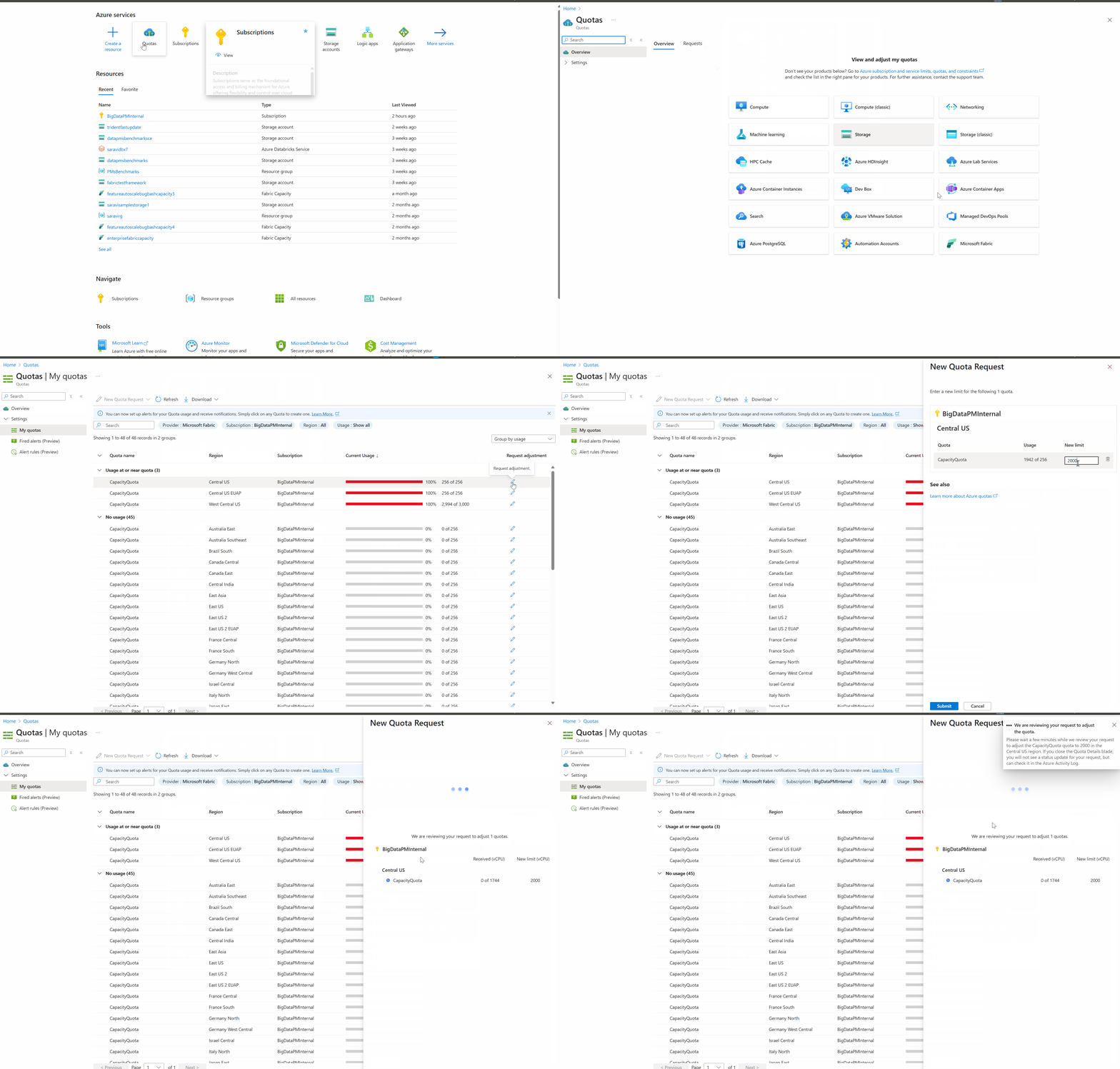
After approval, the updated CU limit is applied to your Fabric capacity.