Bilješka
Pristup ovoj stranici zahtijeva provjeru vjerodostojnosti. Možete pokušati da se prijavite ili promijenite direktorije.
Pristup ovoj stranici zahtijeva provjeru vjerodostojnosti. Možete pokušati promijeniti direktorije.
This article shows you how to manage data access for business events in Microsoft Fabric Real-Time hub.
Important
This feature is in preview.
Overview
Business events use a role-based access control (RBAC) model to manage permissions for publishing and consuming business events. Data access roles enable you to define role-based security to grant users access to publish or consume your business events. Fabric users with Admin or Member roles on the workspace can create a business event and manage the data access roles.
Data access roles are a separate layer from the workspace roles and sharing permissions that control access to the event schema set item itself. Workspace roles determine who can view or edit a schema set and its schemas and event types. Data access roles determine who can publish or consume the event data. Being able to view or edit a schema set doesn't by itself grant publish or consume access. For more information about item-level access, see Permissions.
Each role has multiple components:
Name: Name of the data access role.
Permission: The permissions that users have on the data. You can apply any or both of the following permissions on a data access role:
Publish: Grants the user the ability to publish a business event from any of the supported publishing items like User Data Functions or Notebooks. It also enables users to view data preview per publisher. For more information about supported publishing items, see Publish business events using Notebook and Publish business events using User Data Function.
Consume: Grants the user the ability to consume a business event from any of the supported consuming items like Activator. It also enables users to view data preview per consumer. For more information about supported consuming items, see Set alerts on business events.
Scope: The granularity of the role. Data access roles are enforced at the Event Schema Set level. A role can't span multiple Event Schema Sets.
Members: Any Microsoft Entra identity that you assign to the role, such as users, service principals, or managed identities. Currently, groups and virtualized role memberships aren't supported.
When you assign a member to a role, the user is subject to the associated permissions on the scope of that role. Because Business Events uses a deny-by-default model, all users start with no access to publish or consume events unless a data access role explicitly grants access.
Default role
When you create a business event through Real-time hub, data access roles get enabled for your event schema, and a default role is created with the following parameters:
Name: DefaultBusinessEventsContributer
Permission: Publish and consume
Scope: The event schema set item that the business event belongs to.
Members: user creating the business event
The creator can publish and consume any business event within the same Event Schema Set.
Manage data access roles in Real-Time hub
Important
Currently, you can only update the default role by using the Real-Time hub user interface to add or remove members from the role. At this time, creating, updating, and removing new roles is supported only through the API documented in the next section: Manage data access roles using REST APIs.
Go to Real-Time hub.
Select Business events under the Subscribe to category.
Hover over the business event you want to delete, select the ellipsis (...) menu, and then select Manage data access role.
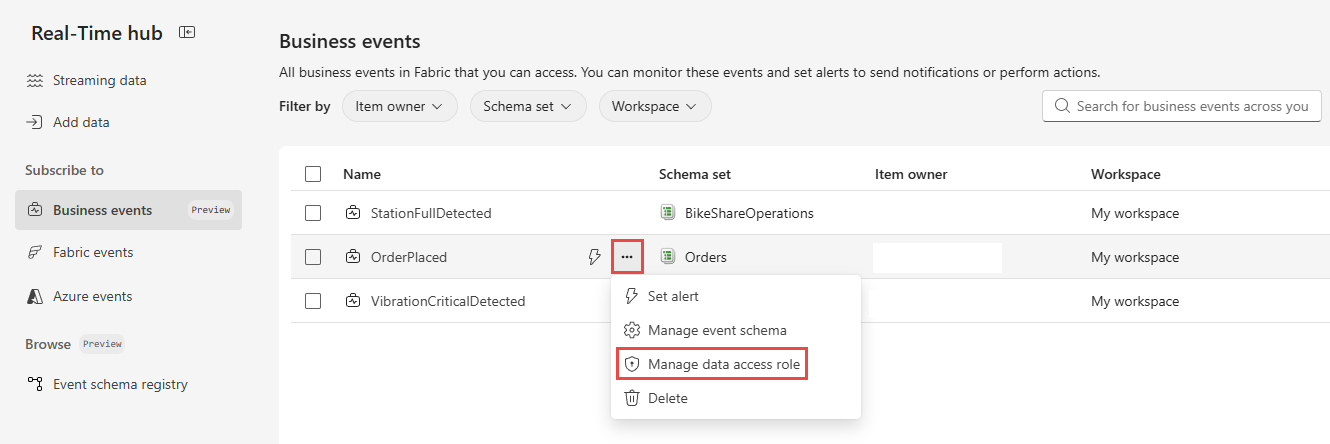
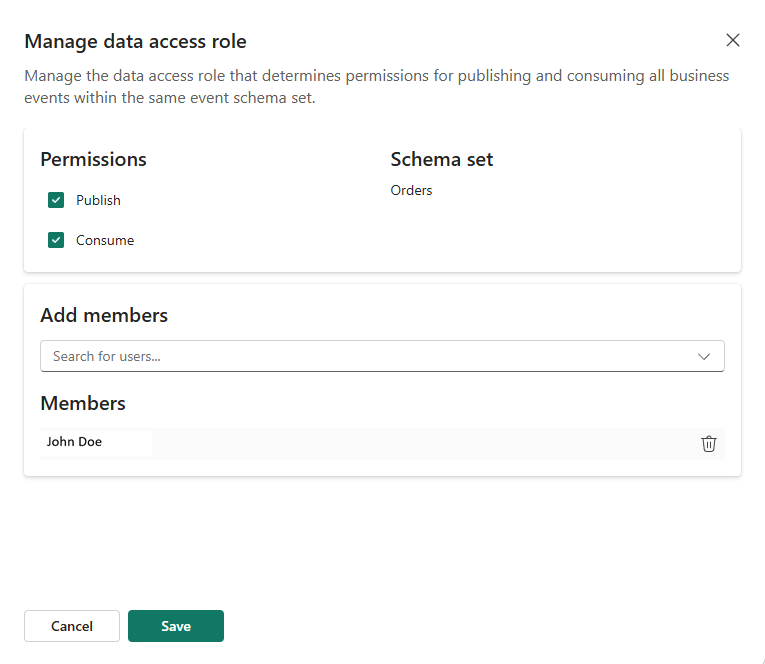
In the Manage data access role pane, you see the default role with the following information:
Permissions: The default role has both Publish and Consume access to business events.
Scope: The permissions are set at the Schema set scope.
Users: The list of users who have access to the business event. The user who creates the business event is automatically added to the list and granted access to the business event.
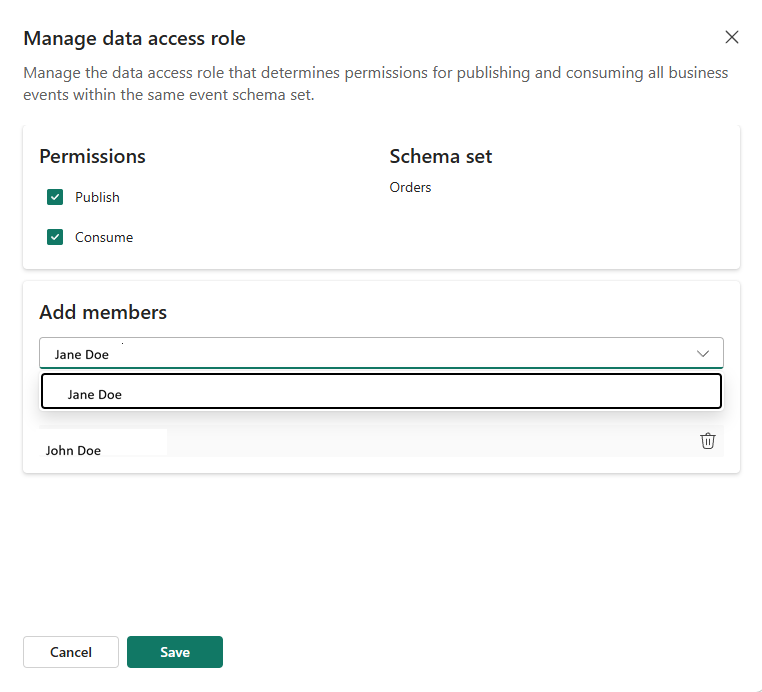
Search for a user by name in the search box. Select the user from the dropdown list to add them to the list of users with access to the business event.
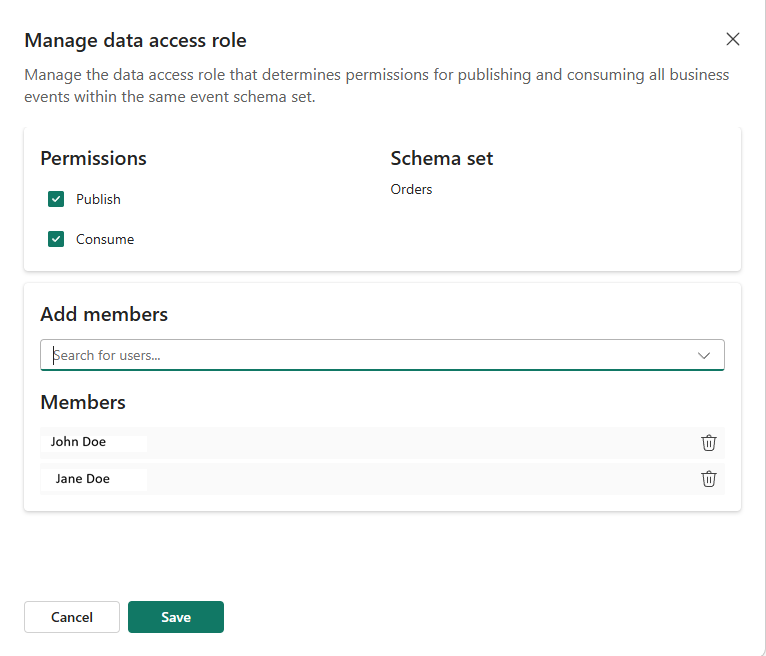
When you finish adding users, select Save to save your changes.
Manage data access roles using REST APIs
Use the Fabric REST API to create or update data access roles for business events. This API updates role definitions by creating, updating, and deleting roles to match the payload you send.
Endpoint
PUT https://api.fabric.microsoft.com/v1/workspaces/{workspaceId}/items/{eventSchemaSetItemId}/dataAccessRoles
Supported payload shape for business events
Although the underlying API supports broader OneLake permission models, business events use a constrained subset.
Supported fields
value[]namedecisionRules[]effect(Business Events supports Permit only)permission[]attributeName:"Path"+attributeValueIncludedIn[]attributeName:"Action"+attributeValueIncludedIn[]
members.microsoftEntraMembers[]
Not supported
members.fabricItemMembers- Microsoft Entra groups (not supported; only
User,ServicePrincipal,ManagedIdentity)
Path attribute (scope)
Business events use Path to represent scope within an event schema set:
*(or/eventtypes) = all business events under this event schema set/eventtypes/{eventTypeName}= a specific business event type (example:/eventtypes/orders)
Action attribute (permissions)
Business Events uses Action to represent the publish and consume permissions:
Publish= publish permissionConsume= consume permission
Example: Create or update roles
PUT https://api.fabric.microsoft.com/v1/workspaces/{workspaceId}/items/{eventSchemaSetItemId}/dataAccessRoles
Content-Type: application/json

{
  "value": [
    {
      "name": "role_1",
      "decisionRules": [
        {
          "effect": "Permit",
          "permission": [
            {
              "attributeName": "Path",
              "attributeValueIncludedIn": [ "*" ]
            },
            {
              "attributeName": "Action",
              "attributeValueIncludedIn": [ "Publish", "Consume" ]
            }
          ]
        }
      ],
      "members": {
        "microsoftEntraMembers": [
          {
            "objectId": "{entraObjectId}",
            "objectType": "User",
            "tenantId": "{tenantId}"
          }
        ]
      }
    }
  ]
}
Related content
See the following end-to-end tutorials: