Bilješka
Pristup ovoj stranici zahtijeva provjeru vjerodostojnosti. Možete pokušati da se prijavite ili promijenite direktorije.
Pristup ovoj stranici zahtijeva provjeru vjerodostojnosti. Možete pokušati promijeniti direktorije.
Real-Time Dashboards let you share visualizations with other users. When you share a dashboard, you control access to the dashboard item separately from access to the underlying data source.
This article helps you understand the permission layers and identity models that determine what users can see and do after you share a Real-Time Dashboard.
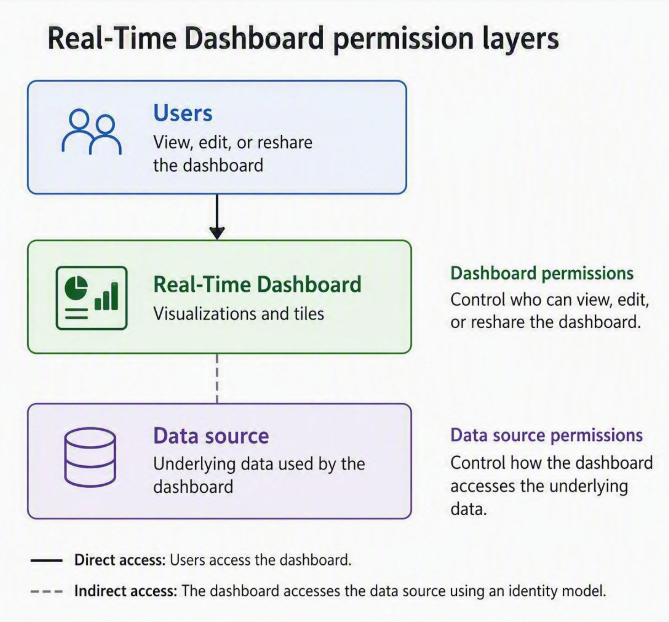
Dashboard permissions and data source permissions
When you share a Real-Time Dashboard, you can control access to the dashboard itself and to the underlying data source.
Dashboard permissions: Dashboard permissions control access to the dashboard item. These permissions determine whether users can view, edit, or reshare the dashboard.
Data source permissions: Data source permissions control access to the underlying data used by dashboard tiles and visuals. Sharing a dashboard doesn't automatically grant access to the underlying data source.
Identity models for data source access
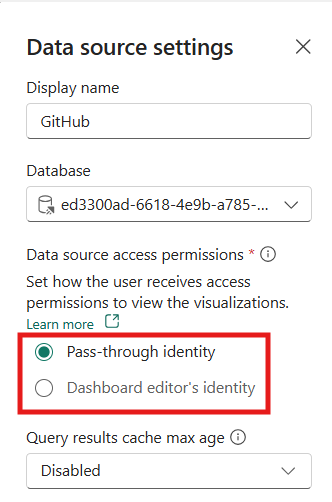
When a user accesses a Real-Time Dashboard, the system uses one of two identity models to determine whether the user can access the underlying data source:
Pass-through identity
With pass-through identity, the dashboard uses the viewer's own identity to authenticate to the data source. This option is the default.
- Users can view tile data only if they already have access to the underlying data source.
- Data source security is continuously enforced, and users can't access data they don't have permission to view.
- No cloud connection is required for this identity model.
Dashboard editor’s identity
With dashboard editor's identity, the dashboard uses a cloud connection configured by an editor to access the data source.
- Viewers can see dashboard data without direct access to the data source.
- Editors configure the cloud connection used by the dashboard.
- If multiple editors modify the dashboard, each editor must set up their own cloud connection.
- If a valid connection isn't available, users can see data only if they have their own access to the data source.
Permission scenarios
The following table summarizes common scenarios for sharing Real-Time Dashboards:
| Dashboard Permission | Data Source access model | Result |
|---|---|---|
| Edit | Dashboard editor's identity | Users can view and edit the dashboard. |
| Edit | Pass-through identity | Users can edit the dashboard. They can see tile data only if they have access to the data source. |
| View | Dashboard editor's identity | Users can view dashboard data, but they can't edit the dashboard. |
| View | Pass-through identity | Users can view the dashboard. They can see data only if they have access to the data source. |
Choose an access model
Use pass-through identity when:
- Each viewer uses their own identity to access the data source.
- Users already have access to the underlying data source.
- You want to enforce data access directly by the source system.
Use dashboard editor's identity when:
- Users need dashboard insights but shouldn't receive direct access to the raw data source.
- You want dashboard viewers to have a consistent view of tile data.
- An editor can manage the cloud connection used for data access.