Dear Tom Pod,
Thank you for reaching out regarding your request to enable multiple rows in the Windows 11 taskbar, similar to the functionality available in Windows 10.
Currently, Windows 11 does not natively support multi-row taskbars through standard settings. However, for advanced users, there is a potential workaround using the Windows Registry Editor.
Registry Editor Workaround (Advanced Users Only)
Steps:
- Press
Win + R, type regedit, and press Enter.
- Navigate to the following path:
HKEY_CURRENT_USER\Software\Microsoft\Windows\CurrentVersion\Explorer\StuckRects3
- Locate the binary value under
Settings.
- In row
00000028, column FE, change the value from 01 to 02.
- Restart Windows Explorer via Task Manager:
- Press
Ctrl + Shift + Esc to open Task Manager.
- Find Windows Explorer, right-click, and select Restart.
Note: Please note that this method is not officially supported by Microsoft and may not work on Windows 11 version 24H2 or later.
Additional Options:
Although this is a limitation of Windows 11, some users have successfully achieved multi-row taskbar functionality by using third-party applications. Please note that these tools are not developed or supported by Microsoft, and we are unable to recommend or support them directly.
As moderators in the community, please be aware that we are not responsible for the design of the product. Moreover, we have limited resources for detailed information about Microsoft products.
Your opinion is very good and practical. In this case, I recommend you visit the following link: https://feedbackportal.microsoft.com/feedback/ to share your thoughts. This action helps your opinion reach others who have had similar experiences and also gets to Microsoft more quickly Go to: https://feedbackportal.microsoft.com/feedback/forum/974915ab-e2bb-ee11-9079-00224827362a→Send Feedback→ Describe your proposal in detail
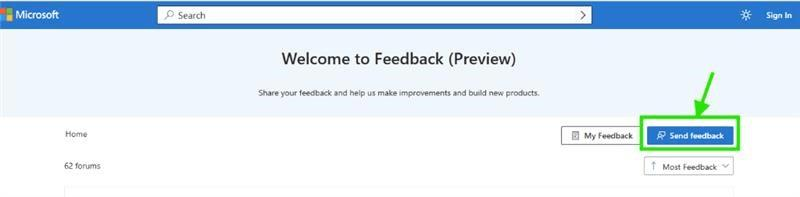
We’re actively listening to customer input, and your request for a true “Move to Workspace” feature is something our team is aware of and considering for future development. Your feedback is important; Microsoft actively monitors user input to prioritize improvements. The more feedback they receive on this issue, the more likely it is to be addressed.
We highly appreciate your suggestions for developing features in Microsoft products to provide better customer experiences.
Your voice matters and this idea could make a real difference. If you’d like help with the submission or want us to support it, we’re here for you. I hope you find this helpful. Please don’t hesitate to reach out again if you need further assistance.
Best regards,
Ben-V - MSFT | Microsoft Community Support Specialist.
If the answer is helpful, please click "Accept Answer" and kindly upvote it. If you have extra questions about this answer, please click "Comment”.
Note: Please follow the steps in our documentation to enable e-mail notifications if you want to receive the related email notification for this thread.
' cx='32' cy='32' r='32' /%3E%3Ctext x='50%25' y='55%25' dominant-baseline='middle' text-anchor='middle' fill='%23FFF' %3ETP%3C/text%3E%3C/svg%3E)

' cx='32' cy='32' r='32' /%3E%3Ctext x='50%25' y='55%25' dominant-baseline='middle' text-anchor='middle' fill='%23FFF' %3E_%3C/text%3E%3C/svg%3E)
' cx='32' cy='32' r='32' /%3E%3Ctext x='50%25' y='55%25' dominant-baseline='middle' text-anchor='middle' fill='%23FFF' %3ECW%3C/text%3E%3C/svg%3E)
' cx='32' cy='32' r='32' /%3E%3Ctext x='50%25' y='55%25' dominant-baseline='middle' text-anchor='middle' fill='%23FFF' %3EPF%3C/text%3E%3C/svg%3E)
' cx='32' cy='32' r='32' /%3E%3Ctext x='50%25' y='55%25' dominant-baseline='middle' text-anchor='middle' fill='%23FFF' %3EDW%3C/text%3E%3C/svg%3E)
' cx='32' cy='32' r='32' /%3E%3Ctext x='50%25' y='55%25' dominant-baseline='middle' text-anchor='middle' fill='%23FFF' %3EJS%3C/text%3E%3C/svg%3E)
' cx='32' cy='32' r='32' /%3E%3Ctext x='50%25' y='55%25' dominant-baseline='middle' text-anchor='middle' fill='%23FFF' %3ESF%3C/text%3E%3C/svg%3E)
' cx='32' cy='32' r='32' /%3E%3Ctext x='50%25' y='55%25' dominant-baseline='middle' text-anchor='middle' fill='%23FFF' %3EPN%3C/text%3E%3C/svg%3E)
' cx='32' cy='32' r='32' /%3E%3Ctext x='50%25' y='55%25' dominant-baseline='middle' text-anchor='middle' fill='%23FFF' %3EO%3C/text%3E%3C/svg%3E)
' cx='32' cy='32' r='32' /%3E%3Ctext x='50%25' y='55%25' dominant-baseline='middle' text-anchor='middle' fill='%23FFF' %3ETD%3C/text%3E%3C/svg%3E)
' cx='32' cy='32' r='32' /%3E%3Ctext x='50%25' y='55%25' dominant-baseline='middle' text-anchor='middle' fill='%23FFF' %3ECL%3C/text%3E%3C/svg%3E)
' cx='32' cy='32' r='32' /%3E%3Ctext x='50%25' y='55%25' dominant-baseline='middle' text-anchor='middle' fill='%23FFF' %3EN%3C/text%3E%3C/svg%3E)
' cx='32' cy='32' r='32' /%3E%3Ctext x='50%25' y='55%25' dominant-baseline='middle' text-anchor='middle' fill='%23FFF' %3EA%3C/text%3E%3C/svg%3E)
' cx='32' cy='32' r='32' /%3E%3Ctext x='50%25' y='55%25' dominant-baseline='middle' text-anchor='middle' fill='%23FFF' %3ER%3C/text%3E%3C/svg%3E)
' cx='32' cy='32' r='32' /%3E%3Ctext x='50%25' y='55%25' dominant-baseline='middle' text-anchor='middle' fill='%23FFF' %3EDC%3C/text%3E%3C/svg%3E)