Note
Access to this page requires authorization. You can try signing in or changing directories.
Access to this page requires authorization. You can try changing directories.
Document-based PII in Azure AI Language Personally Identifiable Information (PII) detection helps you detect and redact sensitive data directly in native document files, including Microsoft Word and PDF files, without building your own text extraction and reconstruction pipeline.
This feature uses an asynchronous API workflow and returns redacted output that preserves document structure and formatting. You can use it when document fidelity is important for compliance review, sharing, analytics, and downstream AI workflows.
Video demonstration
In this video, we introduce the PII detection service and show you how it detects and redacts sensitive data directly from native documents while preserving file structure and formatting. We also cover common use cases, supported formats, and how to get started with document-based PII in Azure AI Language:
Closed captions are available for this video.
At a glance
Document-based PII provides the following capabilities:
- Native document redaction for .pdf, .docx, and .txt files.
- Preserved layout in output documents, including font, spacing, and color.
- A single asynchronous API workflow for extraction, detection, and redaction.
- Enterprise-ready outputs: a redacted document and a structured JSON result.
- Configurable masking policies for character masking, entity labeling, and synthetic replacement scenarios.
GA (2026-05-01) feature additions
The general availability release introduces the following capabilities and operational enhancements. These additions expand the platform's redaction strategies, enhance configuration flexibility, and improve support for specialized document processing scenarios:
- Improved redaction output quality while preserving font, color, and document formatting.
- Blur-based redaction support for image-based document scenarios.
- Expanded masking policy options, including entity-label masking and synthetic replacement.
- Confidence-threshold controls to determine which detected entities are redacted.
- Optional controls to disable strict entity validation for latency-sensitive workflows.
- Entity synonym support to map customer-specific vocabulary to standard PII entity types.
- Value exclusion policy support for terms that should remain unredacted in select workflows.
GA and preview feature comparison
The following table provides a detailed capability matrix comparing the feature sets of the general availability release (2026-05-01) and the preview API version (2026-05-15-preview). Use this comparison to understand which features are available in each release and to make informed decisions about API version selection based on your specific feature requirements:
| Feature | GA (2026-05-01) | Preview (2026-05-15-preview) |
|---|---|---|
| Updated output quality: Font, color, and format preservation | ✅ | ✅ |
| Image redaction with blur | ✅ | ✅ |
| PDF support (including digital PDF support) | ✅ | ✅ |
| Microsoft Word .docx support | ✅ | ✅ |
| Black marker redaction | ➖ | ✅ |
| Anonymization/Synthetic replacement masking policy | ➖ | ✅ |
| Entity label masking policy (for example, [Address]) | ➖ | ✅ |
| Confidence score threshold | ➖ | ✅ |
| Disable entity validation | ➖ | ✅ |
| Entity synonyms (context vocabulary) | ➖ | ✅ |
| Value exclusion policy | ➖ | ✅ |
Why use document-based PII?
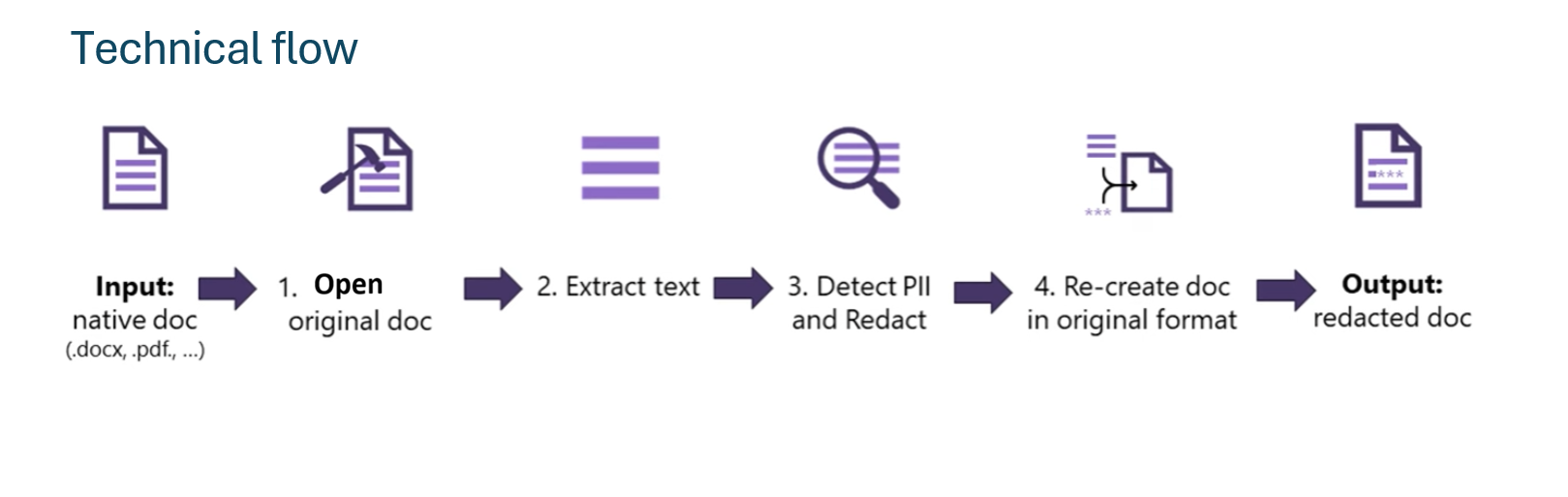
Many custom pipelines require multiple steps to extract text, run detection, and reconstruct document output. Document-based PII simplifies this flow with a single asynchronous API pattern and output artifacts designed for document-processing systems.
Document-based PII is especially useful when you need to:
- Redact PII in .pdf, .docx, and .txt files.
- Preserve document layout for downstream business processes.
- Generate structured JSON output for auditing and integration.
Document-based PII uses the same predefined PII categories as text PII, including entities such as addresses, phone numbers, and credit card numbers.
What Document-based PII returns
When a job succeeds, you receive:
- A redacted document in your target storage container.
- A JSON result file with detected entities, categories, confidence scores, and processing metadata.
- Redaction results that can preserve visual document fidelity for downstream review and audit processes.
How Document-based PII works
Document-based PII uses an asynchronous workflow:
- Submit a job with source and target storage locations.
- Poll the job status by using the operation location.
- Retrieve output artifacts from your target storage location.

For implementation details and request samples, see Detect and redact Personally Identifiable Information in native documents.
How Document-based PII differs from other PII feature types
All PII feature types use predefined entity categories, but they optimize for different input types:
- Document-based PII is optimized for native-file redaction workflows and file output fidelity.
- Text PII is optimized for direct string-based input and app integration.
- Conversation PII is optimized for turn-based and transcript-oriented conversational input.
Common use cases
Document-based PII is designed for enterprise and regulated-industry workflows where teams need to anonymize files before storage, analytics, external sharing, or downstream AI processing.
Typical examples include:
- Court records and legal documentation.
- Government forms and internal records.
- Financial documents.
- Internal enterprise documentation workflows.
Supported formats and limits
Document-based PII accepts native file formats directly, without requiring text preprocessing. The following table lists the supported formats:
| File type | File extension | Description |
|---|---|---|
| Text | .txt | An unformatted text document. |
| Adobe PDF | A portable document file formatted document. | |
| Microsoft Word | .docx | A Microsoft Word document file. |
The following input constraints apply:
| Attribute | Limit |
|---|---|
| Total documents per request | <= 40 |
| Total content size per request | <= 10 MB |
See language support and quotas and limits for current language coverage and service limit details.
Pricing
Document-based PII redaction uses Azure AI Language pricing. For current pricing details, see Azure AI Language pricing.
Next steps
Use the following references to continue implementation: